
webgpu之旅05
·
看一下粒子
这次看官方的demo吧
演示了一个粒子如何用cs动起来
分析
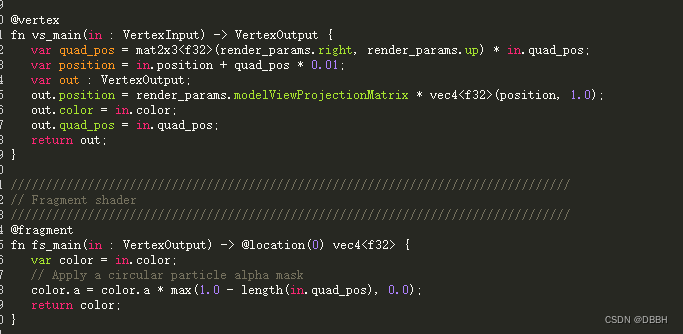
这里是着色部分,看起来没什么特别的,接下来看cs部分
@binding(0) @group(0) var<uniform> sim_params : SimulationParams;
@binding(1) @group(0) var<storage, read_write> data : Particles;
@binding(2) @group(0) var texture : texture_2d<f32>;

@compute @workgroup_size(64) 这里用的64,据说是N卡一个group里刚好这么多个thread
fn simulate(@builtin(global_invocation_id) global_invocation_id : vec3<u32>) {
  let idx = global_invocation_id.x;

  init_rand(idx, sim_params.seed);

  var particle = data.particles[idx];

  // 更新速度
  particle.velocity.z = particle.velocity.z - sim_params.deltaTime * 0.5;

  // 利用新的速度更新position
  particle.position = particle.position + sim_params.deltaTime * particle.velocity;

  // Age each particle. Fade out before vanishing.计算生命还剩多少,根据这个算个渐变
  particle.lifetime = particle.lifetime - sim_params.deltaTime;
  particle.color.a = smoothstep(0.0, 0.5, particle.lifetime);

  // If the lifetime has gone negative, then the particle is dead and should be
  // respawned.
  // 这里就是挂了之后 刷新位置
  if (particle.lifetime < 0.0) {
    // Use the probability map to find where the particle should be spawned.
    // Starting with the 1x1 mip level.
    var coord : vec2<i32>;
    for (var level = u32(textureNumLevels(texture) - 1); level > 0; level--) {
      // omit
    }
    let uv = vec2<f32>(coord) / vec2<f32>(textureDimensions(texture));
    particle.position = vec3<f32>((uv - 0.5) * 3.0 * vec2<f32>(1.0, -1.0), 0.0);
    particle.color = textureLoad(texture, coord, 0);
    particle.velocity.x = (rand() - 0.5) * 0.1;
    particle.velocity.y = (rand() - 0.5) * 0.1;
    particle.velocity.z = rand() * 0.3;
    particle.lifetime = 0.5 + rand() * 3.0;
  }

  // Store the new particle value
  data.particles[idx] = particle;
}
主体就是这样更新粒子的,还有个probablityMap.cs可以看看
更多推荐


 0
0 0
0- 0


 已为社区贡献4条内容

所有评论(0)