
两种实时水下图像增强+目标检测UI界面代码
摘要:本文介绍了一个基于PyQt开发的界面应用,支持加载图像、视频及摄像头输入,可实现实时目标检测并显示FPS等信息。系统包含单目和双目相机两种模式,单目相机(👇)用于常规检测,双目相机(👆)提供立体视觉功能。该界面整合了计算机视觉算法,方便用户进行多模态的目标检测实验。
·
用pyqt做的界面,可以加载图像、视频、摄像头,并实现实时目标检测,显示FPS等信息
下图一个为单目相机,另一个为双目相机。(私信免费获取全部代码,可以帮忙指导部署)
单目相机👇
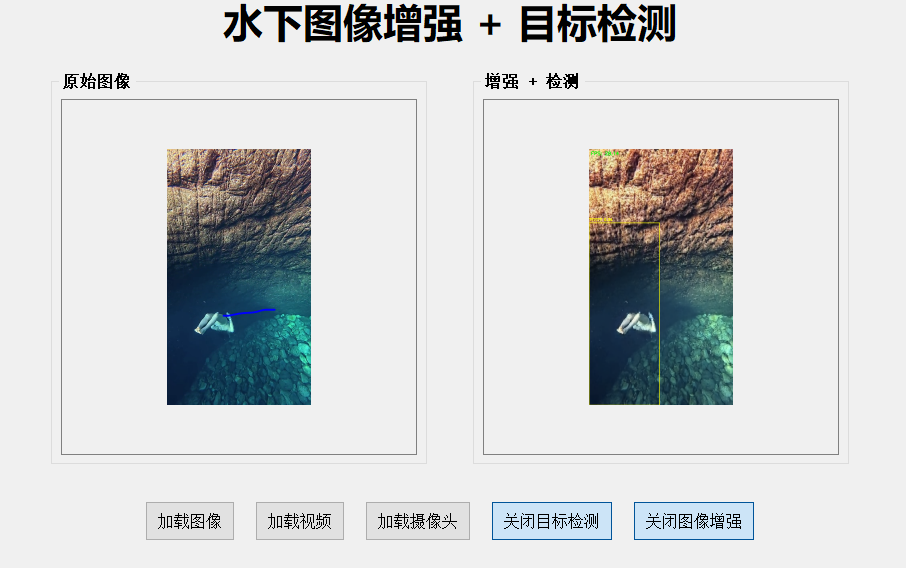
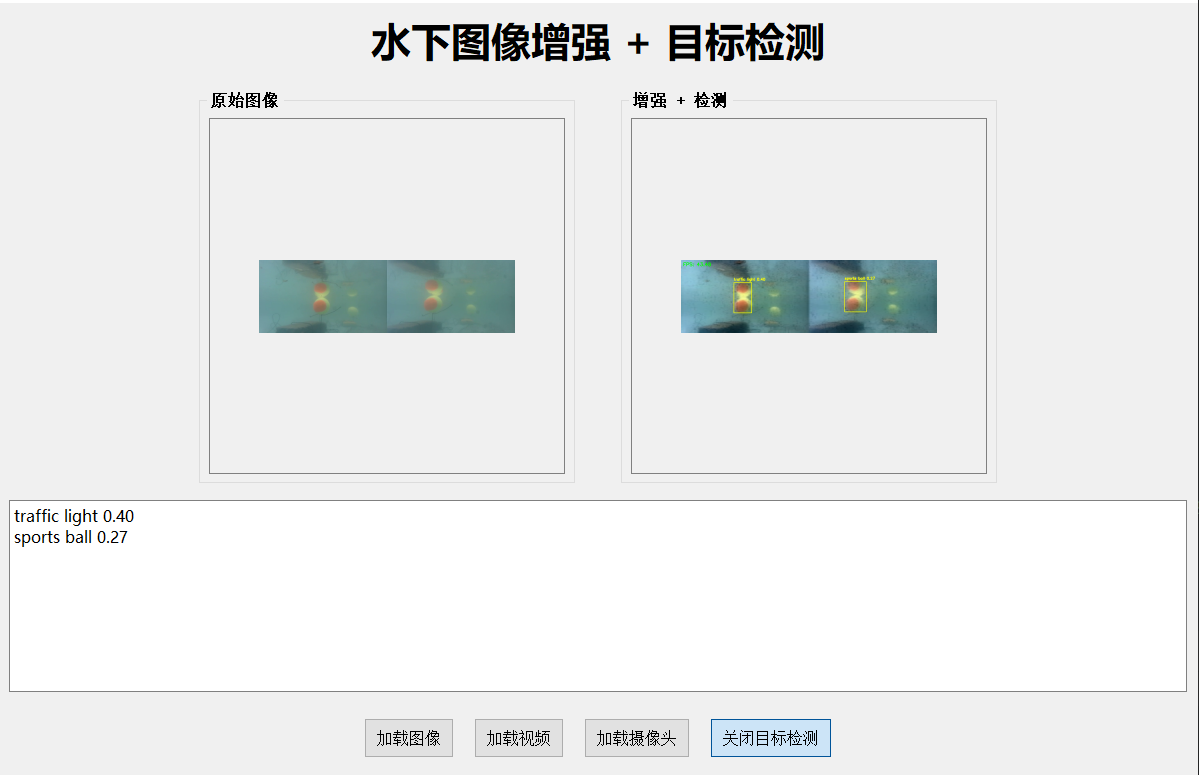
双目相机👆
单目相机UI界面代码如下
import sys
import time
import cv2
import torch
import numpy as np
from PyQt5.QtWidgets import (
    QApplication, QWidget, QLabel, QPushButton, QHBoxLayout,
    QVBoxLayout, QFileDialog, QInputDialog, QGroupBox, QSizePolicy, QTextEdit
)
from PyQt5.QtGui import QPixmap, QImage, QFont
from PyQt5.QtCore import QTimer, Qt

from net.Ushape_Trans import Generator  # 替换为你的模型路径

device = torch.device("cuda" if torch.cuda.is_available() else "cpu")

# 加载图像增强模型
model = Generator()
model.load_state_dict(torch.load("generator_795.pth", map_location=device))
model.to(device)
model.eval()

# 加载 YOLOv5 模型
yolo_model = torch.hub.load('ultralytics/yolov5', 'custom',
                           path=r'.\yolov5s.pt', force_reload=False)
yolo_model.to(device)
yolo_model.eval()

class_names = [
    'person', 'bicycle', 'car', 'motorcycle', 'airplane', 'bus',
    'train', 'truck', 'boat', 'traffic light', 'fire hydrant',
    'stop sign', 'parking meter', 'bench', 'bird', 'cat', 'dog',
    'horse', 'sheep', 'cow', 'elephant', 'bear', 'zebra', 'giraffe',
    'backpack', 'umbrella', 'handbag', 'tie', 'suitcase', 'frisbee',
    'skis', 'snowboard', 'sports ball', 'kite', 'baseball bat',
    'baseball glove', 'skateboard', 'surfboard', 'tennis racket',
    'bottle', 'wine glass', 'cup', 'fork', 'knife', 'spoon', 'bowl',
    'banana', 'apple', 'sandwich', 'orange', 'broccoli', 'carrot',
    'hot dog', 'pizza', 'donut', 'cake', 'chair', 'couch',
    'potted plant', 'bed', 'dining table', 'toilet', 'tv', 'laptop',
    'mouse', 'remote', 'keyboard', 'cell phone', 'microwave',
    'oven', 'toaster', 'sink', 'refrigerator', 'book', 'clock',
    'vase', 'scissors', 'teddy bear', 'hair drier', 'toothbrush'
]

def preprocess(img):
    img = cv2.cvtColor(img, cv2.COLOR_BGR2RGB)
    img = cv2.resize(img, (256, 256))
    img = img.astype(np.float32) / 255.0
    img = torch.from_numpy(img).permute(2, 0, 1).unsqueeze(0).to(device)
    return img

def detect_objects(img):
    # 返回两个结果:检测后的图像,检测信息字符串
    img_rgb = cv2.cvtColor(img, cv2.COLOR_BGR2RGB)
    results = yolo_model(img_rgb)
    df = results.pandas().xyxy[0]

    img_draw = img.copy()
    info_lines = []

    for _, row in df.iterrows():
        x1, y1, x2, y2 = map(int, [row['xmin'], row['ymin'], row['xmax'], row['ymax']])
        conf = row['confidence']
        cls = int(row['class'])
        label = f"{class_names[cls]} {conf:.2f}"
        cv2.rectangle(img_draw, (x1, y1), (x2, y2), (0, 255, 255), 2)
        cv2.putText(img_draw, label, (x1, y1 - 10),
                    cv2.FONT_HERSHEY_SIMPLEX, 0.6, (0, 255, 255), 2)
        info_lines.append(label)

    info_text = "\n".join(info_lines) if info_lines else "未检测到目标"
    return img_draw, info_text

def enhance_image(img, is_video=False, detect_enabled=False):
    model_input = preprocess(img)
    with torch.no_grad():
        st = time.time()
        output = model(model_input)[3]
        output = output.squeeze(0).permute(1, 2, 0).cpu().numpy()
        output = np.clip(output * 255.0, 0, 255).astype(np.uint8)
        output = cv2.cvtColor(output, cv2.COLOR_RGB2BGR)
        output = cv2.resize(output, (img.shape[1], img.shape[0]))
        end = time.time()

    if is_video:
        fps = 1.0 / max(end - st, 1e-6)
        cv2.putText(output, f"FPS: {fps:.2f}", (10, 30),
                    cv2.FONT_HERSHEY_SIMPLEX, 0.8, (0, 255, 0), 2)

    info_text = ""
    if detect_enabled:
        output, info_text = detect_objects(output)

    return output, info_text

class ImageEnhancerApp(QWidget):
    def __init__(self):
        super().__init__()
        self.setWindowTitle("水下增强 + YOLOv5目标检测系统")
        self.resize(1200, 800)  # 高度加高以显示信息文本框

        self.cap = None
        self.timer = QTimer()
        self.detect_enabled = False

        self.init_ui()

    def init_ui(self):
        title = QLabel("水下图像增强 + 目标检测")
        title.setFont(QFont("Microsoft YaHei", 30, QFont.Bold))
        title.setAlignment(Qt.AlignCenter)

        self.original_label = QLabel()
        self.enhanced_label = QLabel()
        for lbl in (self.original_label, self.enhanced_label):
            lbl.setMinimumSize(356, 356)
            lbl.setSizePolicy(QSizePolicy.Expanding, QSizePolicy.Expanding)
            lbl.setAlignment(Qt.AlignCenter)
            lbl.setStyleSheet("background-color: #F0F0F0; border: 1px solid gray;")

        lb1 = self.create_group("原始图像", self.original_label)
        lb2 = self.create_group("增强 + 检测", self.enhanced_label)
        imglayout = QHBoxLayout()
        imglayout.addStretch()
        imglayout.addWidget(lb1)
        imglayout.addSpacing(40)
        imglayout.addWidget(lb2)
        imglayout.addStretch()

        # 新增文本框显示检测信息
        self.info_text = QTextEdit()
        self.info_text.setReadOnly(True)
        self.info_text.setMinimumHeight(150)
        self.info_text.setFont(QFont("Microsoft YaHei", 12))
        self.info_text.setStyleSheet("background-color: #FFFFFF; border: 1px solid gray;")

        self.load_image_btn = QPushButton("加载图像")
        self.load_video_btn = QPushButton("加载视频")
        self.load_camera_btn = QPushButton("加载摄像头")
        self.toggle_detect_btn = QPushButton("启用目标检测")
        self.toggle_detect_btn.setCheckable(True)
        self.toggle_detect_btn.toggled.connect(self.toggle_detection)

        for b in (self.load_image_btn, self.load_video_btn,
                  self.load_camera_btn, self.toggle_detect_btn):
            b.setFixedHeight(40)
            b.setStyleSheet("font-size:16px; padding:6px 12px;")

        self.load_image_btn.clicked.connect(self.load_image)
        self.load_video_btn.clicked.connect(self.load_video)
        self.load_camera_btn.clicked.connect(self.load_camera)

        btnlayout = QHBoxLayout()
        btnlayout.addStretch()
        btnlayout.addWidget(self.load_image_btn)
        btnlayout.addWidget(self.load_video_btn)
        btnlayout.addWidget(self.load_camera_btn)
        btnlayout.addWidget(self.toggle_detect_btn)
        btnlayout.addStretch()
        btnlayout.setSpacing(20)

        main = QVBoxLayout()
        main.addWidget(title)
        main.addSpacing(20)
        main.addLayout(imglayout)
        main.addSpacing(10)
        main.addWidget(self.info_text)  # 添加检测信息文本框
        main.addSpacing(20)
        main.addLayout(btnlayout)
        main.addStretch()
        self.setLayout(main)

    def create_group(self, title, widget):
        grp = QGroupBox(title)
        grp.setStyleSheet("QGroupBox { font-size:16px; font-weight:bold; }")
        lay = QVBoxLayout()
        lay.addWidget(widget, alignment=Qt.AlignCenter)
        grp.setLayout(lay)
        return grp

    def toggle_detection(self, checked):
        self.detect_enabled = checked
        self.toggle_detect_btn.setText("关闭目标检测" if checked else "启用目标检测")

    def load_image(self):
        p, _ = QFileDialog.getOpenFileName(self, "选择图像", "", "Image Files (*.png *.jpg *.bmp)")
        if p:
            img = cv2.imread(p)
            out, info = enhance_image(img, is_video=False, detect_enabled=self.detect_enabled)
            self.display(img, out)
            self.info_text.setText(info)

    def load_video(self):
        p, _ = QFileDialog.getOpenFileName(self, "选择视频", "", "Video Files (*.mp4 *.avi)")
        if p:
            self.reset_timer()
            self.cap = cv2.VideoCapture(p)
            self.timer.timeout.connect(self.update_frame)
            self.timer.start(30)

    def load_camera(self):
        url, ok = QInputDialog.getText(self, "摄像头地址", "请输入 RTSP/HTTP 地址:")
        if ok and url:
            self.reset_timer()
            self.cap = cv2.VideoCapture(url)
            if not self.cap.isOpened():
                print("无法打开 URL")
                return
            self.timer.timeout.connect(self.update_frame)
            self.timer.start(30)

    def reset_timer(self):
        self.timer.stop()
        try:
            self.timer.timeout.disconnect()
        except Exception:
            pass
        if self.cap:
            self.cap.release()
        self.cap = None

    def update_frame(self):
        ret, frame = self.cap.read()
        if not ret:
            self.reset_timer()
            return
        out, info = enhance_image(frame, is_video=True, detect_enabled=self.detect_enabled)
        self.display(frame, out)
        self.info_text.setText(info)

    def display(self, a, b):
        self.original_label.setPixmap(self.cvt_pix(a))
        self.enhanced_label.setPixmap(self.cvt_pix(b))

    def cvt_pix(self, img):
        rgb = cv2.cvtColor(img, cv2.COLOR_BGR2RGB)
        h, w, _ = rgb.shape
        qimg = QImage(rgb.data, w, h, 3 * w, QImage.Format_RGB888)
        return QPixmap.fromImage(qimg).scaled(256, 256, Qt.KeepAspectRatio, Qt.SmoothTransformation)

if __name__ == "__main__":
    app = QApplication(sys.argv)
    w = ImageEnhancerApp()
    w.show()
    sys.exit(app.exec_())
更多推荐


 2
2 0
0- 0


 已为社区贡献1条内容

所有评论(0)