
UNI-APP,人脸信息采集(人脸识别)功能的实现方案
·
效果图
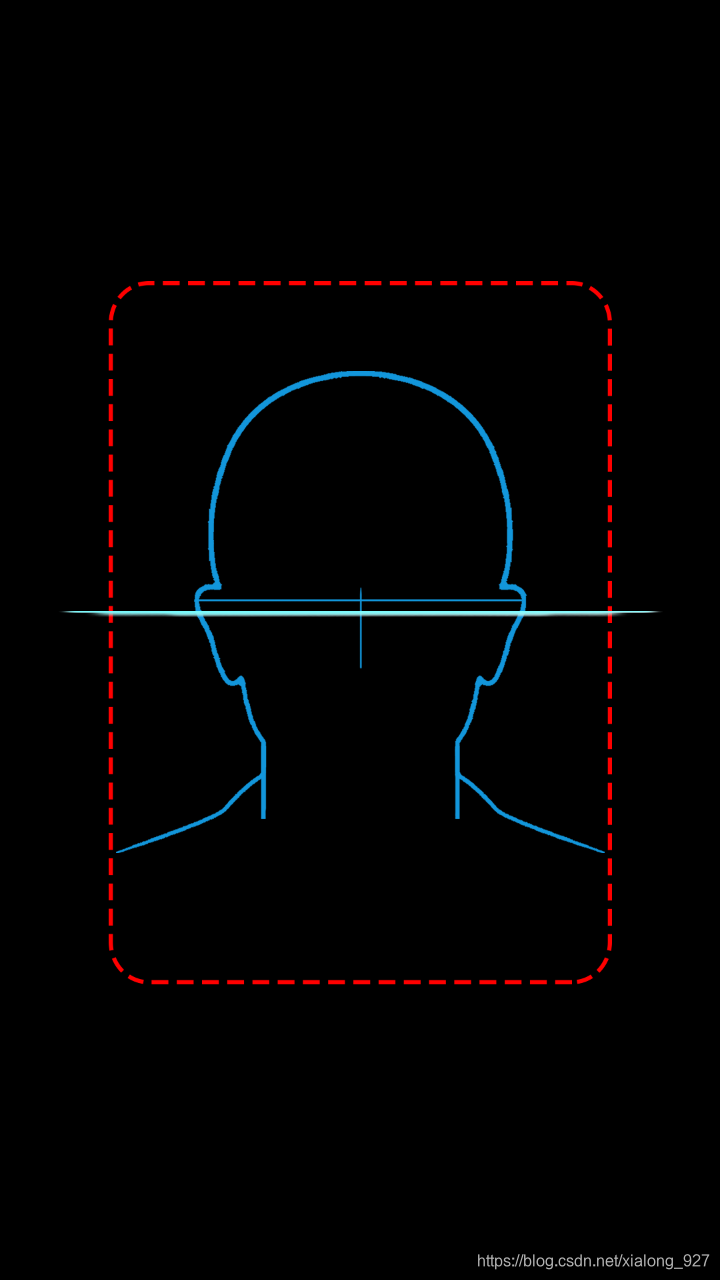
如图,通过入口进入用户身份认证页面,点击快速验证,进入人脸信息采集页面,人脸比对算法采用的腾讯云的人脸核身接口,具体可参考腾讯云文档。
实现代码入下:
a、人脸信息采集需要在nvue中进行,首先需要配置如图两项: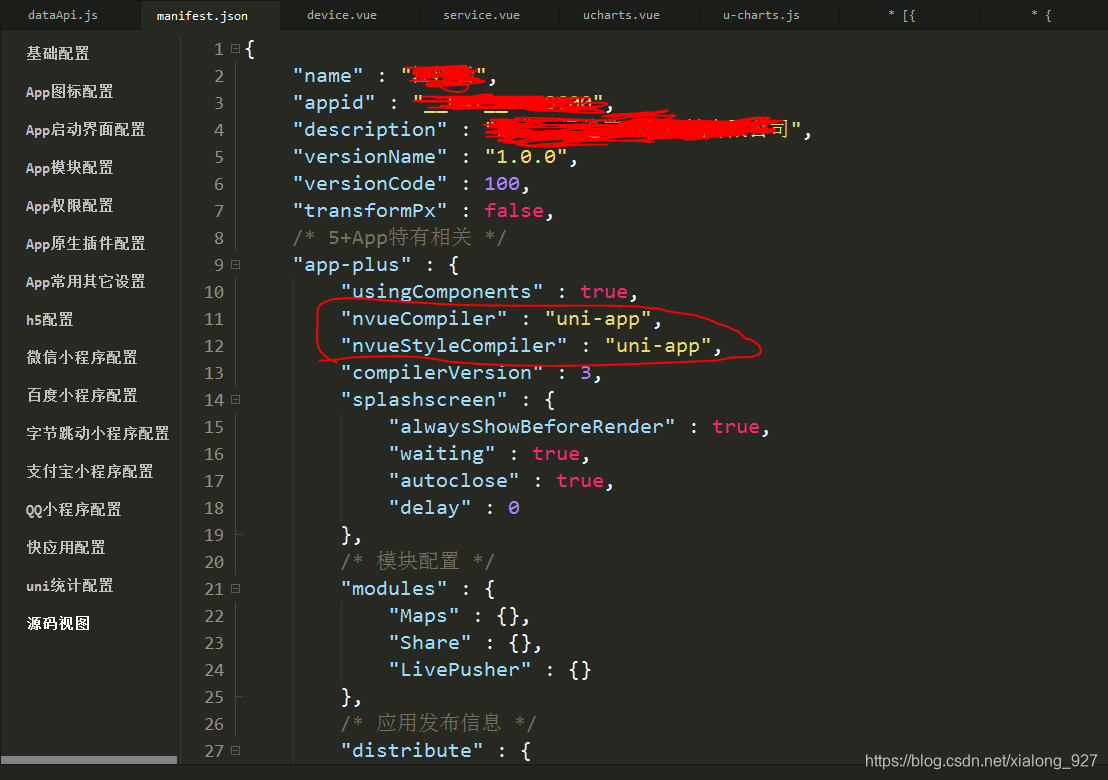
b、在uni-app工程目录中/static/image/目录下准备素材图片: facecheck.jpg
 line.png
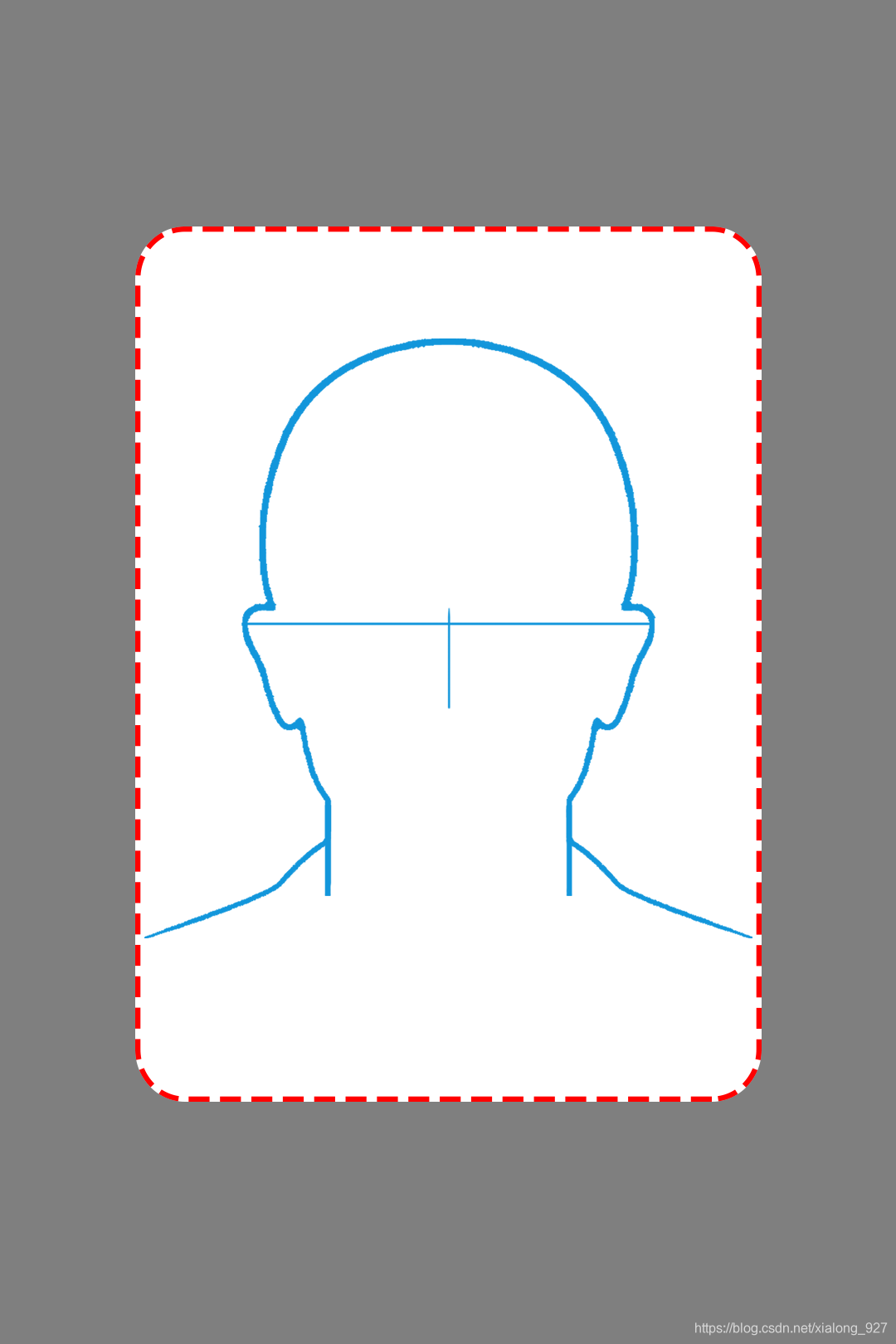 idphotoskin.png
c、在工程中添加两个页面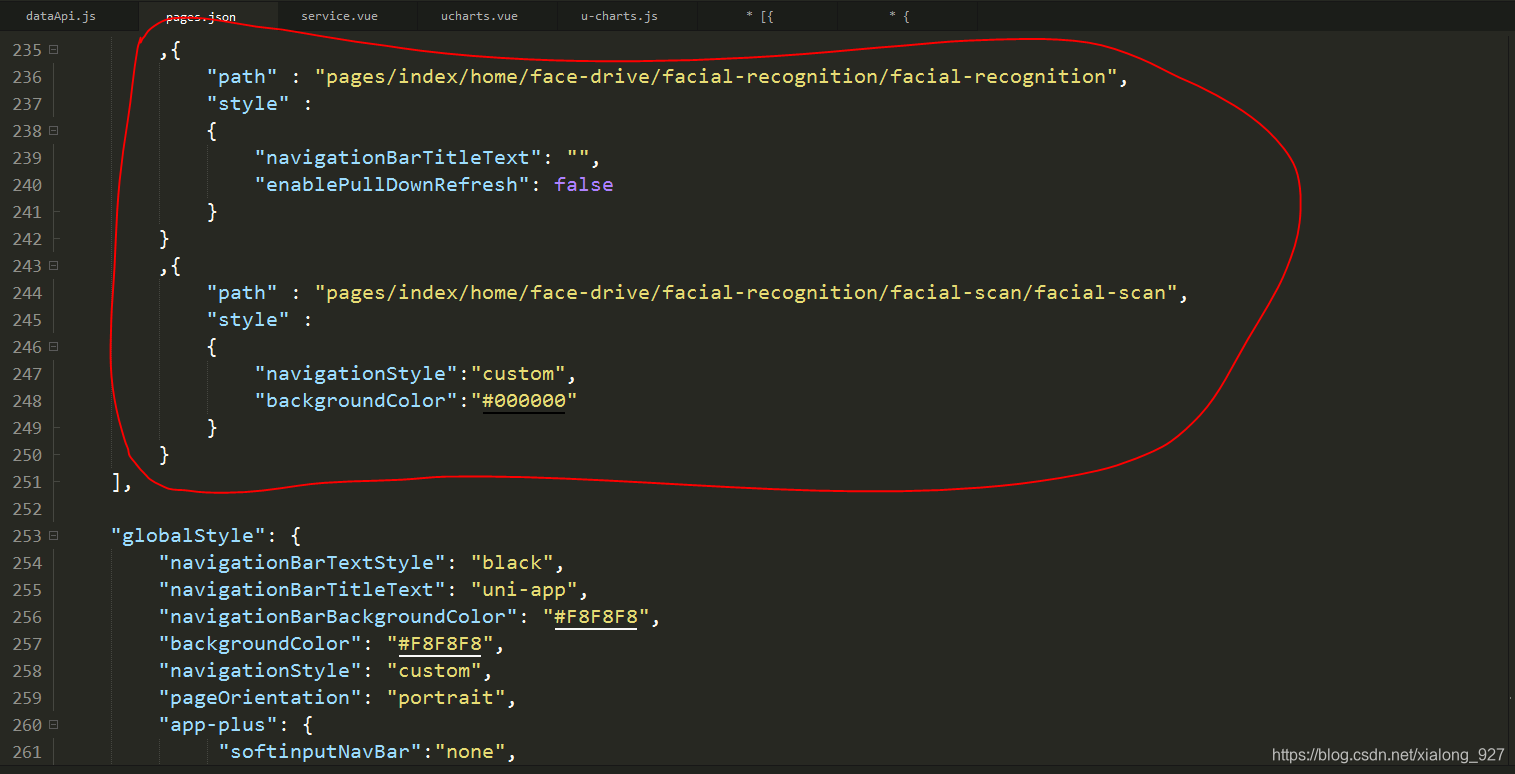
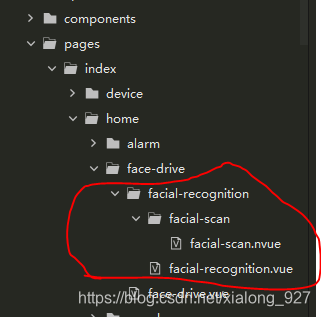
d、facial-recognition.vue
<template>
	<view>
		<!--导航栏-->
		<cu-custom bgColor="bg-blue" :isBack="true"><block slot="content">用户身份认证</block></cu-custom>
		<view class="img-pt">
			<image mode="aspectFit" class="img" src="../../../../../static/images/facecheck.jpg"></image>
		</view>
		<view class="padding flex flex-direction">
			<button class="cu-btn bg-blue margin-tb-sm lg" @click="submit()">快速验证</button>
		</view>
		<canvas id="canvas-clipper" canvas-id="canvas-clipper" type="2d" :style="{width: canvasSiz.width+'px',height: canvasSiz.height+'px',position: 'absolute',left:'-500000px',top: '-500000px'}" />
		<!-- 对话框 -->
		<uni-popup id="popupDialog" ref="popupDialog" type="dialog" @change="change">
			<uni-popup-dialog type="info" :title="dlgTitle" :content="dlgContent" :before-close="true" @confirm="dialogConfirm" @close="dialogClose"></uni-popup-dialog>
		</uni-popup>
	</view>
</template>

<script>
	var _this;
	export default {
		data() {
			return {
				cmuid: '',
				username: '',
				devInfo: {},
				imagesrc: null,
				canvasSiz:{
					width:188,
					height:273
				},
				baseImg: null,
				operType: '',
				dlgTitle: '',
				dlgContent: '',
			}
		},
		onLoad(option) {
			//获取传递的参数
			this.devInfo = JSON.parse(decodeURIComponent(option.item));
			//获取cmuid
			this.cmuid = uni.getStorageSync('cmuid');
			//获取username
			this.username = uni.getStorageSync('syncUsername');
			//初始化
			_this= this;
		},
		methods: {
			//设置图片
			setImage(e) {
				//显示在页面
				if(e.dotype =='idphoto'){
					_this.zjzClipper(e.path);
				}
			},
			//证件照裁切
			zjzClipper(path) {
				uni.getImageInfo({
					src: path,
					success: function(image) {
						console.log(image);
						_this.canvasSiz.width =188;
						_this.canvasSiz.height =273;
						//因为nvue页面使用canvas比较麻烦,所以在此页面上处理图片
						let ctx = uni.createCanvasContext('canvas-clipper', _this);
						ctx.drawImage(
							path,
							parseInt(0.15 * image.width),
							parseInt(0.17 * image.height),
							parseInt(0.69 * image.width),
							parseInt(0.65 * image.height),
							0,
							0,
							188,
							273
						);
						ctx.draw(false, () => {
							uni.canvasToTempFilePath(
								{
									destWidth: 188,
									destHeight: 273,
									canvasId: 'canvas-clipper',
									fileType: 'jpg',
									success: function(res) {
										//_this.savePhoto(res.tempFilePath);

										uni.compressImage({
											src: res.tempFilePath,
											quality: 80,
											success: ys => {
												//#ifdef APP-PLUS

												plus.io.resolveLocalFileSystemURL(ys.tempFilePath, function(entry) {
													// 可通过entry对象操作test.html文件
													entry.file(function(file) {
														var fileReader = new plus.io.FileReader();
														fileReader.readAsDataURL(file);
														fileReader.onloadend = function(evt) {
															//let base64URL = Buffer.from(evt.target.result).toString("base64");
															let base64 = evt.target.result;
															_this.baseImg = base64;
															console.log(_this.baseImg);
															//人脸验证
															_this.faceCheck();
														}
													});
												}, function(e) {
													//console.log( "Resolve file URL failed: " + e.message );
												});

												//#endif
											}
										})
									}
								},
								_this
							);
						});
					}
				});
			},
			//保存图片到相册,方便核查
			savePhoto(path){
				this.imagesrc = path;
				//保存到相册
				uni.saveImageToPhotosAlbum({
					filePath: path,
					success: () => {
						uni.showToast({
							title: '已保存至相册',
							duration: 2000
						});
					}
				});
			},
			//快速验证
			submit(){
				uni.navigateTo({
					url: '/pages/index/home/face-drive/facial-recognition/facial-scan/facial-scan'
				})
			},
			//获取人脸信息之后,尝试获取授权,人脸验证
			faceCheck(){
				let para = {
					'userName': this.username,
					'image': this.baseImg?this.baseImg.substring(this.baseImg.indexOf(',')+1):'',
					'adaptorCode': this.devInfo.adapterCode
				}
				this.api.faceAuth(para).then(res=>{
					if(res && res.data && res.data.msgCode && res.data.msgCode=='0'){
						//校验成功
						this.api.showComToast('验证通过');
						setTimeout(()=>{
							_this.gotoDeviceDetail();
						}, 2000)
					}
					if(res && res.msgCode){
						if(res.msgCode == 5){
							//申请注册弹窗
							this.applyRegisterDlg();
						}else{
							this.api.showComToast(res.message);
						}
					}
				})
			},
			//未注册人脸信息,申请注册
			applyRegister(){
				let para = {
					'userName': this.username,
					'image': this.baseImg?this.baseImg.substring(this.baseImg.indexOf(',')+1):'',
					'adaptorCode': this.devInfo.adapterCode
				}
				this.api.applyRegister(para).then(res=>{
					if(res && res.data && res.data.msgCode && res.data.msgCode=='0'){
						this.api.showComToast('提交成功,请耐心等待审核');
					}else{
						this.api.showComToast(res.message);
					}
				})
			},
			//申请注册对话框
			applyRegisterDlg(){
				this.operType = 'apply';
				this.dlgTitle = '提示';
				this.dlgContent = '该账户尚未注册人脸信息,是否申请注册此人脸信息?'
				this.$refs.popupDialog.open();
			},
			/*对话框点击确认按钮*/
			dialogConfirm(done) {
				switch (this.operType) {
					case 'apply':
						//申请注册
						this.applyRegister();
						break;
				}
				// 需要执行 done 才能关闭对话框
				done()
			},
			/*对话框取消按钮*/
			dialogClose(done) {
				// 需要执行 done 才能关闭对话框
				done()
			},
			/*popup 状态发生变化触发*/
			change(e) {
				console.log('popup ' + e.type + ' 状态', e.show)
			},
			/*跳转到设备详情页*/
			gotoDeviceDetail(){
				uni.navigateTo({
					url: '/pages/index/service/detail/detail?item='+encodeURIComponent(JSON.stringify(_this.devInfo))
				})
			},
		}
	}
</script>

<style lang="scss">
.img-pt{
	margin-top: 1rpx;
	.img{
		width: 750rpx;
		height: 676rpx;
	}
}
</style>
e、facial-scan.nvue
<template>
	<view class="preview" :style="{ width: windowWidth, height: windowHeight }">
		<live-pusher
			id="livePusher"
			ref="livePusher"
			class="livePusher"
			mode="FHD"
			beauty="1"
			whiteness="0"
			:aspect="aspect"
			min-bitrate="1000"
			audio-quality="16KHz"
			device-position="front"
			:auto-focus="true"
			:muted="true"
			:enable-camera="true"
			:enable-mic="false"
			:zoom="false"
			@statechange="statechange"
			:style="{ width: cameraWidth, height: cameraHeight }"
		></live-pusher>

		<!--辅助线-->
		<cover-view class="outline-box" :style="{ width: windowWidth, height: windowHeight }">
			<cover-image class="outline-img" src="/static/images/idphotoskin.png" style=""></cover-image>
		</cover-view>

		<!--辅助线-->
		<cover-view class="outline-box1" :style="{ width: windowWidth, height: windowHeight, paddingBottom: padBot+'rpx'}">
			<cover-image class="outline-img1" src="/static/images/line.png"></cover-image>
		</cover-view>
	</view>

</template>

<script>
let _this = null;
export default {
	data() {
		return {
			dotype: 'idphoto', //操作类型
			message: '', //提示
			aspect: '2:3', //比例
			cameraWidth: '', //相机画面宽度
			cameraHeight: '', //相机画面宽度
			windowWidth: '', //屏幕可用宽度
			windowHeight: '', //屏幕可用高度
			camerastate: false, //相机准备好了
			livePusher: null, //流视频对象
			snapshotsrc: null, //快照
			padBot: 550,
			scanCount: 0,
			intervalTimer: null,
		};
	},
	onLoad(e) {
		_this = this;
		if (e.dotype != undefined) this.dotype = e.dotype;
		this.initCamera();
	},
	onReady() {
		this.livePusher = uni.createLivePusherContext('livePusher', this);
		this.startPreview(); //开启预览并设置摄像头
		this.poenCarme();

		this.intervalTimer = setInterval(()=>{
			this.padBot = this.padBot - 15;
			if(this.padBot <= -550){
				this.padBot = 550;
				this.scanCount++;
				if(this.scanCount == 3){
					this.snapshot();
				}
			}
		}, 40)
	},
	onUnload() {
		clearInterval(this.intervalTimer);
	},
	methods: {
		//轮询打开
		poenCarme() {
			//#ifdef APP-PLUS
			if (plus.os.name == 'Android') {
				this.poenCarmeInterval = setInterval(function() {
					console.log(_this.camerastate);
					if (!_this.camerastate) _this.startPreview();
				}, 2500);
			}
			//#endif
		},

		//初始化相机
		initCamera() {
			uni.getSystemInfo({
				success: function(res) {
					_this.windowWidth = res.windowWidth;
					_this.windowHeight = res.windowHeight;
					_this.cameraWidth = res.windowWidth;
					_this.cameraHeight = res.windowWidth * 1.5;
				}
			});
		},

		//开始预览
		startPreview() {
			this.livePusher.startPreview({
				success: a => {
					console.log(a);
				}
			});
		},
		//停止预览
		stopPreview() {
			this.livePusher.stopPreview({
				success: a => {
					_this.camerastate = false; //标记相机未启动
				}
			});
		},

		//状态
		statechange(e) {
			//状态改变
			console.log(e);
			if (e.detail.code == 1007) {
				_this.camerastate = true;
			} else if (e.detail.code == -1301) {
				_this.camerastate = false;
			}
		},

		//抓拍
		snapshot() {
			this.livePusher.snapshot({
				success: e => {
					_this.snapshotsrc = e.message.tempImagePath;
					_this.stopPreview();
					_this.setImage();
					uni.navigateBack();
				}
			});
		},

		//设置
		setImage() {
			let pages = getCurrentPages();
			let prevPage = pages[pages.length - 2]; //上一个页面

			//直接调用上一个页面的setImage()方法,把数据存到上一个页面中去
			prevPage.$vm.setImage({ path: _this.snapshotsrc, dotype: this.dotype });
		}
	}
};
</script>

<style lang="scss">
	.preview {
		justify-content: center;
		align-items: center;
		.outline-box {
			position: absolute;
			top: 0;
			left: 0;
			bottom: 0;
			z-index: 99;
			align-items: center;
			justify-content: center;
			.outline-img {
				width: 750rpx;
				height: 1125rpx;
			}
		}

		.outline-box1 {
			position: absolute;
			top: 0;
			left: 0;
			bottom: 0;
			z-index: 100;
			align-items: center;
			justify-content: center;
			.outline-img1 {
				width: 750rpx;
				height: 10rpx;
			}
		}
	}

</style>
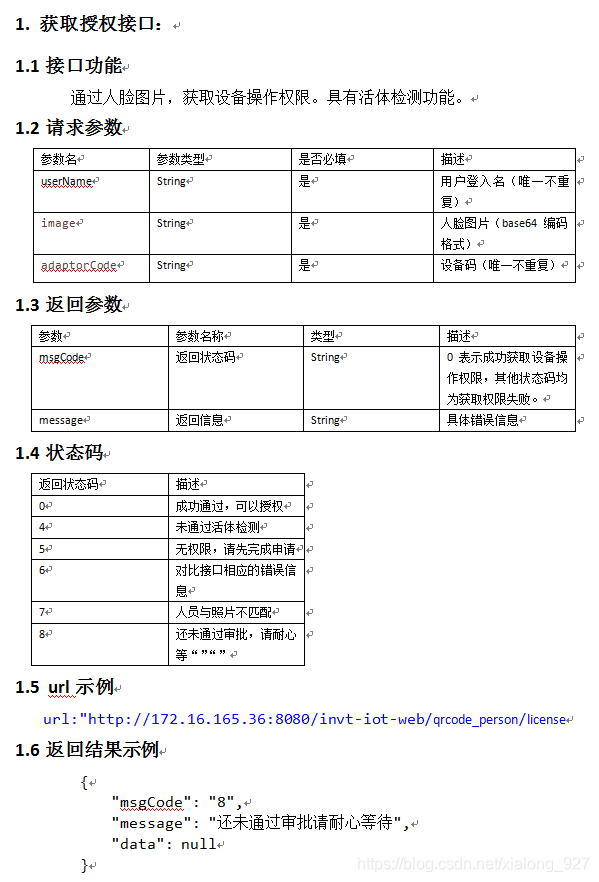
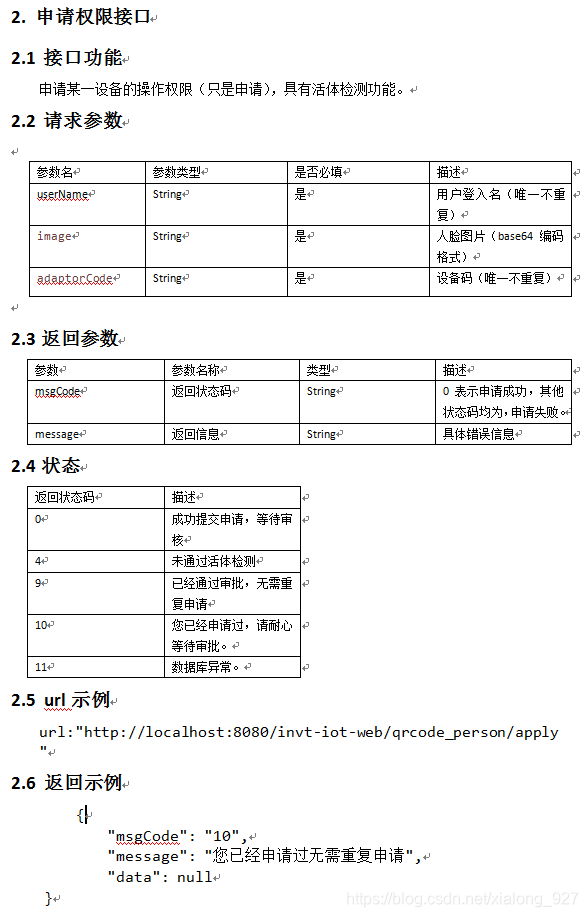
f、人脸核身接口
//----------------------人脸识别,获取授权-------------------------
// let para = {
// 	'userName': '',
// 	'image': '',
// 	'adaptorCode': ''
// }
export function faceAuth(para){
	return http.post('qrcode_person/license', para)
}

//----------------------人脸识别,申请注册-------------------------
// let para = {
// 	'userName': '',
// 	'image': '',
// 	'adaptorCode': ''
// }
export function applyRegister(para){
	return http.post('qrcode_person/apply', para)
}
g、调用人脸识别模块
uni.navigateTo({
					url: '/pages/index/home/face-drive/facial-recognition/facial-recognition?item='+encodeURIComponent(JSON.stringify(this.devInfo))
				})
完!!!
更多推荐



 1
1 0
0- 0


 已为社区贡献1条内容

所有评论(0)