
交通信号灯识别毕设:Python+PyTorch+Pyside6 界面(红灯 / 绿灯 / 黄灯 / 倒计时)毕业设计深度学习 毕业设计(建议收藏)✅
交通信号灯识别毕设:Python+PyTorch+Pyside6 界面(红灯 / 绿灯 / 黄灯 / 倒计时)毕业设计深度学习 毕业设计(建议收藏)✅
·
博主介绍:✌全网粉丝10W+,前互联网大厂软件研发、集结硕博英豪成立工作室。专注于计算机相关专业项目实战6年之久,选择我们就是选择放心、选择安心毕业✌
> 🍅想要获取完整文章或者源码,或者代做,拉到文章底部即可与我联系了。🍅🍅感兴趣的可以先收藏起来,点赞、关注不迷路,大家在毕设选题,项目以及论文编写等相关问题都可以给我留言咨询,希望帮助同学们顺利毕业 。🍅
1、毕业设计:2025年计算机专业毕业设计选题汇总(建议收藏)✅
2、大数据毕业设计:2025年选题大全 深度学习 python语言 JAVA语言 hadoop和spark(建议收藏)✅
1、项目介绍
技术栈:
Python语言、YOLOv5模型、交通信号灯识别、深度学习 pytorch、Pysdie6库页面、OpenCV
YOLOv5多种交通灯识别(红灯、绿灯、黄灯、倒计时)
YOLO多种交通灯识别系统 深度学习 pytorch和Pysdie6库页面OpenCV 计算机毕业设计✅
本项目是面向智慧交通与计算机毕业设计需求开发的多类型交通信号灯识别系统,以 Python 为开发语言,核心集成 YOLOv5 深度学习目标检测模型、PyTorch 深度学习框架、Pyside6 图形界面库与 OpenCV 图像处理技术,专注于实现红灯、绿灯、黄灯及倒计时交通信号灯的精准识别,构建具备多类型灯态检测、实时交互、可视化展示的一体化系统,可广泛应用于智能驾驶辅助、交通路口监控、自动驾驶信号决策等场景,解决传统交通灯识别类型单一、动态场景适应性差的问题,兼具技术创新性与实际应用价值,完全符合计算机毕业设计的技术深度与功能完整性要求。
技术架构上,项目形成 “模型训练 - 数据处理 - 界面交互 - 精准识别” 的完整体系:YOLOv5 模型作为核心检测引擎,依托 PyTorch 框架进行训练优化,通过专属交通信号灯数据集(含不同灯态、光照、天气场景样本)迭代调参,实现对红灯、绿灯、黄灯及倒计时灯的细分识别,打破传统系统仅能识别基础灯态的局限;OpenCV 负责图像预处理(如降噪、色彩空间转换、轮廓增强)与视频流解析,针对交通灯 “小目标、高动态” 特性优化输入数据,提升模型在复杂路口场景下的检测精度;Pyside6 搭建直观交互界面,相比传统界面库更适配现代桌面应用设计,支持图像 / 视频导入、实时检测控制、识别结果标注展示等功能,降低用户操作门槛;整体技术栈围绕 “多类型交通灯识别” 核心,保障从模型推理到界面输出的全流程高效运转。
核心功能聚焦 “多类型识别 - 实时检测 - 可视化交互” 全场景:支持多灯态精准识别,YOLOv5 模型可同时检测图像中红灯、绿灯、黄灯及倒计时信号灯,通过 bounding box 标注灯态位置,同步输出类别标签(如 “红灯”“绿灯(倒计时 5s)”)与置信度,解决路口多灯并存时的分类难题;支持实时检测,OpenCV 读取摄像头画面或路口监控视频流,逐帧传递给 YOLOv5 模型,实现动态场景下的灯态实时识别,响应速度快,适配交通灯切换的高时效性需求;支持可视化交互,Pyside6 界面划分 “文件导入区、检测控制区、结果展示区”,用户点击 “打开文件” 导入图像 / 视频,或 “启动摄像头” 开启实时检测,界面实时标注识别结果,倒计时灯态还可同步显示剩余时间,直观呈现检测信息。
系统界面设计简洁现代,Pyside6 的组件化开发让操作流程更流畅,即使非技术用户也能快速上手。YOLOv5 模型经 PyTorch 框架优化训练,对小目标交通灯的识别准确率高,搭配 OpenCV 的动态图像处理,能适应雨天、逆光、遮挡等复杂场景。项目融合深度学习目标检测、框架训练、GUI 开发与图像处理技术,既展现了扎实的技术整合能力,又为智慧交通信号感知提供细分场景解决方案,是兼顾学术研究与实际应用的优质计算机毕业设计。
2、项目界面
(1)红灯、绿灯
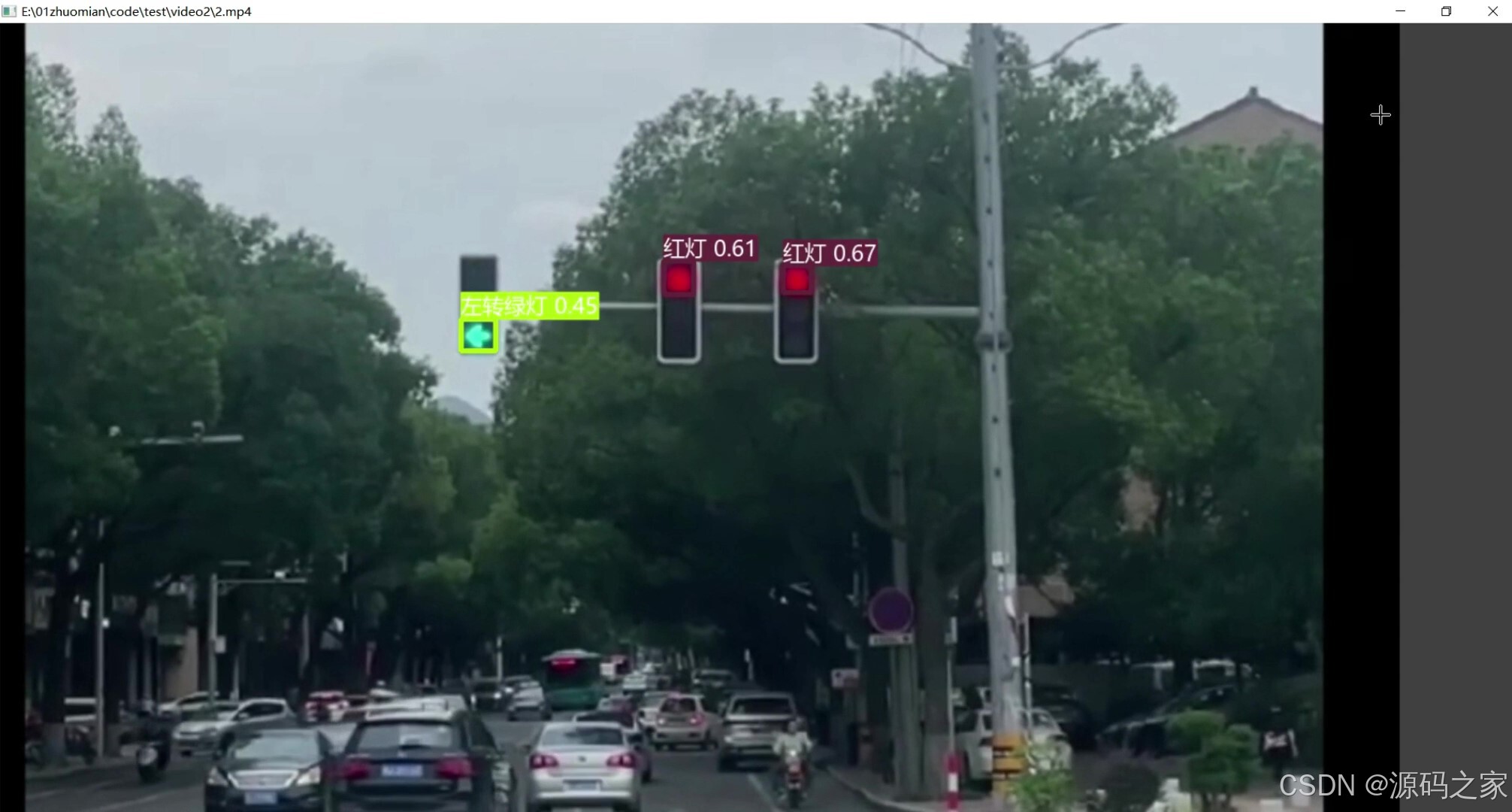
(2)红灯、倒计时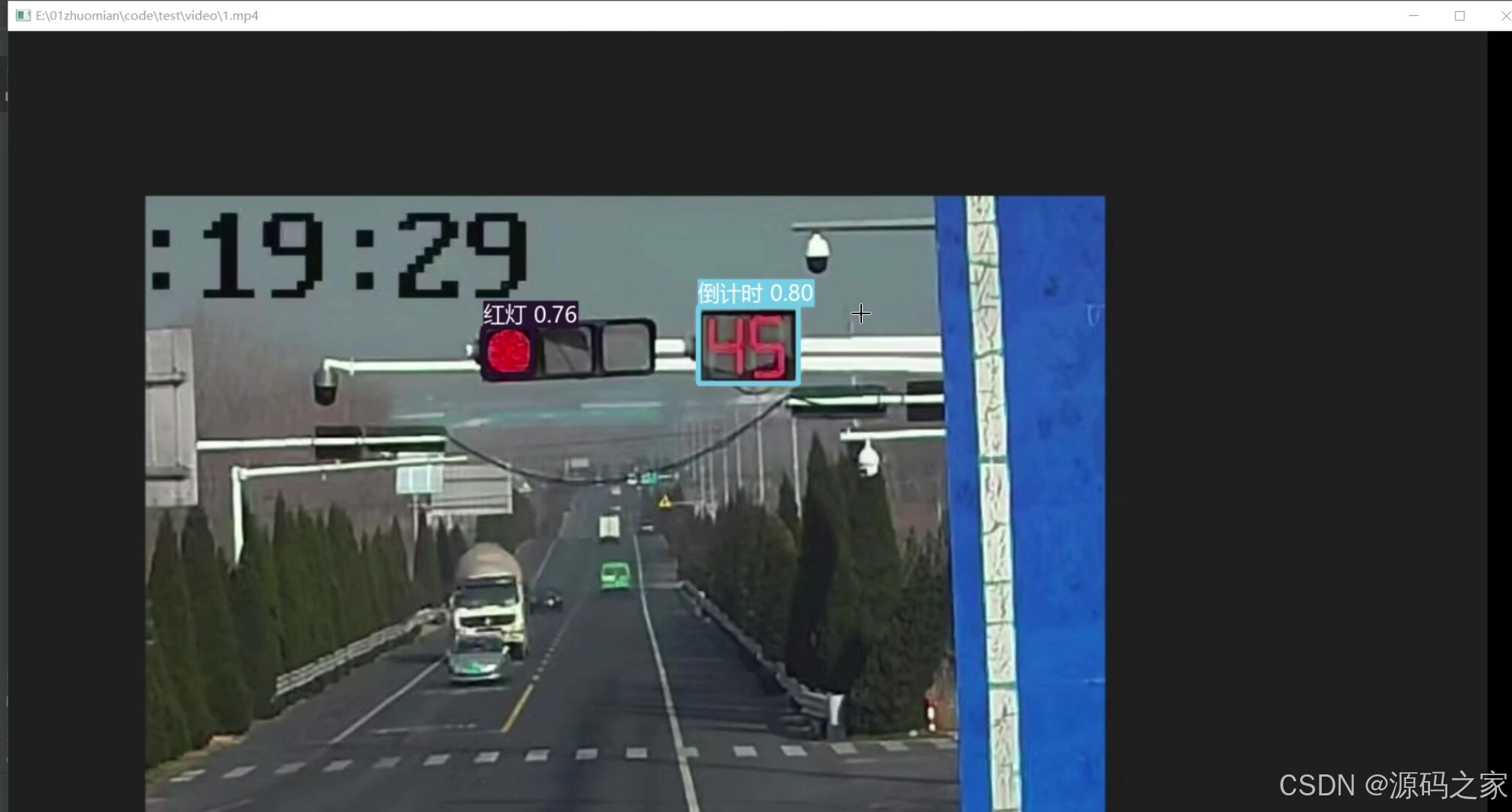
(3)红灯、黄灯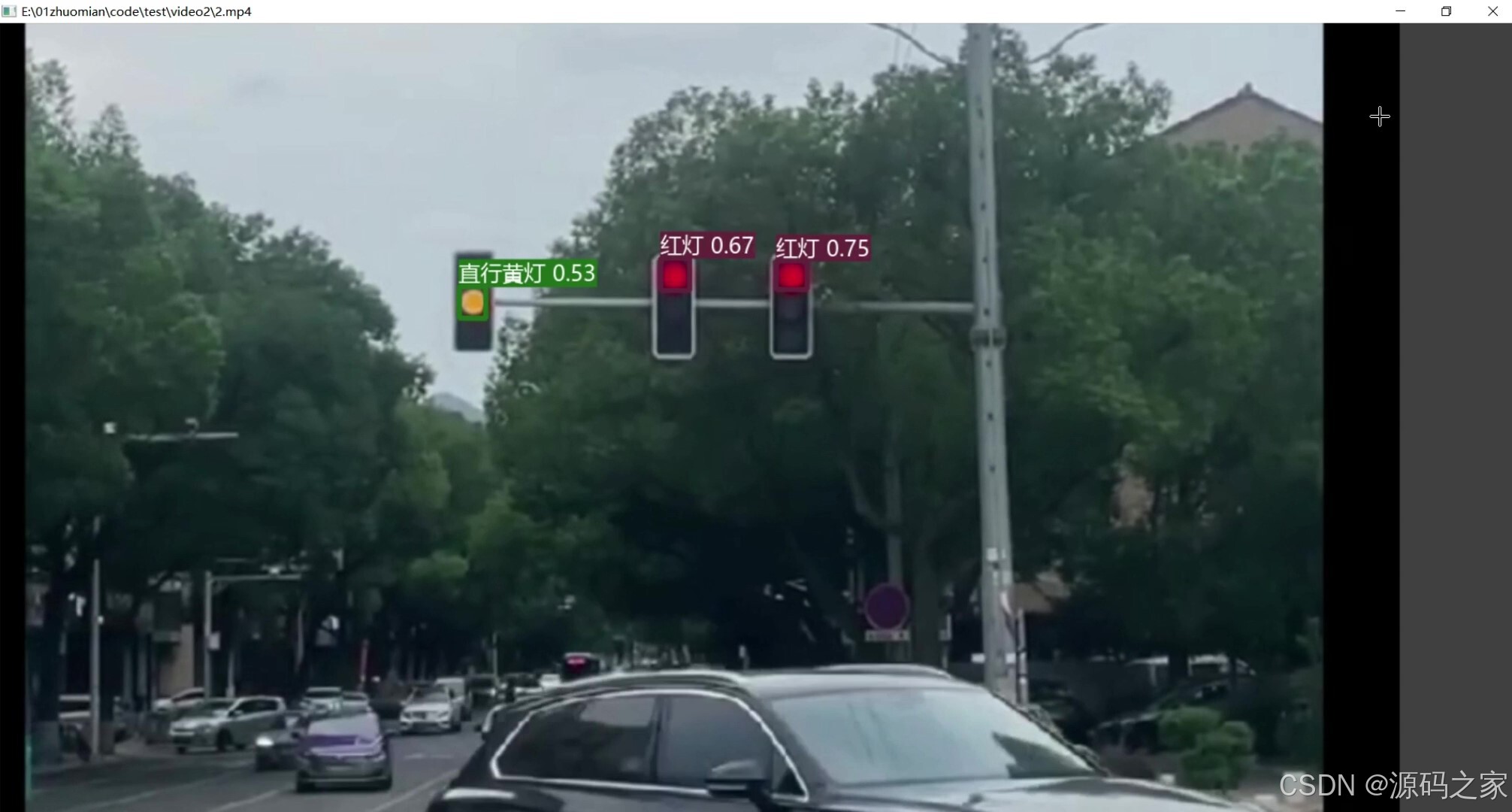
(4)红灯、黄灯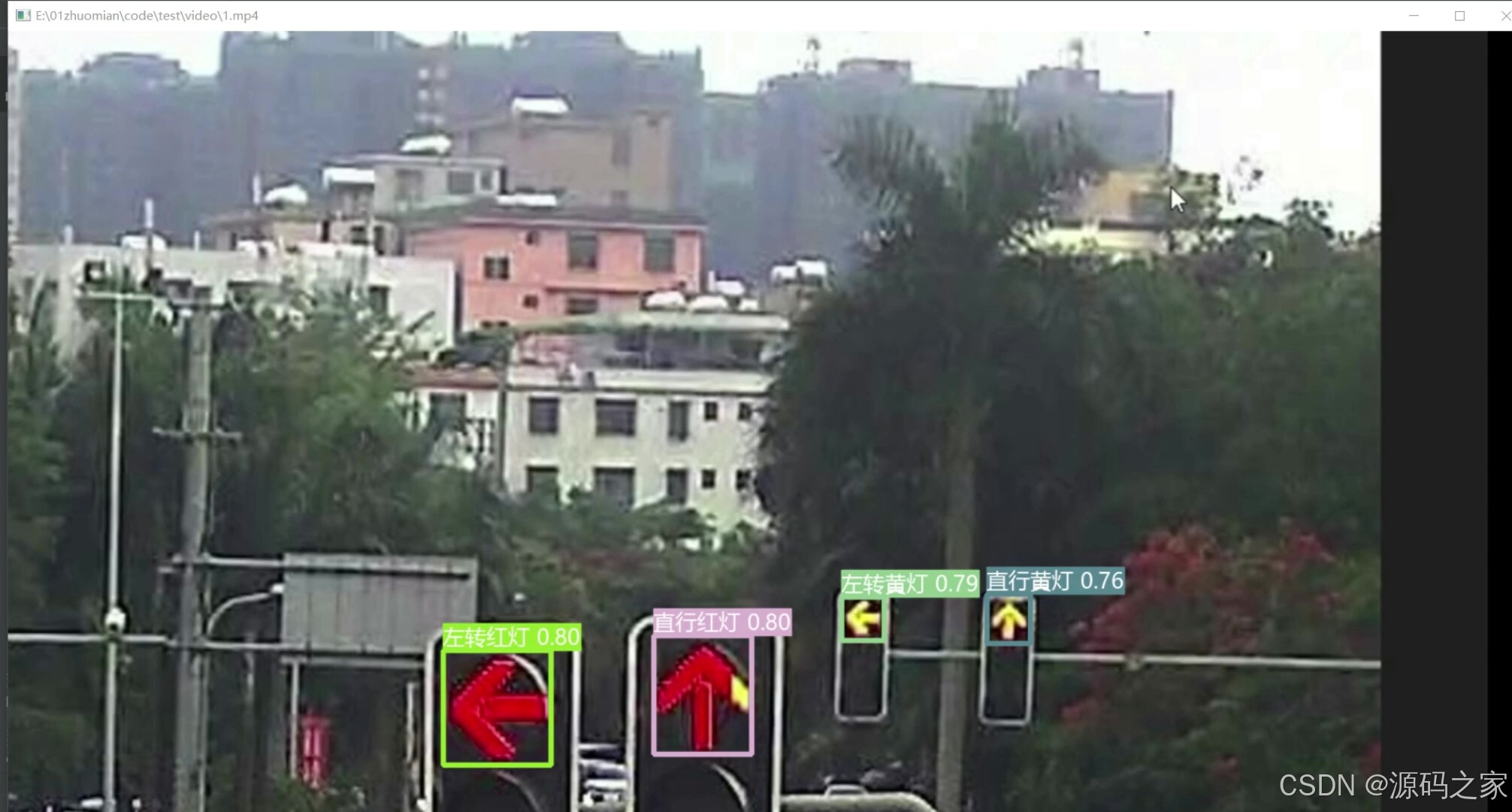
(5)绿灯、倒计时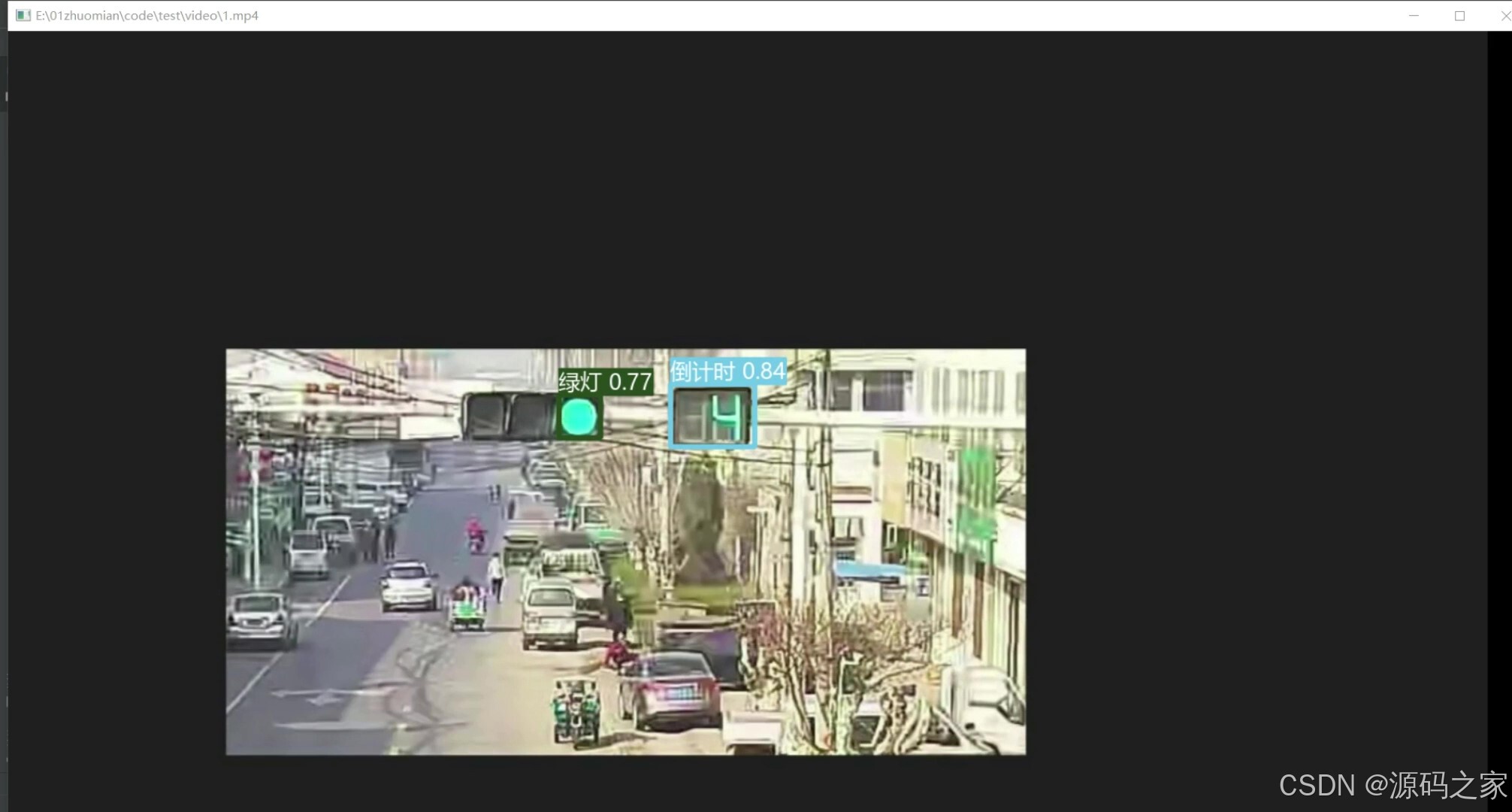
(6)左转绿灯、直行绿灯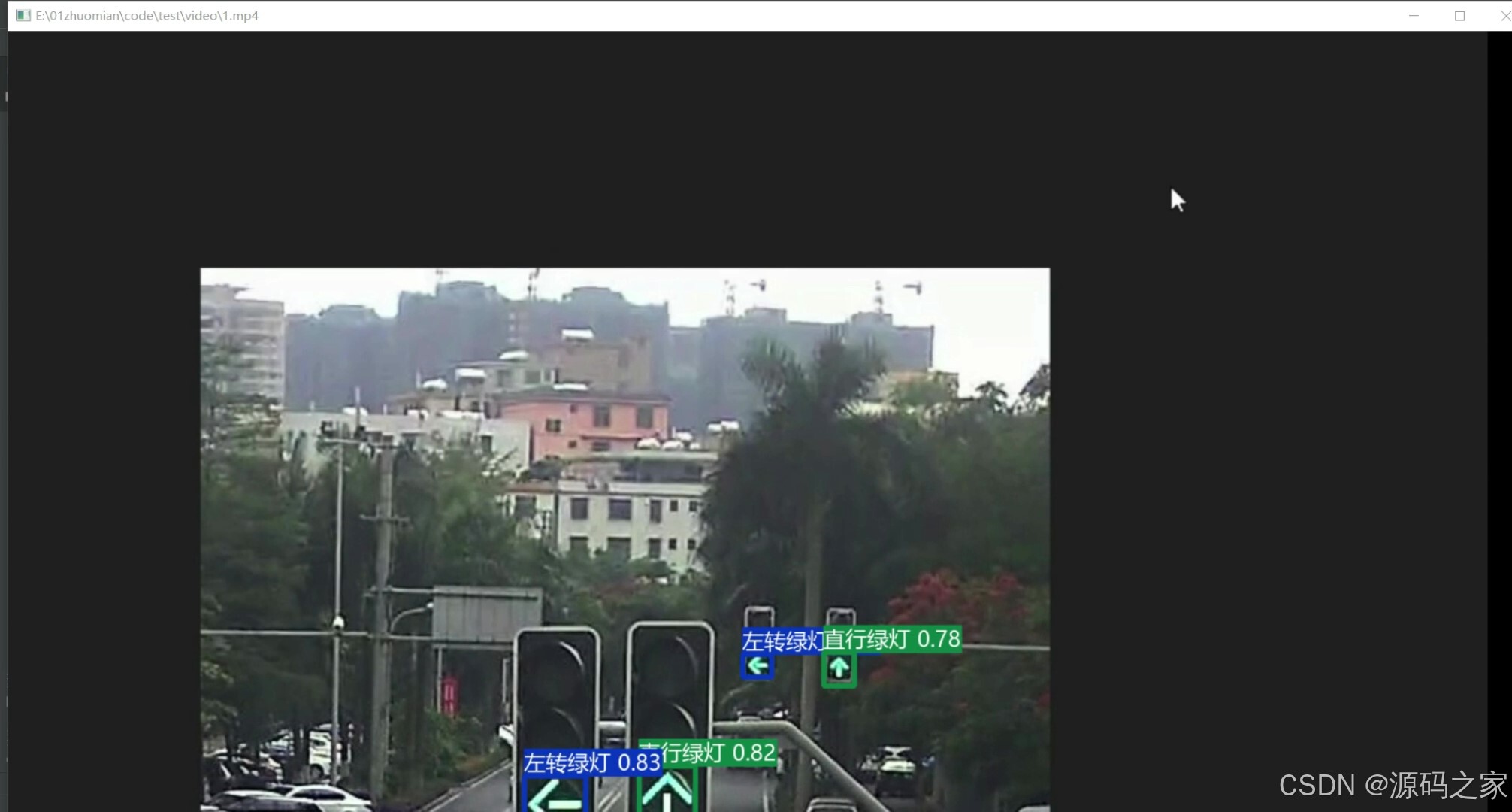
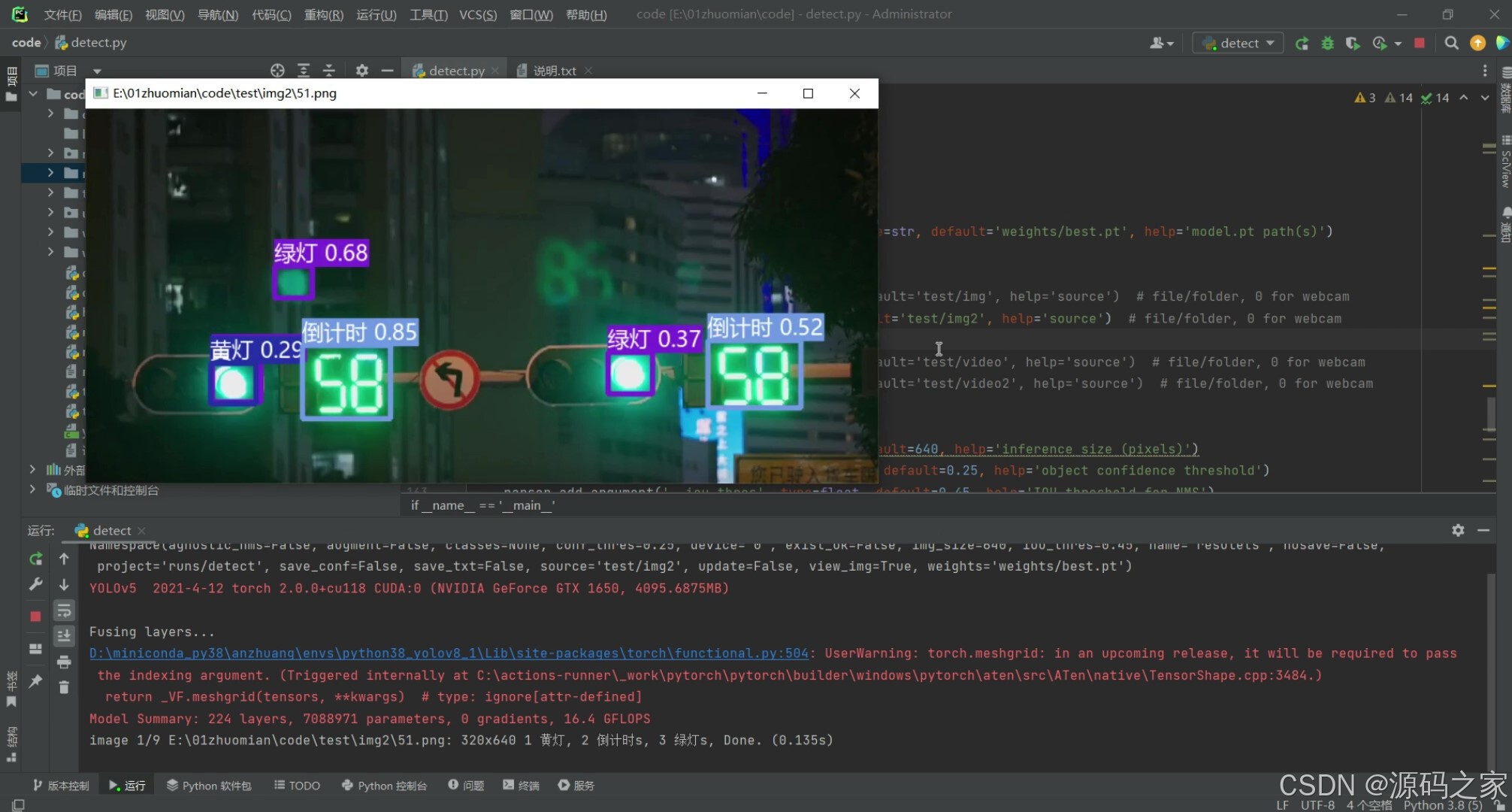
(7)图片保存
3、项目说明
技术栈:
Python语言、YOLOv5模型、交通信号灯识别、深度学习 pytorch、Pysdie6库页面、OpenCV
YOLOv5多种交通灯识别(红灯、绿灯、黄灯、倒计时)
4、核心代码
import argparse
import time
from pathlib import Path

import cv2
import torch
import torch.backends.cudnn as cudnn
from numpy import random

from models.experimental import attempt_load
from utils.datasets import LoadStreams, LoadImages
from utils.general import check_img_size, check_requirements, check_imshow, non_max_suppression, apply_classifier, \
    scale_coords, xyxy2xywh, strip_optimizer, set_logging, increment_path
from utils.plots import plot_one_box
from utils.torch_utils import select_device, load_classifier, time_synchronized


def detect(save_img=False):
    source, weights, view_img, save_txt, imgsz = opt.source, opt.weights, opt.view_img, opt.save_txt, opt.img_size
    save_img = not opt.nosave and not source.endswith('.txt')  # save inference images
    webcam = source.isnumeric() or source.endswith('.txt') or source.lower().startswith(
        ('rtsp://', 'rtmp://', 'http://', 'https://'))

    # Directories
    save_dir = Path(increment_path(Path(opt.project) / opt.name, exist_ok=opt.exist_ok))  # increment run
    (save_dir / 'labels' if save_txt else save_dir).mkdir(parents=True, exist_ok=True)  # make dir

    # Initialize
    set_logging()
    device = select_device(opt.device)
    half = device.type != 'cpu'  # half precision only supported on CUDA

    # Load model
    model = attempt_load(weights, map_location=device)  # load FP32 model
    stride = int(model.stride.max())  # model stride
    imgsz = check_img_size(imgsz, s=stride)  # check img_size
    if half:
        model.half()  # to FP16

    # Second-stage classifier
    classify = False
    if classify:
        modelc = load_classifier(name='resnet101', n=2)  # initialize
        modelc.load_state_dict(torch.load('weights/resnet101.pt', map_location=device)['model']).to(device).eval()

    # Set Dataloader
    vid_path, vid_writer = None, None
    if webcam:
        view_img = check_imshow()
        cudnn.benchmark = True  # set True to speed up constant image size inference
        dataset = LoadStreams(source, img_size=imgsz, stride=stride)
    else:
        dataset = LoadImages(source, img_size=imgsz, stride=stride)

    # Get names and colors
    names = model.module.names if hasattr(model, 'module') else model.names
    colors = [[random.randint(0, 255) for _ in range(3)] for _ in names]

    # Run inference
    if device.type != 'cpu':
        model(torch.zeros(1, 3, imgsz, imgsz).to(device).type_as(next(model.parameters())))  # run once
    t0 = time.time()
    for path, img, im0s, vid_cap in dataset:
        img = torch.from_numpy(img).to(device)
        img = img.half() if half else img.float()  # uint8 to fp16/32
        img /= 255.0  # 0 - 255 to 0.0 - 1.0
        if img.ndimension() == 3:
            img = img.unsqueeze(0)

        # Inference
        t1 = time_synchronized()
        pred = model(img, augment=opt.augment)[0]

        # Apply NMS
        pred = non_max_suppression(pred, opt.conf_thres, opt.iou_thres, classes=opt.classes, agnostic=opt.agnostic_nms)
        t2 = time_synchronized()

        # Apply Classifier
        if classify:
            pred = apply_classifier(pred, modelc, img, im0s)

        # Process detections
        for i, det in enumerate(pred):  # detections per image
            if webcam:  # batch_size >= 1
                p, s, im0, frame = path[i], '%g: ' % i, im0s[i].copy(), dataset.count
            else:
                p, s, im0, frame = path, '', im0s, getattr(dataset, 'frame', 0)

            p = Path(p)  # to Path
            save_path = str(save_dir / p.name)  # img.jpg
            txt_path = str(save_dir / 'labels' / p.stem) + ('' if dataset.mode == 'image' else f'_{frame}')  # img.txt
            s += '%gx%g ' % img.shape[2:]  # print string
            gn = torch.tensor(im0.shape)[[1, 0, 1, 0]]  # normalization gain whwh
            if len(det):
                # Rescale boxes from img_size to im0 size
                det[:, :4] = scale_coords(img.shape[2:], det[:, :4], im0.shape).round()

                # Print results
                for c in det[:, -1].unique():
                    n = (det[:, -1] == c).sum()  # detections per class
                    s += f"{n} {names[int(c)]}{'s' * (n > 1)}, "  # add to string

                # Write results
                for *xyxy, conf, cls in reversed(det):
                    if save_txt:  # Write to file
                        xywh = (xyxy2xywh(torch.tensor(xyxy).view(1, 4)) / gn).view(-1).tolist()  # normalized xywh
                        line = (cls, *xywh, conf) if opt.save_conf else (cls, *xywh)  # label format
                        with open(txt_path + '.txt', 'a') as f:
                            f.write(('%g ' * len(line)).rstrip() % line + '\n')

                    if save_img or view_img:  # Add bbox to image
                        label = f'{names[int(cls)]} {conf:.2f}'
                        im0 = plot_one_box(xyxy, im0, label=label, color=colors[int(cls)],line_thickness=3)

            # Print time (inference + NMS)
            print(f'{s}Done. ({t2 - t1:.3f}s)')

            # Stream results
            if view_img:
                cv2.imshow(str(p), im0)
                cv2.waitKey(1)  # 1 millisecond

            # Save results (image with detections)
            if save_img:
                if dataset.mode == 'image':
                    cv2.imwrite(save_path, im0)
                else:  # 'video' or 'stream'
                    if vid_path != save_path:  # new video
                        vid_path = save_path
                        if isinstance(vid_writer, cv2.VideoWriter):
                            vid_writer.release()  # release previous video writer
                        if vid_cap:  # video
                            fps = vid_cap.get(cv2.CAP_PROP_FPS)
                            w = int(vid_cap.get(cv2.CAP_PROP_FRAME_WIDTH))
                            h = int(vid_cap.get(cv2.CAP_PROP_FRAME_HEIGHT))
                        else:  # stream
                            fps, w, h = 30, im0.shape[1], im0.shape[0]
                            save_path += '.mp4'
                        vid_writer = cv2.VideoWriter(save_path, cv2.VideoWriter_fourcc(*'mp4v'), fps, (w, h))
                    vid_writer.write(im0)

    if save_txt or save_img:
        s = f"\n{len(list(save_dir.glob('labels/*.txt')))} labels saved to {save_dir / 'labels'}" if save_txt else ''
        print(f"Results saved to {save_dir}{s}")

    print(f'Done. ({time.time() - t0:.3f}s)')


if __name__ == '__main__':
    parser = argparse.ArgumentParser()
    parser.add_argument('--weights', nargs='+', type=str, default='weights/best.pt', help='model.pt path(s)')

    # 设置检测的文件路径
    parser.add_argument('--source', type=str, default='test/img', help='source')  # file/folder, 0 for webcam
    # parser.add_argument('--source', type=str, default='test/img2', help='source')  # file/folder, 0 for webcam

    # parser.add_argument('--source', type=str, default='test/video', help='source')  # file/folder, 0 for webcam
    # parser.add_argument('--source', type=str, default='test/video2', help='source')  # file/folder, 0 for webcam

    with torch.no_grad():
        if opt.update:  # update all models (to fix SourceChangeWarning)
            for opt.weights in ['yolov5s.pt', 'yolov5m.pt', 'yolov5l.pt', 'yolov5x.pt']:
                detect()
                strip_optimizer(opt.weights)
        else:
            detect()
5、源码获取方式
biyesheji0005 或 biyesheji0001 (绿色聊天软件)
🍅由于篇幅限制,获取完整文章或源码、代做项目的,查看我的【用户名】、【专栏名称】、【顶部选题链接】就可以找到我啦🍅
感兴趣的可以先收藏起来,点赞、关注不迷路,下方查看👇🏻获取联系方式👇🏻
更多推荐


 24
24 0
0- 0


 已为社区贡献5条内容

所有评论(0)