
【离线语音助手】Xamarin From Android 语音识别 合成 sherpa-onnx
xamarin from 通过 sherpa-onnx 实现离线语音识别、语音合成
概要
本方详细介绍了如何在Xamarin From中如何实现离线语音识别合生,并提供解决方案与部分代码。这里我们选用 sherpa 开源项目部署语音识别、合成等模型。离线语音识别库有whisper、kaldi、pocketshpinx等,在了解这些库的时候,发现了所谓“下一代Kaldi”的sherpa。从文档和模型名称看,它是一个很新的离线语音识别库,支持中英双语识别,文件和实时语音识别。sherpa是一个基于下一代 Kaldi 和 onnxruntime 的开源项目,专注于语音识别、文本转语音、说话人识别和语音活动检测(VAD)等功能。该项目支持在没有互联网连接的情况下本地运行,适用于嵌入式系统、Android、iOS、Raspberry Pi、RISC-V 和 x86_64 服务器等多种平台。支持流式语音处理。
他有 ncnn、onnx 等平台的子项目:
https://github.com/k2-fsa/sherpa-onnx
https://github.com/k2-fsa/sherpa-ncnn
包含的功能如下:
| 功能 | 描述 |
|---|---|
| 实时语音识别 (Streaming Speech Recognition) | 在语音输入的同时进行处理和识别,适用于需要即时反馈的场景,如会议和语音助手。 |
| 非实时语音识别 (Non-Streaming Speech Recognition) | 在录制完毕后进行处理,适合需要高准确率的场景,如音频转写和文档生成。 |
| 文本转语音 (Text-to-Speech, TTS) | 将文本内容转换为自然语音输出,广泛应用于语音助手和导航系统。 |
| 说话人分离 (Speaker Diarization) | 识别和区分音频流中的不同说话人,常用于会议记录和多说话人对话分析。 |
| 说话人识别 (Speaker Identification) | 确认说话者的身份,分析声纹特征并与数据库进行比对。 |
| 说话人验证 (Speaker Verification) | 要求说话者提供声纹以确认身份,常用于安全性较高的场合,如银行系统。 |
| 口语语言识别 (Spoken Language Identification) | 识别语音中使用的语言,帮助系统在多语言环境中自动切换语言。 |
| 音频标记 (Audio Tagging) | 为音频内容添加标签,便于分类和搜索,常用于音频库管理和内容推荐。 |
| 语音活动检测 (Voice Activity Detection, VAD) | 检测音频流中是否存在语音活动,提升语音识别准确性并节省带宽和处理资源。 |
| 关键词检测 (Keyword Spotting) | 识别特定关键词或短语,常用于智能助手和语音控制设备,允许用户通过语音命令与设备交互。 |
官方参考文档:
https://k2-fsa.github.io/sherpa/onnx/index.html
技术细节
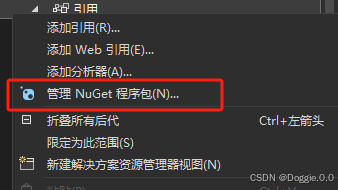
步骤一、在Visual Studio中导入nuget包
安装 org.k2fsa.sherpa.onnx.runtime.osx-x64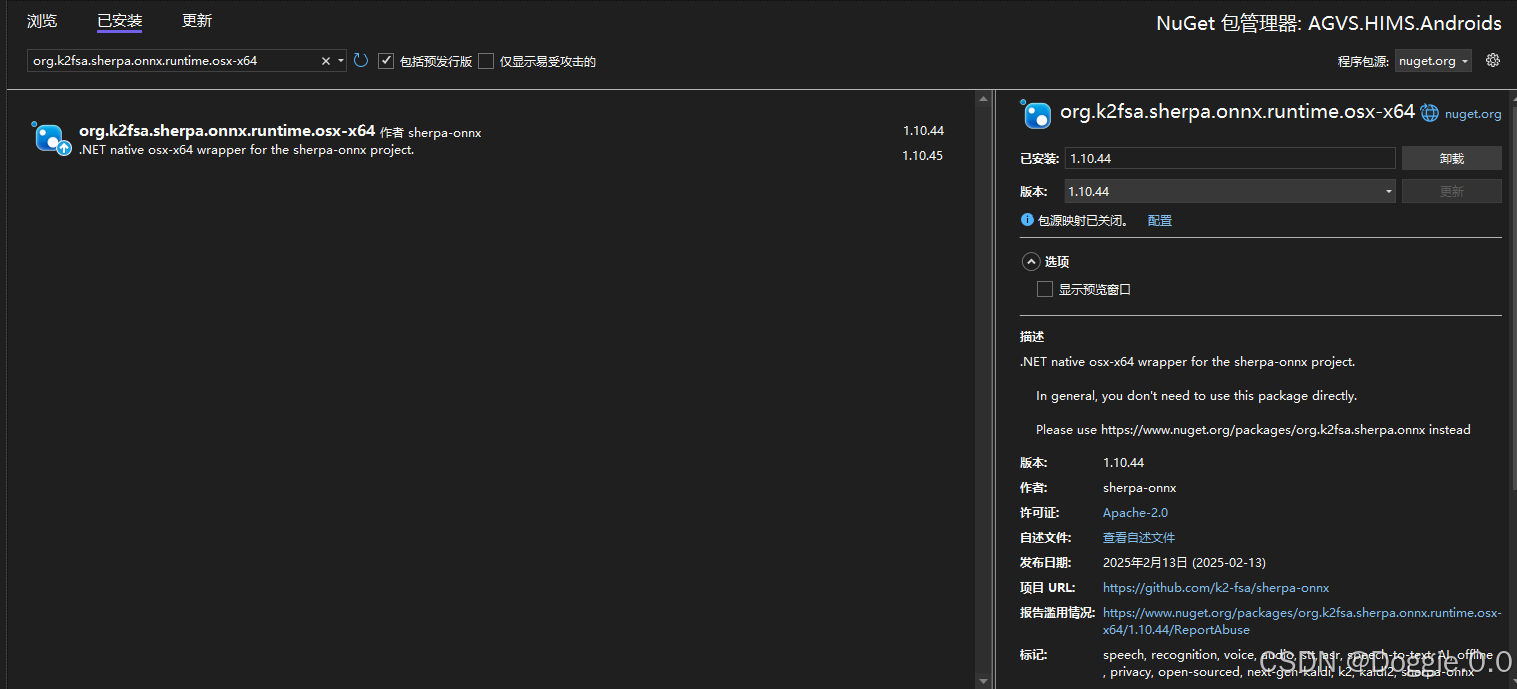
安装 Microsoft.ML.OnnxRuntime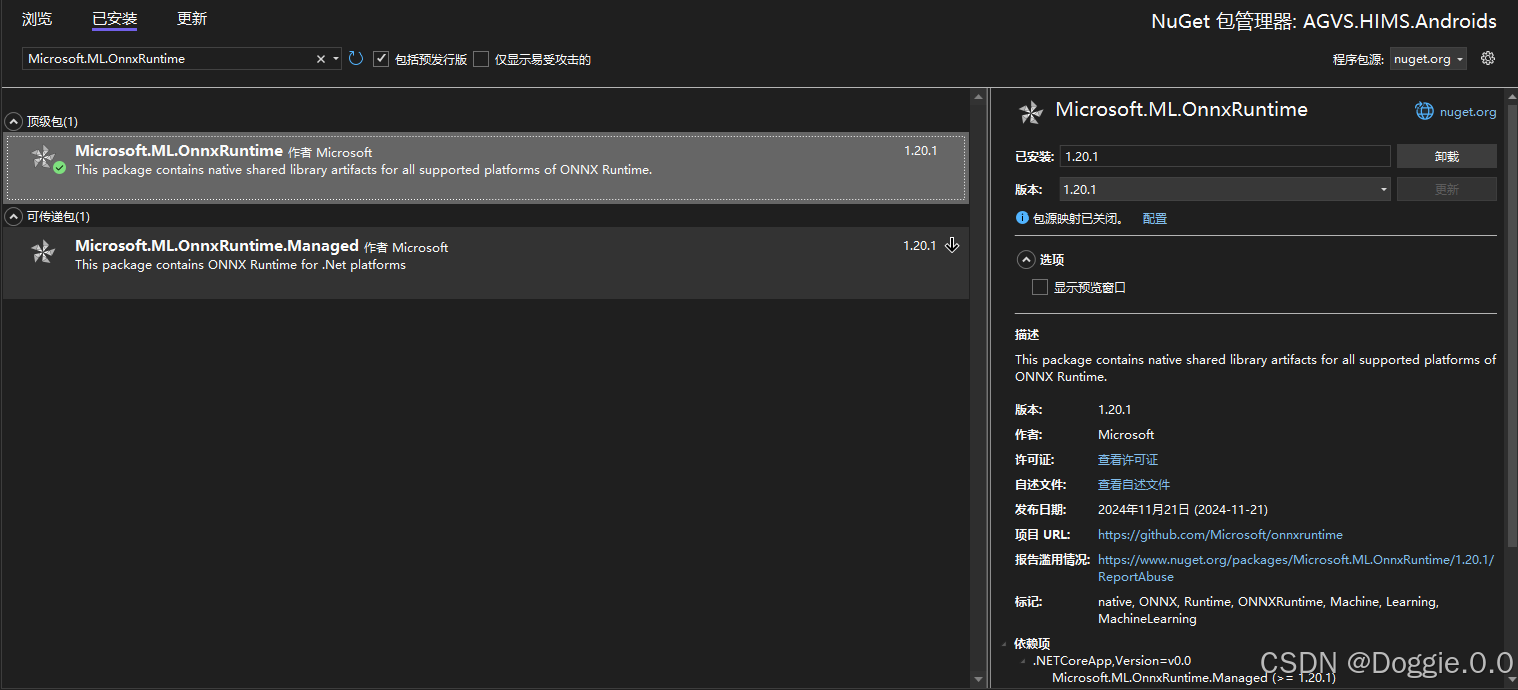
步骤二、下载官方模型文件与SDK引入到项目
语音识别模型下载与引用
本文使用的是sherpa-onnx-streaming-zipformer-ctc-multi-zh-hans-2023-12-13模型,当然官方还提供了不少其他模型,各位小伙伴根据自己的需求下载
官方模型列表地址:官方模型
本文模型下载地址:sherpa-onnx-streaming-zipformer-ctc-multi-zh-hans-2023-12-13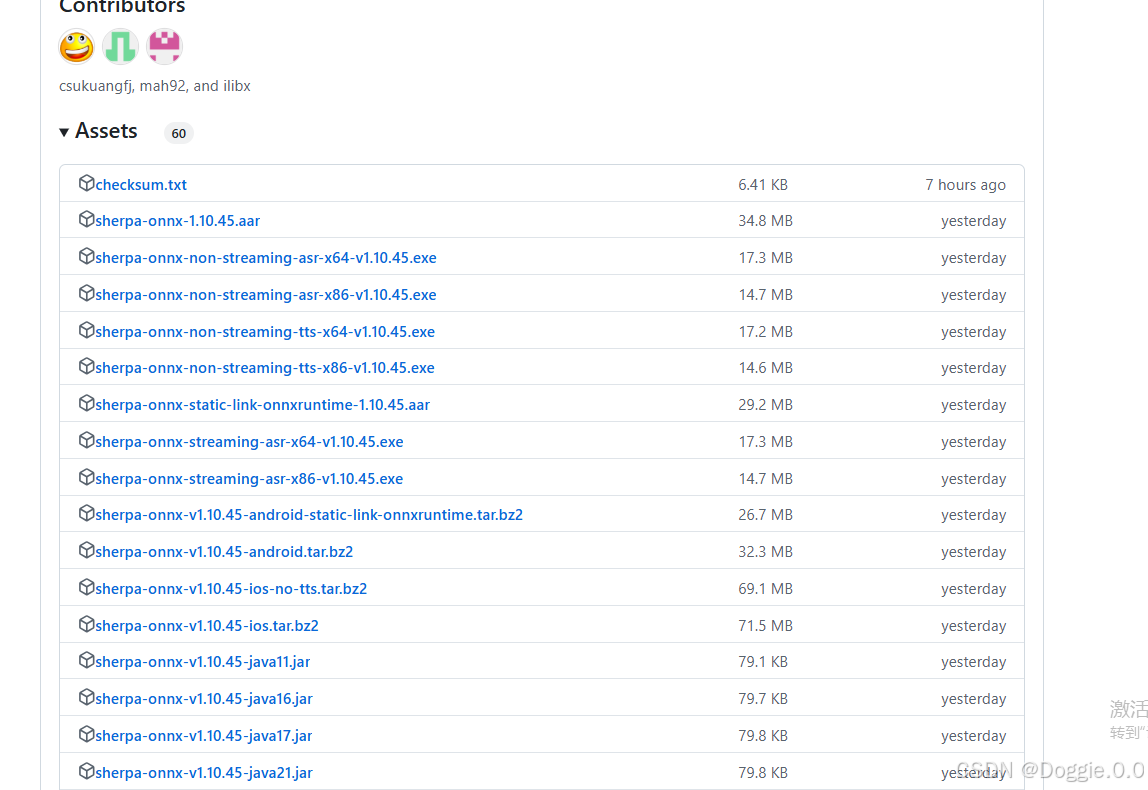
模型解压后得到如下目录结构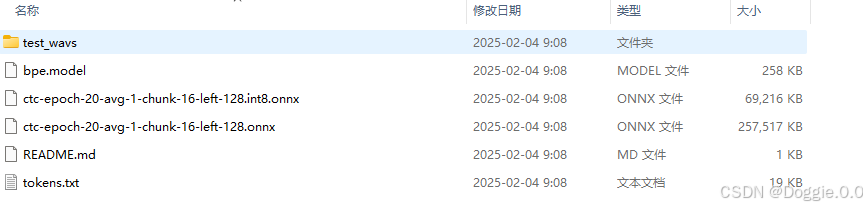
复制此目录到项目目录Assets目录下:如果没有请Assets 在此目录下创建Assets文件夹
因为下来文件名sherpa-onnx-streaming-zipformer-ctc-multi-zh-hans-2023-12-13太长了所以我把名字修改成了sherpaonnxSpeechToText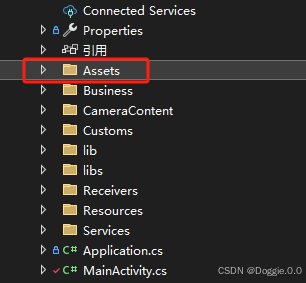

并修改所有文件属性为AndroidAsset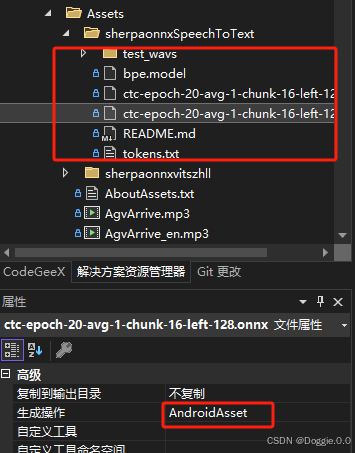
语音合成模型下载与引用
本文使用的是sherpa-onnx-vits-zh-ll模型,当然官方还提供了不少其他模型,各位小伙伴根据自己的需求下载
官方模型列表地址:官方模型
本文模型下载地址:sherpa-onnx-vits-zh-l
解压后文件目录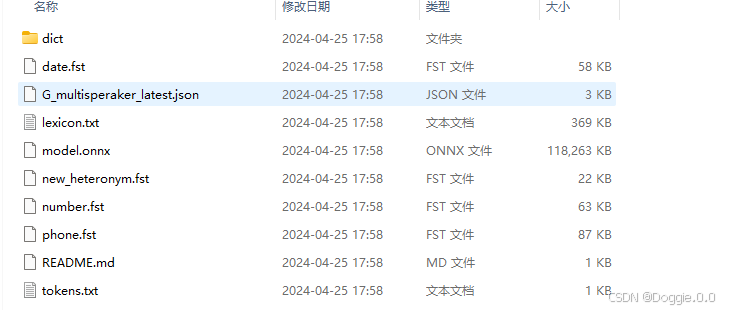
和上面一样复制此目录到Accets目录下 并修改所有目录文件属性为AndroidAsset
此项目中sherpa-onnx-vits-zh-ll改名成sherpaonnxvitszhll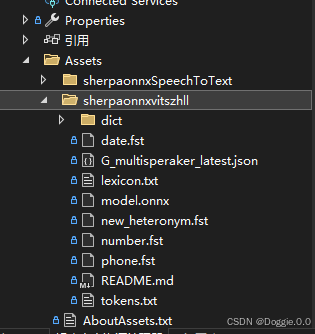
引用so文件
官方模型列表地址:官方模型
这里选择的是v1.10.20java8的版本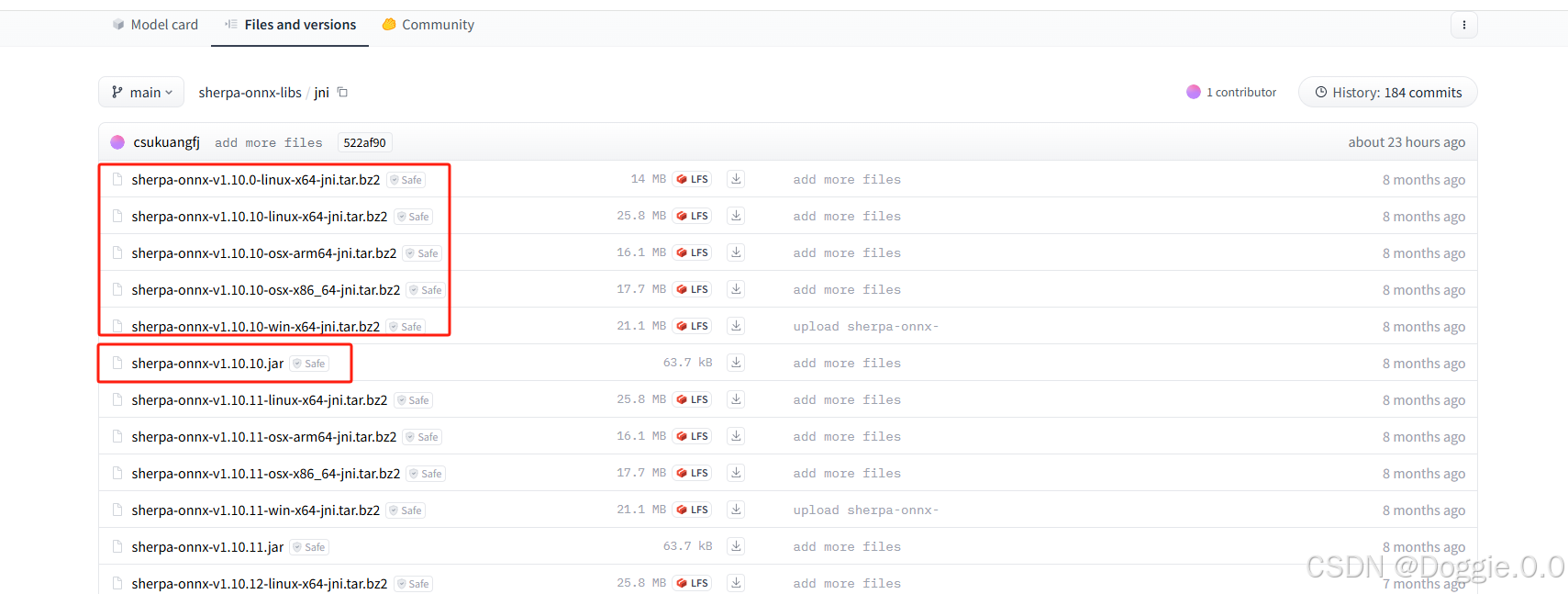
解压后目录
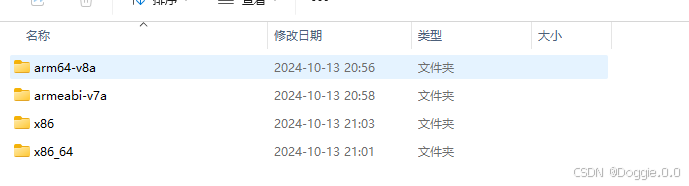
在项目中创建libs目录 按照解压后的文件把so分别放到项目对应的目录中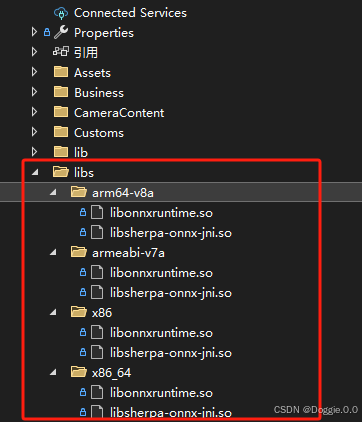
设置所有so文件属性AndroidNativeLibrary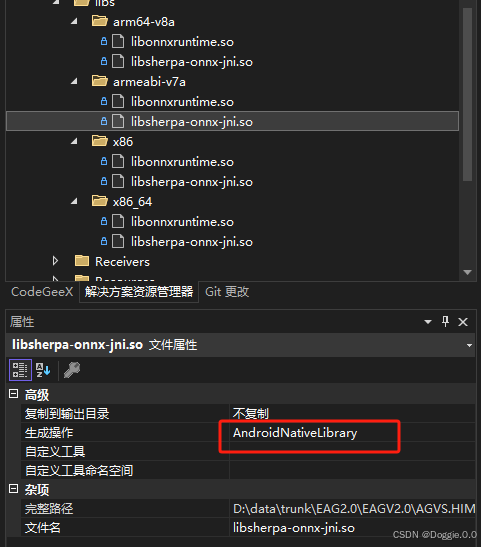
导入jar包
和模型一起下载的还有一个jar包 我们需要把此jar包引用到项目中,犹豫vs项目不支持直接引用jar包,所以我们要创建一个jar项目,再通过引用jar项目来引用jar包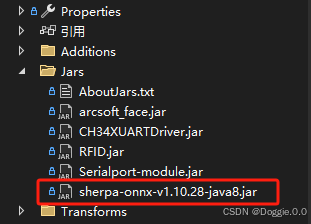
引用此jar包项目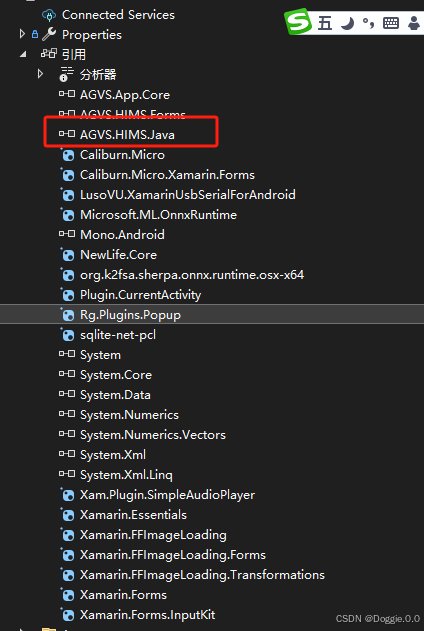
上面准备工作做好了现在我们就可以写代码运行了
这里是我的代码结构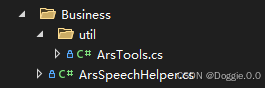
ArsTools功能是把Assets资源中的模型导入到app内部目录(直接访问外部目录可能导致系统找不到模型文件)
ArsTools代码
using Android.App;
using Android.Content;
using System;
using System.IO;
using Android.Content.Res;
using Android.Content;
using Android.Media;
using Xamarin.Essentials;
using static Android.Provider.MediaStore;

namespace Your.Namespace
{

    public class ArsTools
    {
        private static readonly string TAG = typeof(Tools).FullName;

        // 设置 context
        private static Context _context;

        public static void SetContext(Context context)
        {
            _context = context;
        }

        // 递归复制文件
        public static void CopyAsset(string assetPath, string root)
        {
            AssetManager assetManager = _context.Assets;
            string[] files = null;

            try
            {
                // 获取指定目录下的所有文件和目录
                files = assetManager.List(assetPath);
            }
            catch (IOException e)
            {
                Console.WriteLine(e.Message);
            }

            if (files != null)
            {
                foreach (var filename in files)
                {
                    string assetFilePath = Path.Combine(assetPath, filename); // 资源文件的完整路径
                    string destFilePath = Path.Combine(root, assetPath) + "/" + filename; // 目标文件的完整路径

                    try
                    {
                        if (!File.Exists(Path.Combine(root, assetPath)))
                        {
                            // 如果是目录,则创建目录并递归复制
                            Directory.CreateDirectory(Path.Combine(root, assetPath));
                        }
                        // 判断是否为目录
                        if (assetManager.List(assetFilePath)?.Length > 0)
                        {
                            if (!File.Exists(destFilePath))
                            {
                                // 如果是目录,则创建目录并递归复制
                                Directory.CreateDirectory(Path.GetDirectoryName(destFilePath));
                            }
                            CopyAsset(assetFilePath, root);
                        }
                        else
                        {
                            if (!File.Exists(destFilePath))
                            {
                                using (System.IO.Stream input = assetManager.Open(assetFilePath))
                                using (System.IO.Stream output = File.Create(destFilePath))
                                {
                                    // 复制文件
                                    input.CopyTo(output);
                                }
                            }
                        }

                        Console.WriteLine($"文件复制:{destFilePath},成功:{File.Exists(destFilePath)}");
                    }
                    catch (Exception e)
                    {
                        Console.WriteLine(e.Message);
                    }
                }
            }
        }
        //}


        // 播放 wav 文件
        //public static async void PlayWav(string wavPath)
        //{
        //    try
        //    {
        //        await Audio.PlayAsync(wavPath);
        //    }
        //    catch (Exception e)
        //    {
        //        Console.WriteLine(e.Message);
        //    }
        //}

        // 获取 app 存储路径
        public static string GetAppStoragePath()
        {
            return FileSystem.AppDataDirectory;
        }
    }

}
业务代码
ArsSpeechHelper
using AGVS.HIMS.Androids.Business.util;
using AGVS.HIMS.Forms.AppServer;
using Android.Content;
using Com.K2fsa.Sherpa.Onnx;
using NPOI.POIFS.Properties;
using System;
using System.Diagnostics;
using System.IO;

namespace Your.Namespace
{
    public class ArsSpeechHelper
    {
        Context ArsContext;
        public ArsSpeechHelper(Context context)
        {
            ArsContext = context;
        }

        public void SpeechToText()
        {
            try
            {
                //https://github.com/k2-fsa/sherpa-onnx/releases/download/asr-models/sherpa-onnx-streaming-zipformer-ctc-multi-zh-hans-2023-12-13.tar.bz2
                //数据库名称
                var sqliteFilename = "sherpaonnxSpeechToText";

                ArsTools.SetContext(ArsContext);
                ArsTools.CopyAsset(sqliteFilename, Tools.GetAppStoragePath());
                string model = ArsTools.GetAppStoragePath() + "/sherpaonnxSpeechToText/ctc-epoch-20-avg-1-chunk-16-left-128.onnx";
                string tokens = ArsTools.GetAppStoragePath() + "/sherpaonnxSpeechToText/tokens.txt";
                string waveFilename = ArsTools.GetAppStoragePath() + "/sherpaonnxSpeechToText/test_wavs/DEV_T0000000000.wav";

                WaveReader reader = new WaveReader(waveFilename);
                OnlineZipformer2CtcModelConfig ctc = OnlineZipformer2CtcModelConfig.InvokeBuilder()
                    .SetModel(model).Build();
                OnlineModelConfig modelConfig = OnlineModelConfig.InvokeBuilder()
                                .SetZipformer2Ctc(ctc)
                                .SetTokens(tokens)
                                .SetNumThreads(1)
                                .SetDebug(true)
                                .Build();
                OnlineRecognizerConfig config = OnlineRecognizerConfig.InvokeBuilder()
                                .SetOnlineModelConfig(modelConfig)
                                .SetDecodingMethod("greedy_search")
                                .Build();
                OnlineRecognizer recognizer = new OnlineRecognizer(config);
                OnlineStream stream = recognizer.CreateStream();
                stream.AcceptWaveform(reader.GetSamples(), reader.SampleRate);
                float[] tailPaddings = new float[(int)(0.3 * reader.SampleRate)];
                stream.AcceptWaveform(tailPaddings, reader.SampleRate);
                while (recognizer.IsReady(stream))
                {
                    recognizer.Decode(stream);
                }
                string text = recognizer.GetResult(stream).Text;
                //System.out.printf("filename:%s\nresult:%s\n", waveFilename, text);
                stream.Release();
                recognizer.Release();

            }
            catch (Exception ex) { }
        }

        public void TextToSpeech(string text = "你好!")
        {
            try
            {
                //测试
                text = "在语音输入的同时进行处理和识别,适用于需要即时反馈的场景,如会议和语音助手。在录制完毕后进行处理,适合需要高准确率的场景,如音频转写和文档生成。";
                // please visit
                //  https://github.com/k2-fsa/sherpa-onnx/releases/download/tts-models/vits-melo-tts-zh_en.tar.bz2
                // to download model files
                //读取数据库文件
                string documentsPath = (string)Android.OS.Environment.GetExternalStoragePublicDirectory(Android.OS.Environment.DirectoryDownloads);
                //数据库名称
                var sqliteFilename = "sherpaonnxvitszhll";

                ArsTools.SetContext(ArsContext);
                ArsTools.CopyAsset(sqliteFilename, Tools.GetAppStoragePath());

                string model = ArsTools.GetAppStoragePath() + "/sherpaonnxvitszhll/model.onnx";

                string tokens = ArsTools.GetAppStoragePath() + "/sherpaonnxvitszhll/tokens.txt";
                string lexicon = ArsTools.GetAppStoragePath() + "/sherpaonnxvitszhll/lexicon.txt";
                string dictDir = ArsTools.GetAppStoragePath() + "/sherpaonnxvitszhll/dict";
                string ruleFsts =
                         ArsTools.GetAppStoragePath() + "/sherpaonnxvitszhll/phone.fst," +
                         ArsTools.GetAppStoragePath() + "/sherpaonnxvitszhll/date.fst," +
                         ArsTools.GetAppStoragePath() + "/sherpaonnxvitszhll/number.fst";

                OfflineTtsVitsModelConfig vitsModelConfig = OfflineTtsVitsModelConfig.InvokeBuilder()
                                .SetModel(model)
                                .SetTokens(tokens)
                                .SetLexicon(lexicon)
                                .SetDictDir(dictDir)
                                .Build();
                OfflineTtsModelConfig modelConfig = OfflineTtsModelConfig.InvokeBuilder()
                                .SetVits(vitsModelConfig)
                                .SetNumThreads(1)
                                .SetDebug(true)
                                .Build();
                OfflineTtsConfig config = OfflineTtsConfig.InvokeBuilder()
                    .SetModel(modelConfig)
                    .Build();
                OfflineTts tts = new OfflineTts(config);
                int sid = 100;
                float speed = 1.0f;
                // 使用 Stopwatch 记录处理时间
                Stopwatch stopwatch = new Stopwatch();
                stopwatch.Start();
                GeneratedAudio audio = tts.Generate(text, sid, speed);
                stopwatch.Stop();
                float timeElapsedSeconds = stopwatch.ElapsedMilliseconds / 1000.0f;
                float audioDuration = audio.GetSamples().Length / (float)audio.SampleRate;
                float real_time_factor = timeElapsedSeconds / audioDuration;
                string waveFilename = Path.Combine(documentsPath, "tts-vits-zh.wav");
                audio.Save(waveFilename);
                //System.out.printf("-- elapsed : %.3f seconds\n", timeElapsedSeconds);
                //System.out.printf("-- audio duration: %.3f seconds\n", timeElapsedSeconds);
                //System.out.printf("-- real-time factor (RTF): %.3f\n", real_time_factor);
                //System.out.printf("-- text: %s\n", text);
                //System.out.printf("-- Saved to %s\n", waveFilename);
                tts.Release();

            }
            catch (Exception ex)
            {

            }
        }
    }
}
这样我们就可以在MainActivity.cs中使用啦
 [Activity(Label = "测试", Icon = "@drawable/app2", Theme = "@style/MainTheme", MainLauncher = true, ConfigurationChanges = ConfigChanges.ScreenSize | ConfigChanges.Orientation)]
 public class MainActivity : FormsAppCompatActivity
 {
  protected override async void OnCreate(Bundle savedInstanceState)
 {
     try
     {
         //设置主题
         this.SetTheme(Resource.Style.MainTheme);
         TabLayoutResource = Resource.Layout.Tabbar;
         ToolbarResource = Resource.Layout.Toolbar;
         //全屏界面
         var uiOpts = SystemUiFlags.LayoutStable
          | SystemUiFlags.LayoutHideNavigation
          | SystemUiFlags.LayoutFullscreen
          | SystemUiFlags.Fullscreen
          | SystemUiFlags.HideNavigation
          | SystemUiFlags.Immersive;
         Window.DecorView.SystemUiVisibility = (StatusBarVisibility)uiOpts;
         base.OnCreate(savedInstanceState);
         //调用接口
         ArsSpeechHelper arsSpeechHelper = new ArsSpeechHelper(BaseContext);
         arsSpeechHelper.TextToSpeech("");
         arsSpeechHelper.SpeechToText();
     }
  	 catch (Exception ex)
  	 {
  	 }
  	 finally
  	 {
      	 try
      	 {
          	 //初始化容器
          	 LoadApplication(new Bootstrapper(IoC.Get<SimpleContainer>()));
      	 }
      catch (System.Exception ex)
      {
      }
  }
 }
//启动程序 语音生成 与 语音合成 也都达到了我想要的结果(亲测有效)
当前还有一些不完美的地方
后期打算把这段ArsSpeechHelper逻辑放到Services中通过后台服务来执行。
GitHub示例代码地址
android 项目示例代码:
ars语音识别示例项目
tts语音合成示例项目
更多推荐
 12
12 0
0- 0


 已为社区贡献1条内容

所有评论(0)