
Azure text-to-speech 语音合成 中文晓晓情感API使用及教程
官方演示:https://azure.microsoft.com/en-us/services/cognitive-services/text-to-speech/#features相关演示请加群721829413 发送azttsLyrical#内容演示第一步登录Azure 并且创建资源搜索 speeh 找到语音服务点击创建,输入相关资料后点创建创建完成后在资源管理中找到密钥和终节点,主要是密钥一
·
官方演示:https://azure.microsoft.com/en-us/services/cognitive-services/text-to-speech/#features
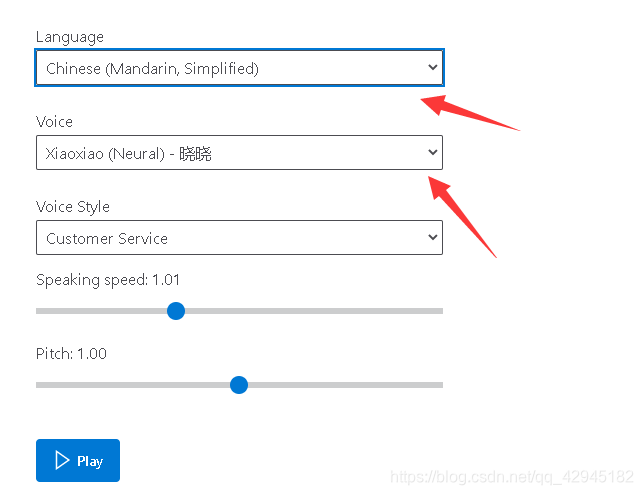
第一步登录Azure 并且创建资源
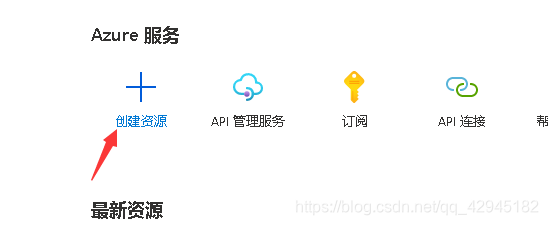
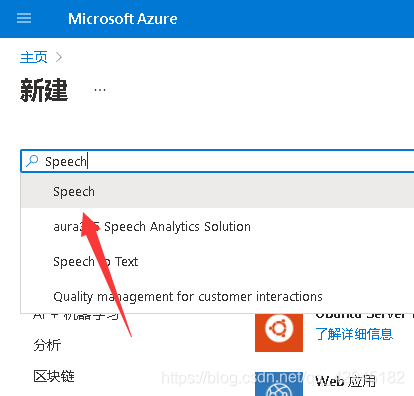
搜索 speeh 找到语音服务
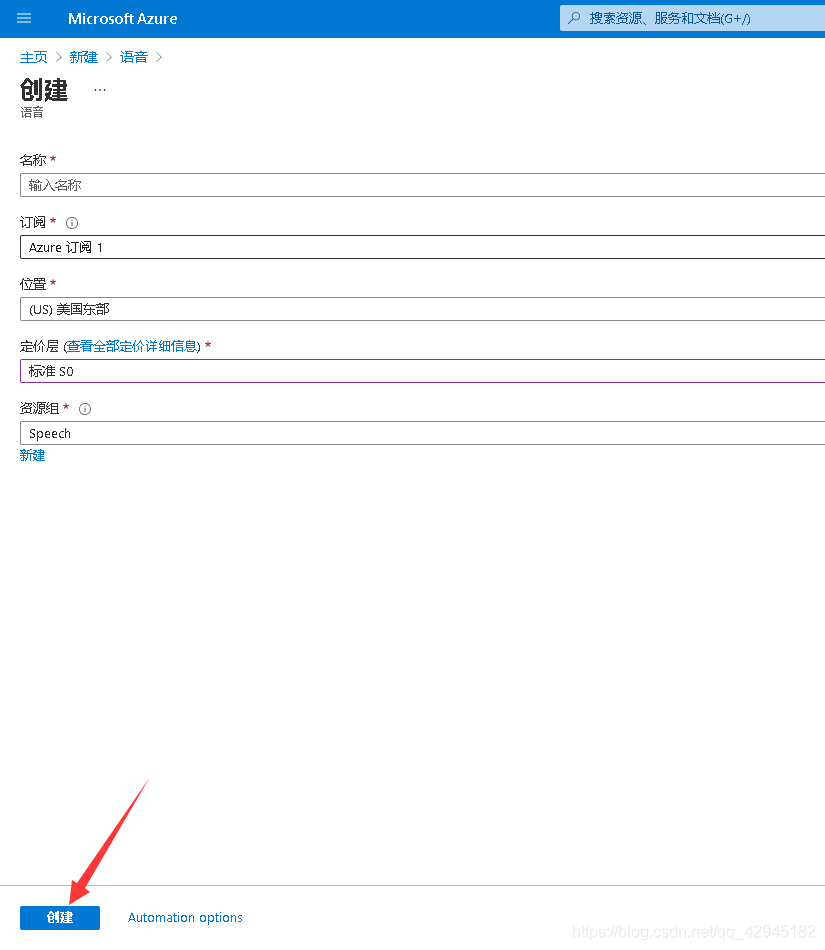
点击创建,输入相关资料后点创建
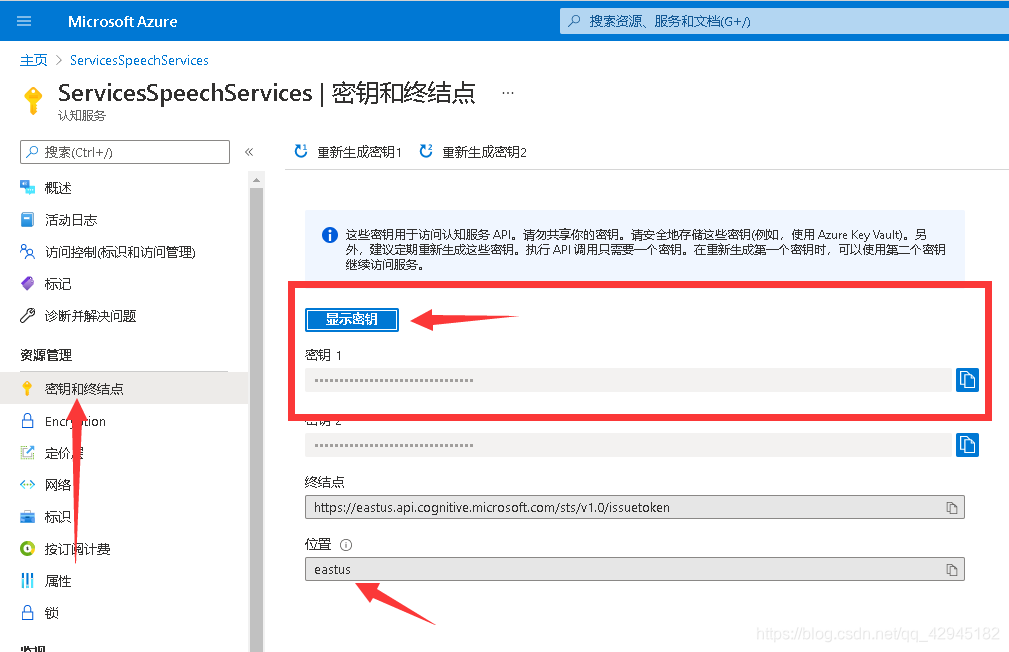
创建完成后在资源管理中找到密钥和终节点,主要是密钥一和区域这2个
HTTP请求示例
POST /sts/v1.0/issueToken HTTP/1.1
Host: 区域.api.cognitive.microsoft.com
User-Agent: Mozilla/5.0 (Windows NT 10.0; Win64; x64) AppleWebKit/537.36 (KHTML, like Gecko) Chrome/88.0.4324.182 Safari/537.36 Edg/88.0.705.74
Ocp-Apim-Subscription-Key: 密钥一
curl --location --request POST 'https://eastus.api.cognitive.microsoft.com/sts/v1.0/issueToken' \
--header 'User-Agent: Mozilla/5.0 (Windows NT 10.0; Win64; x64) AppleWebKit/537.36 (KHTML, like Gecko) Chrome/88.0.4324.182 Safari/537.36 Edg/88.0.705.74' \
--header 'Ocp-Apim-Subscription-Key: 密钥一' \
--data-raw ''NodeJs请求示例
var request = require('request');
var options = {
  'method': 'POST',
  'url': 'https://eastus.api.cognitive.microsoft.com/sts/v1.0/issueToken',
  'headers': {
    'User-Agent': 'Mozilla/5.0 (Windows NT 10.0; Win64; x64) AppleWebKit/537.36 (KHTML, like Gecko) Chrome/88.0.4324.182 Safari/537.36 Edg/88.0.705.74',
    'Ocp-Apim-Subscription-Key': '密钥一'
  }
};
request(options, function (error, response) {
  if (error) throw new Error(error);
  console.log(response.body);
});
PHP请求示例
<?php

$curl = curl_init();

curl_setopt_array($curl, array(
  CURLOPT_URL => 'https://eastus.api.cognitive.microsoft.com/sts/v1.0/issueToken',
  CURLOPT_RETURNTRANSFER => true,
  CURLOPT_ENCODING => '',
  CURLOPT_MAXREDIRS => 10,
  CURLOPT_TIMEOUT => 0,
  CURLOPT_FOLLOWLOCATION => true,
  CURLOPT_HTTP_VERSION => CURL_HTTP_VERSION_1_1,
  CURLOPT_CUSTOMREQUEST => 'POST',
  CURLOPT_HTTPHEADER => array(
    'User-Agent: Mozilla/5.0 (Windows NT 10.0; Win64; x64) AppleWebKit/537.36 (KHTML, like Gecko) Chrome/88.0.4324.182 Safari/537.36 Edg/88.0.705.74',
    'Ocp-Apim-Subscription-Key: 密钥一'
  ),
));

$response = curl_exec($curl);

curl_close($curl);
echo $response;
Py请求示例
import http.client

conn = http.client.HTTPSConnection("eastus.api.cognitive.microsoft.com")
payload = ''
headers = {
  'User-Agent': 'Mozilla/5.0 (Windows NT 10.0; Win64; x64) AppleWebKit/537.36 (KHTML, like Gecko) Chrome/88.0.4324.182 Safari/537.36 Edg/88.0.705.74',
  'Ocp-Apim-Subscription-Key': '密钥一'
}
conn.request("POST", "/sts/v1.0/issueToken", payload, headers)
res = conn.getresponse()
data = res.read()
print(data.decode("utf-8"))
golang请求示例
package main

import (
  "fmt"
  "strings"
  "net/http"
  "io/ioutil"
)

func main() {

  url := "https://eastus.api.cognitive.microsoft.com/sts/v1.0/issueToken"
  method := "POST"

  payload := strings.NewReader(``)

  client := &http.Client {
  }
  req, err := http.NewRequest(method, url, payload)

  if err != nil {
    fmt.Println(err)
    return
  }
  req.Header.Add("User-Agent", "Mozilla/5.0 (Windows NT 10.0; Win64; x64) AppleWebKit/537.36 (KHTML, like Gecko) Chrome/88.0.4324.182 Safari/537.36 Edg/88.0.705.74")
  req.Header.Add("Ocp-Apim-Subscription-Key", "密钥一")

  res, err := client.Do(req)
  if err != nil {
    fmt.Println(err)
    return
  }
  defer res.Body.Close()

  body, err := ioutil.ReadAll(res.Body)
  if err != nil {
    fmt.Println(err)
    return
  }
  fmt.Println(string(body))
}
获取返回的Token备用(base64数据)
SDK不支持情感,我们使用websocket来获取
websocket连接地址
wss://区域.tts.speech.microsoft.com/cognitiveservices/websocket/v1?Authorization=Token&X-ConnectionId=32位随机大写Md5
websocket OnOpen 后发送数据(分别发送下方的代码,分2次发)
Path: synthesis.context
X-RequestId: 32位随机大写Md5
X-Timestamp: 2021-01-01T00:00:00.123Z #更改为当前时间
Content-Type: application/json

{synthesis:{audio:{metadataOptions:{sentenceBoundaryEnabled:false,wordBoundaryEnabled:false},outputFormat:ogg-24khz-16bit-mono-opus},language:{autoDetection:false}}}
情感对照表:
Affectionate#深情
Angry#生气
Calm#镇静
Cheerful#开朗
Disgruntled#不满
Fearful#惊恐
Gentle#温柔
Lyrical# 抒情
General#一般
Assistant#助理
Chat#聊天
Customer Service#客户服务
Newscast#播音
Sad#悲伤
Serious#严肃Path: ssml
X-RequestId: 32位随机大写Md5
X-Timestamp: 2021-01-01T00:00:00.123Z #更改为当前时间
Content-Type: application/ssml+xml
<speak xmlns="http://www.w3.org/2001/10/synthesis" xmlns:mstts="http://www.w3.org/2001/mstts" xmlns:emo="http://www.w3.org/2009/10/emotionml" version="1.0" xml:lang="en-US"><voice name="zh-CN-XiaoxiaoNeural"><mstts:express-as style="情感style(小写)"><prosody rate="0%" pitch="0%">文本内容</prosody></mstts:express-as></voice></speak>
在OnMessage中会返回二进制语音数据,
接收到
X-RequestId:B926B795BE2A47AAA9FE30FD8D3EA6D5
Content-Type:application/json; charset=utf-8
Path:turn.end
{}
将所有获取到的二进制合并为 xxx.ogg
调用ffmpeg将ogg转换成mp3即可
ffmpeg -y -i D:\11111.ogg -c:a libmp3lame -q:a 2 D:\11111.mp3
更多推荐
 0
0 0
0- 0


 已为社区贡献1条内容

所有评论(0)