
科大讯飞语音识别——纯web端实现
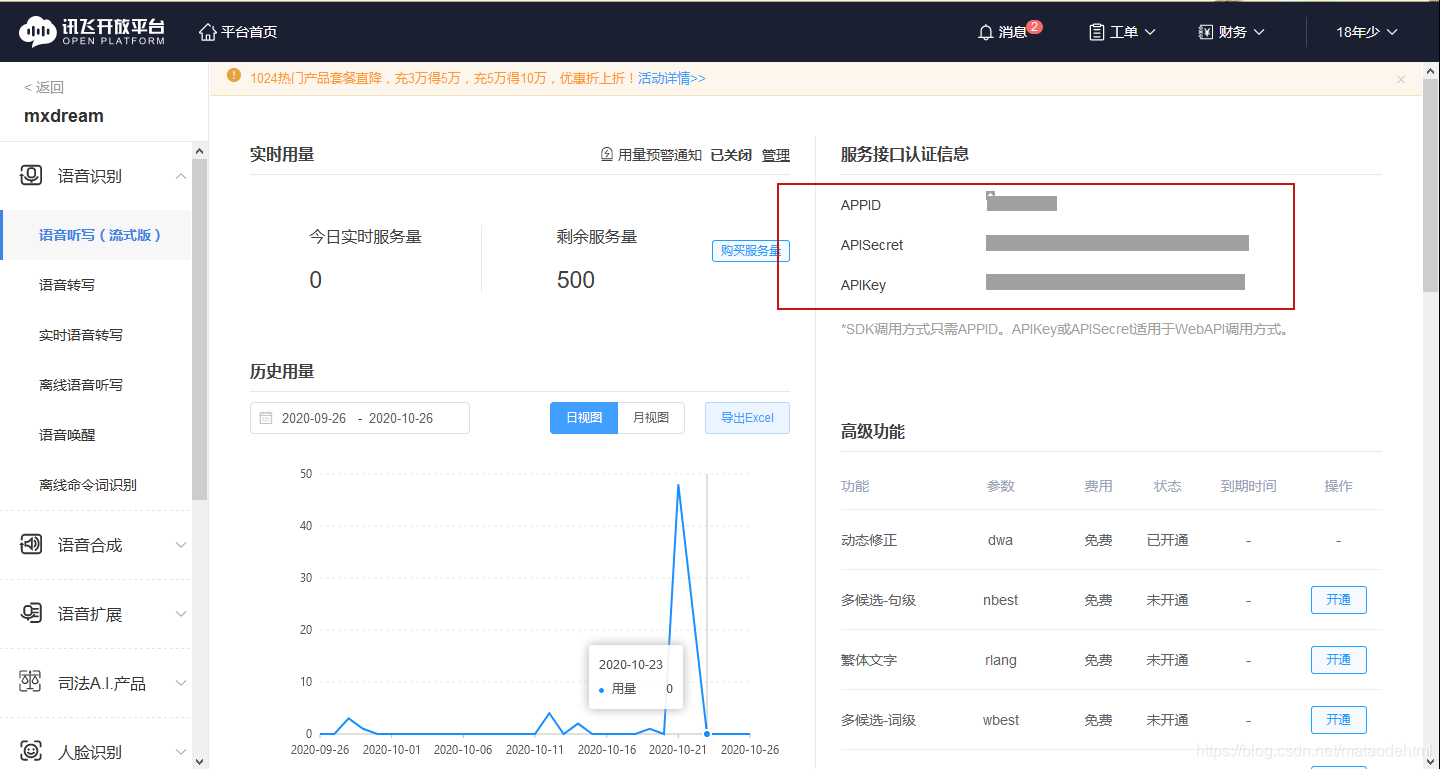
vue实现讯飞语音识别功能获取调用接口的参数主要代码项目源码功能实现:使用浏览器录音功能(https、localhost、127.0.0.1),在web端实现录音,然后通过websocket实现接口传输,获取对应的识别结果获取调用接口的参数如果要使用讯飞的接口,必须要在讯飞中申请账号,并在控制台中开启相应的权限,在我的应用中创建新的应用并获取对应的APPID,APISecret,APIKey如下图
功能实现:使用浏览器录音功能(https、localhost、127.0.0.1),在web端实现录音,然后通过websocket实现接口传输,获取对应的识别结果
获取调用接口的参数
如果要使用讯飞的接口,必须要在讯飞中申请账号,并在控制台中开启相应的权限,在我的应用中创建新的应用并获取对应的APPID,APISecret,APIKey如下图:
主要代码
因为整个流程的演示代码都在github中了,所以我在这里就不多说了,本实例是vue前端项目实现的,主要代码如下
IatRecorder.js
const APPID = ''
const API_SECRET = ''
const API_KEY = ''
import CryptoJS from 'crypto-js'
import Worker from './transcode.worker.js'
const transWorker = new Worker()
console.log(transWorker)
var startTime = ""
var endTime = ""

function getWebSocketUrl(){
  return new Promise((resolve, reject) => {
 // 请求地址根据语种不同变化
 var url = 'wss://iat-api.xfyun.cn/v2/iat'
 var host = 'iat-api.xfyun.cn'
 var apiKey = API_KEY
 var apiSecret = API_SECRET
 var date = new Date().toGMTString()
 var algorithm = 'hmac-sha256'
 var headers = 'host date request-line'
 var signatureOrigin = `host: ${host}\ndate: ${date}\nGET /v2/iat HTTP/1.1`
 var signatureSha = CryptoJS.HmacSHA256(signatureOrigin, apiSecret)
 var signature = CryptoJS.enc.Base64.stringify(signatureSha)
 var authorizationOrigin = `api_key="${apiKey}", algorithm="${algorithm}", headers="${headers}", signature="${signature}"`
 var authorization = btoa(authorizationOrigin)
 url = `${url}?authorization=${authorization}&date=${date}&host=${host}`
 resolve(url)
 })
}
const IatRecorder = class  {
    constructor({ language, accent, appId } = {}) {
      let self = this
      this.status = 'null'
      this.language = language || 'zh_cn'
      this.accent = accent || 'mandarin'
      this.appId = appId || APPID
      // 记录音频数据
      this.audioData = []
      // 记录听写结果
      this.resultText = ''
      // wpgs下的听写结果需要中间状态辅助记录
      this.resultTextTemp = ''
      transWorker.onmessage = function (event) {
        // console.log("构造方法中",self.audioData)
        self.audioData.push(...event.data)
      }
    }

    // 修改录音听写状态
    setStatus(status) {
      this.onWillStatusChange && this.status !== status && this.onWillStatusChange(this.status, status)
      this.status = status
    }
    setResultText({ resultText, resultTextTemp } = {}) {
      this.onTextChange && this.onTextChange(resultTextTemp || resultText || '')
      resultText !== undefined && (this.resultText = resultText)
      resultTextTemp !== undefined && (this.resultTextTemp = resultTextTemp)
    }
    // 修改听写参数
    setParams({ language, accent } = {}) {
      language && (this.language = language)
      accent && (this.accent = accent)
    }
    // 连接websocket
    connectWebSocket() {
      return getWebSocketUrl().then(url => {
        let iatWS
        if ('WebSocket' in window) {
          iatWS = new WebSocket(url)
        } else if ('MozWebSocket' in window) {
          iatWS = new MozWebSocket(url)
        } else {
          alert('浏览器不支持WebSocket')
          return
        }
        this.webSocket = iatWS
        this.setStatus('init')
        iatWS.onopen = e => {
          this.setStatus('ing')
          // 重新开始录音
          setTimeout(() => {
            this.webSocketSend()
          }, 500)
        }
        iatWS.onmessage = e => {
          this.result(e.data)
        }
        iatWS.onerror = e => {
          this.recorderStop()
        }
        iatWS.onclose = e => {
          endTime = Date.parse(new Date())
          console.log("持续时间",endTime-startTime)
          this.recorderStop()
        }
      })
    }
    // 初始化浏览器录音
    recorderInit() {
      navigator.getUserMedia =
        navigator.getUserMedia ||
        navigator.webkitGetUserMedia ||
        navigator.mozGetUserMedia ||
        navigator.msGetUserMedia

      // 创建音频环境
      try {
        this.audioContext = new (window.AudioContext || window.webkitAudioContext)()
        this.audioContext.resume()
        if (!this.audioContext) {
          alert('浏览器不支持webAudioApi相关接口')
          return
        }
      } catch (e) {
        if (!this.audioContext) {
          alert('浏览器不支持webAudioApi相关接口')
          return
        }
      }

      // 获取浏览器录音权限
      if (navigator.mediaDevices && navigator.mediaDevices.getUserMedia) {
        navigator.mediaDevices
          .getUserMedia({
            audio: true,
            video: false,
          })
          .then(stream => {
            getMediaSuccess(stream)
          })
          .catch(e => {
            getMediaFail(e)
          })
      } else if (navigator.getUserMedia) {
        navigator.getUserMedia(
          {
            audio: true,
            video: false,
          },
          stream => {
            getMediaSuccess(stream)
          },
          function(e) {
            getMediaFail(e)
          }
        )
      } else {
        if (navigator.userAgent.toLowerCase().match(/chrome/) && location.origin.indexOf('https://') < 0) {
          alert('chrome下获取浏览器录音功能,因为安全性问题,需要在localhost或127.0.0.1或https下才能获取权限')
        } else {
          alert('无法获取浏览器录音功能,请升级浏览器或使用chrome')
        }
        this.audioContext && this.audioContext.close()
        return
      }
      // 获取浏览器录音权限成功的回调
      let getMediaSuccess = stream => {
        // 创建一个用于通过JavaScript直接处理音频
        this.scriptProcessor = this.audioContext.createScriptProcessor(0, 1, 1)
        this.scriptProcessor.onaudioprocess = e => {
          // 去处理音频数据
           if (this.status === 'ing') {
             transWorker.postMessage(e.inputBuffer.getChannelData(0))
            //  this.audioData.push(e.inputBuffer.getChannelData(0))
           }
        }
        // 创建一个新的MediaStreamAudioSourceNode 对象,使来自MediaStream的音频可以被播放和操作
        this.mediaSource = this.audioContext.createMediaStreamSource(stream)
        // 连接
        this.mediaSource.connect(this.scriptProcessor)
        this.scriptProcessor.connect(this.audioContext.destination)
        this.connectWebSocket()
      }

      let getMediaFail = (e) => {
        this.audioContext && this.audioContext.close()
        this.audioContext = undefined
        // 关闭websocket
        if (this.webSocket && this.webSocket.readyState === 1) {
          this.webSocket.close()
        }
      }
    }
    recorderStart() {
      if (!this.audioContext) {
        this.recorderInit()
      } else {
        this.audioContext.resume()
        this.connectWebSocket()
      }
    }
    // 暂停录音
    recorderStop() {
      // safari下suspend后再次resume录音内容将是空白,设置safari下不做suspend
      if (!(/Safari/.test(navigator.userAgent) && !/Chrome/.test(navigator.userAgen))){
        this.audioContext && this.audioContext.suspend()
      }
      this.setStatus('end')
    }
    // 处理音频数据
    // transAudioData(audioData) {
    //   audioData = transAudioData.transaction(audioData)
    //   this.audioData.push(...audioData)
    // }
    // 对处理后的音频数据进行base64编码,
    toBase64(buffer) {
      var binary = ''
      var bytes = new Uint8Array(buffer)
      var len = bytes.byteLength
      for (var i = 0; i < len; i++) {
        binary += String.fromCharCode(bytes[i])
      }
      return window.btoa(binary)
    }
    // 向webSocket发送数据
    webSocketSend() {
      if (this.webSocket.readyState !== 1) {
        return
      }
      let audioData = this.audioData.splice(0, 1280)
      var params = {
        common: {
          app_id: this.appId,
        },
        business: {
          language: this.language, //小语种可在控制台--语音听写(流式)--方言/语种处添加试用
          domain: 'iat',
          accent: this.accent, //中文方言可在控制台--语音听写(流式)--方言/语种处添加试用
        },
        data: {
          status: 0,
          format: 'audio/L16;rate=16000',
          encoding: 'raw',
          audio: this.toBase64(audioData),
        },
      }
      console.log("参数language:",this.language)
      console.log("参数accent:",this.accent)
      this.webSocket.send(JSON.stringify(params))
      startTime = Date.parse(new Date())
      this.handlerInterval = setInterval(() => {
        // websocket未连接
        if (this.webSocket.readyState !== 1) {
          console.log("websocket未连接")
          this.audioData = []
          clearInterval(this.handlerInterval)
          return
        }
        if (this.audioData.length === 0) {
          console.log("自动关闭",this.status)
          if (this.status === 'end') {
            this.webSocket.send(
              JSON.stringify({
                data: {
                  status: 2,
                  format: 'audio/L16;rate=16000',
                  encoding: 'raw',
                  audio: '',
                },
              })
            )
            this.audioData = []
            clearInterval(this.handlerInterval)
          }
          return false
        }
        audioData = this.audioData.splice(0, 1280)
        // 中间帧
        this.webSocket.send(
          JSON.stringify({
            data: {
              status: 1,
              format: 'audio/L16;rate=16000',
              encoding: 'raw',
              audio: this.toBase64(audioData),
            },
          })
        )
      }, 40)
    }
    result(resultData) {
      // 识别结束
      let jsonData = JSON.parse(resultData)
      if (jsonData.data && jsonData.data.result) {
        let data = jsonData.data.result
        let str = ''
        let resultStr = ''
        let ws = data.ws
        for (let i = 0; i < ws.length; i++) {
          str = str + ws[i].cw[0].w
        }
        console.log("识别的结果为:",str)
        // 开启wpgs会有此字段(前提:在控制台开通动态修正功能)
        // 取值为 "apd"时表示该片结果是追加到前面的最终结果;取值为"rpl" 时表示替换前面的部分结果,替换范围为rg字段
        if (data.pgs) {
          if (data.pgs === 'apd') {
            // 将resultTextTemp同步给resultText
            this.setResultText({
              resultText: this.resultTextTemp,
            })
          }
          // 将结果存储在resultTextTemp中
          this.setResultText({
            resultTextTemp: this.resultText + str,
          })
        } else {
          this.setResultText({
            resultText: this.resultText + str,
          })
        }
      }
      if (jsonData.code === 0 && jsonData.data.status === 2) {
        this.webSocket.close()
      }
      if (jsonData.code !== 0) {
        this.webSocket.close()
        console.log(`${jsonData.code}:${jsonData.message}`)
      }
    }
    start() {
      this.recorderStart()
      this.setResultText({ resultText: '', resultTextTemp: '' })
    }
    stop() {
      this.recorderStop()
    }
  }

  export default IatRecorder
主要的前端vue组件:
HelloWorld.vue
<template>
  <div class="body">
      <p>按住录制音频</p>
      <img src="../../static/image/timg.gif" alt="" @click="translationStart" >
      <span @click="translationStart">停止</span>
  </div>
</template>

<script>
import IatRecorder  from '@/assets/js/IatRecorder.js'
// import TransWorker from '../../../assets/js/transcode.worker.js'
import Enc from 'enc'
import VConsole from 'vconsole'
// let transWorker = new TransWorker()
// console.log(transWorker)
const iatRecorder = new IatRecorder('en_us','mandarin','5f27b6a9')//
export default {
  data() {
    return {
    };
  },
  mounted() {
  },
  created() {},
  methods: {
    translationStart(){

            iatRecorder.start()

    },
    translationEnd(){
      iatRecorder.stop()
    }
  },
};
</script>
<style scoped>
.body{
            user-select: none;
        }
audio {
  display: block;
  margin-bottom: 10px;
}
#audio-container {
  padding: 20px 0;
}
.ui-btn {
  display: inline-block;
  padding: 5px 20px;
  font-size: 14px;
  line-height: 1.428571429;
  box-sizing: content-box;
  text-align: center;
  border: 1px solid #e8e8e8;
  border-radius: 3px;
  color: #555;
  background-color: #fff;
  border-color: #e8e8e8;
  white-space: nowrap;
  cursor: pointer;
  -webkit-user-select: none;
  -moz-user-select: none;
  -ms-user-select: none;
  user-select: none;
}
.ui-btn:hover,
.ui-btn.hover {
  color: #333;
  text-decoration: none;
  background-color: #f8f8f8;
  border: 1px solid #ddd;
}
.ui-btn:focus,
.ui-btn:active {
  color: #333;
  outline: 0;
}
.ui-btn.disabled,
.ui-btn.disabled:hover,
.ui-btn.disabled:active,
.ui-btn[disabled],
.ui-btn[disabled]:hover,
.ui-state-disabled .ui-btn {
  cursor: not-allowed;
  background-color: #eee;
  border-color: #eee;
  color: #aaa;
}
.ui-btn-primary {
  color: #fff;
  background-color: #39b54a;
  border-color: #39b54a;
  position: fixed;
  bottom: 1.5rem;
  width: 80%;
  margin-left: 10%;
  padding: 0.5rem 0;
}
.ui-btn-primary:hover,
.ui-btn-primary.hover {
  color: #fff;
  background-color: #16a329;
  border-color: #16a329;
}
.ui-btn-primary:focus,
.ui-btn-primary:active {
  color: #fff;
}
.ui-btn-primary.disabled:focus {
  color: #aaa;
}
img {
  display: block;
  width: 40%;
  margin: auto;
}
body {
  margin: 0;
  padding: 0;
}
#mask {
  width: 43%;
  background: rgba(0, 0, 0, 0.05);
  padding: 3rem 0 1rem 0;
  display: none;
  margin: 2rem auto;
  margin-top: 51%;
}
#mask p {
  text-align: center;
  font-size: 0.8rem;
  color: rgba(0, 0, 0, 0.5);
}
</style>
项目源码
本案例使用vue实现的
地址:
基于科大讯飞的客户端语音识别案例(vue)(https://github.com/Ma-Tao007/XunFei-vioceAl-VueSDK)
其他实现方式的连接:
基于百度的服务端语音识别案例(java)(https://github.com/Ma-Tao007/baidu-vioceAI-javaSDK)
基于百度的客户端语音识别案例(vue)(https://github.com/Ma-Tao007/baidu-vioceAI-VueSDK)
基于科大讯飞的服务端语音识别案例(java)(https://github.com/Ma-Tao007/XunFei-vioceAl-javaSDK)
更多推荐
 6
6 0
0- 0


 已为社区贡献1条内容

所有评论(0)