
SpringCloud+Vue虹软人脸识别图片上传(附前端代码)
·
1、登录(注册)虹软开放平台
官网地址:虹软视觉开放平台—以免费人脸识别技术为核心的人脸识别算法开放平台 (arcsoft.com.cn)
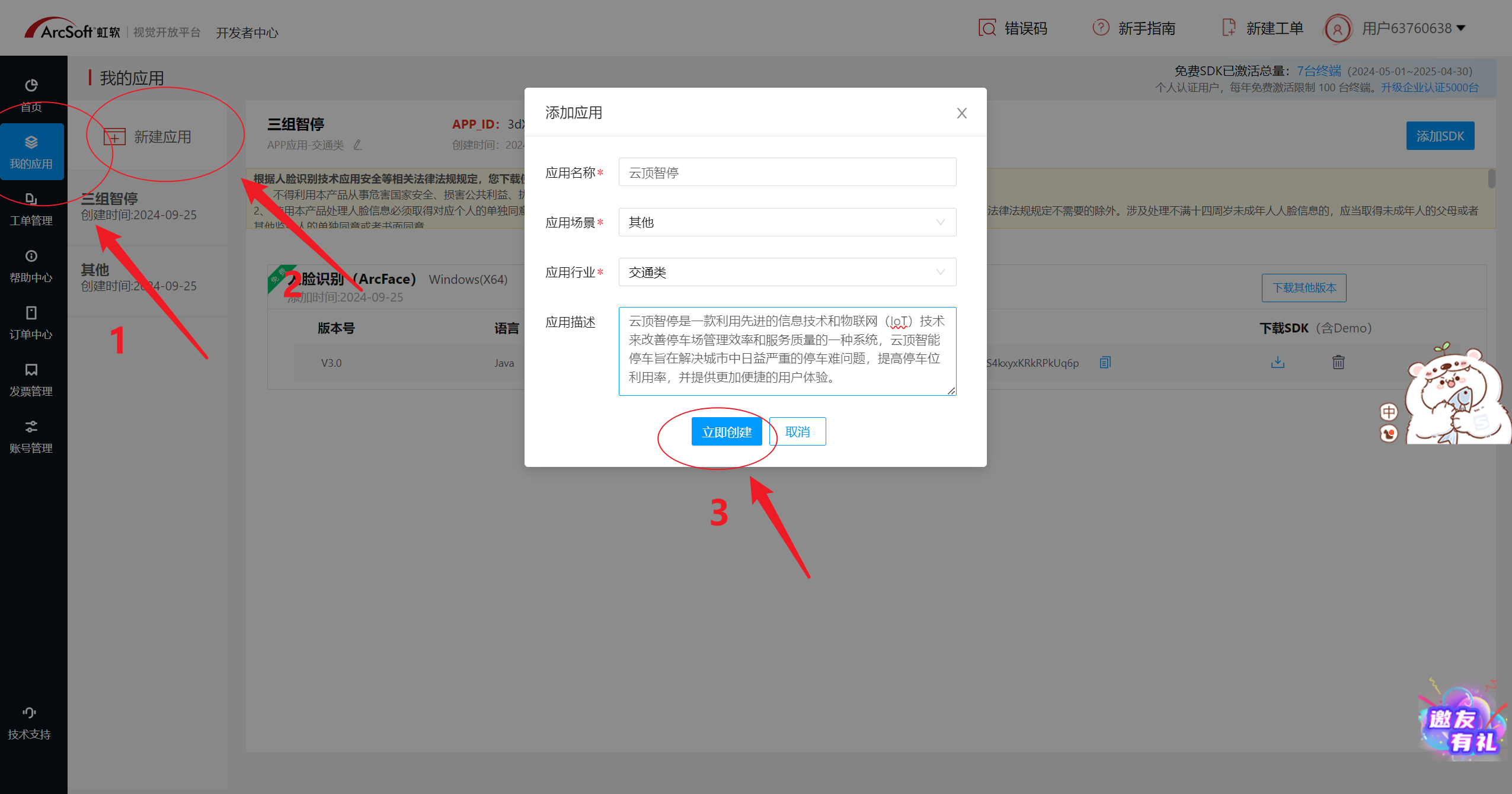
2、登录后进入开发者中心、申请应用、添加SDK
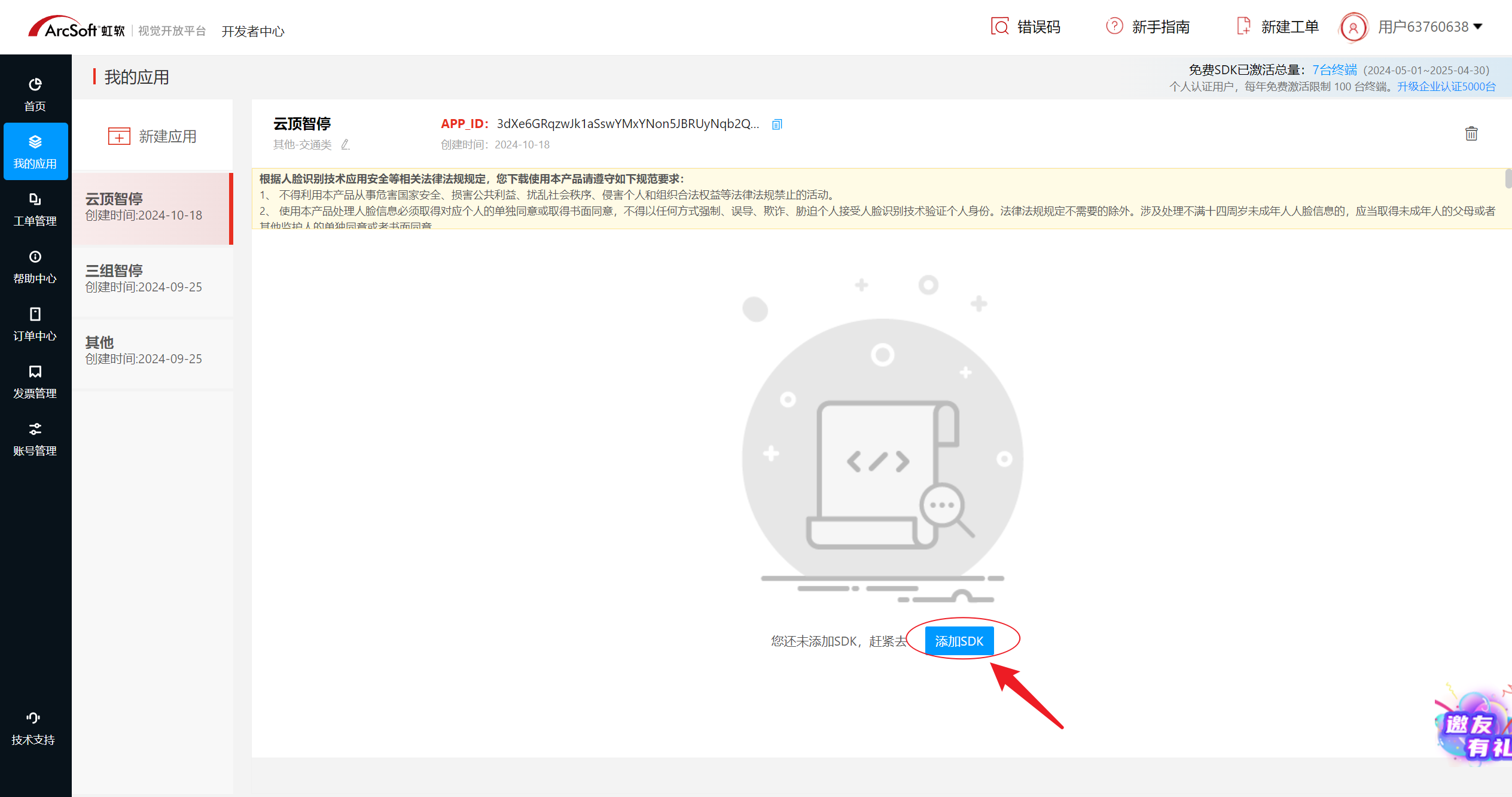
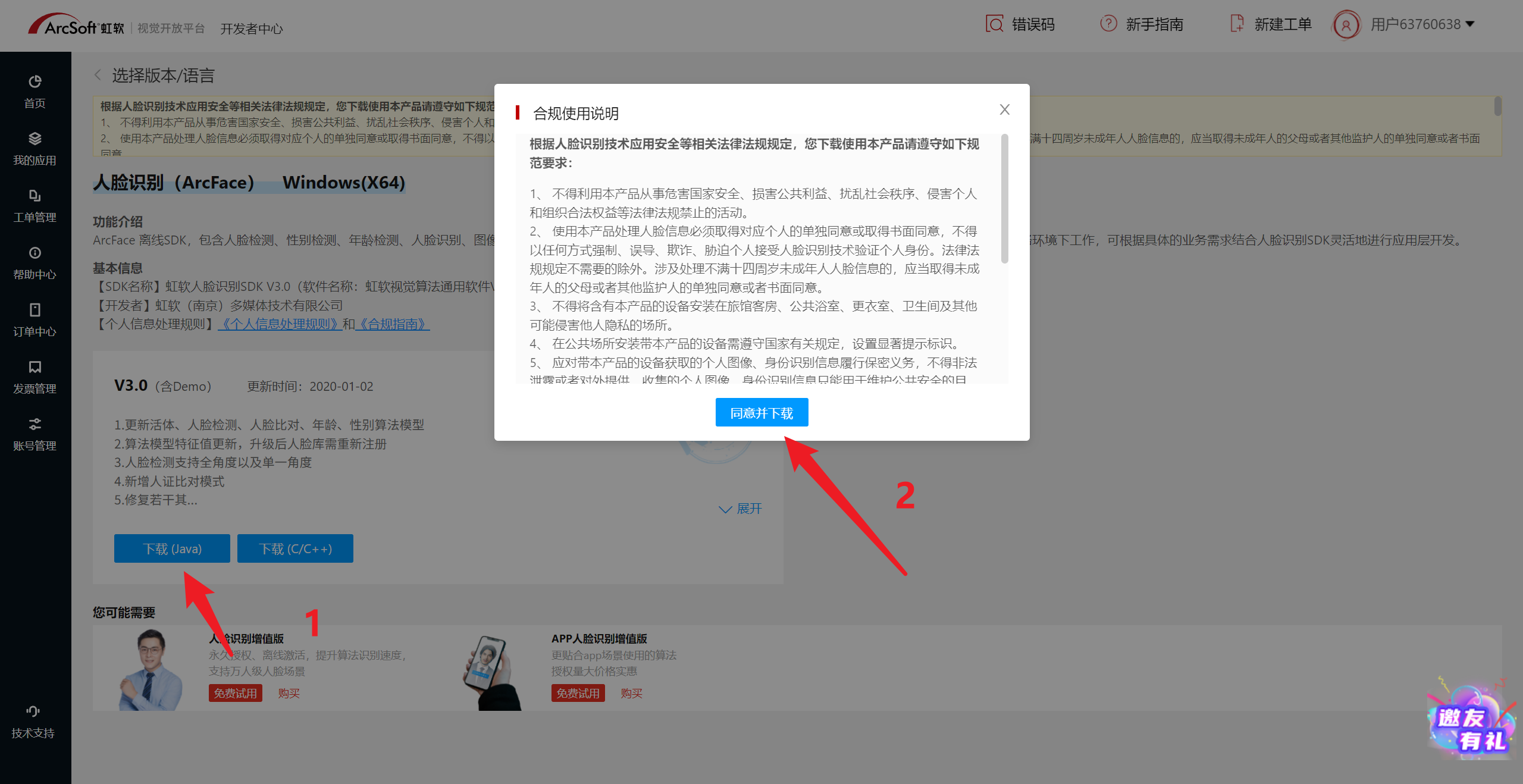
3、申请通过后,在我的应用里可以看到APPID、SDKKEY。以及下载SDK。


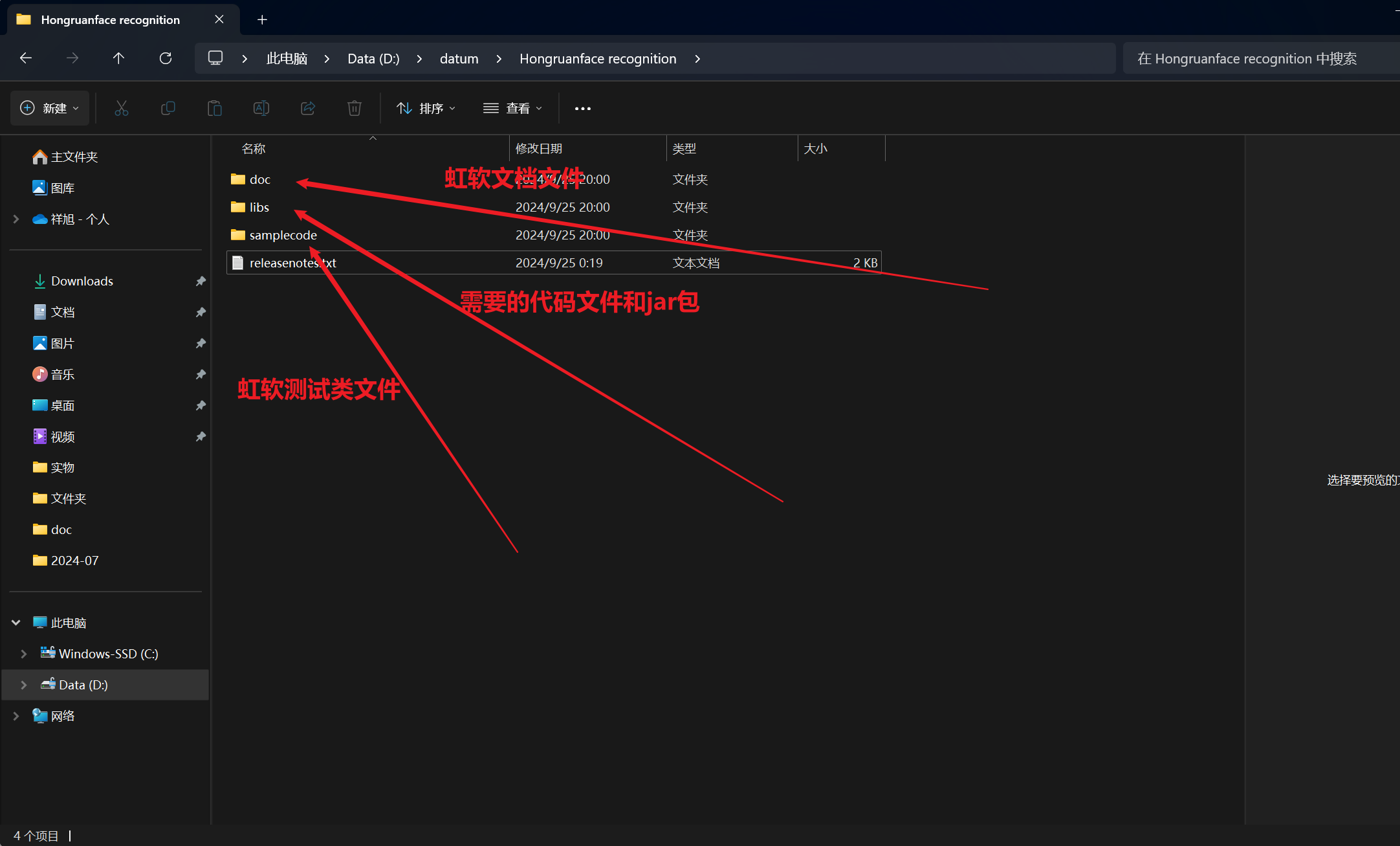
4、下载解压后,文件夹目录如下
5、编写代码
这个配置文件是基于虹软提供的测试类来实现,感觉不够好用或者不够全,可以根据虹软测试类自己重新配置
- 配置类
package com.txx.config.hongRuanFace;

import cn.hutool.core.io.FileUtil;
import cn.hutool.http.HttpUtil;
import com.arcsoft.face.*;
import com.arcsoft.face.enums.*;
import com.arcsoft.face.toolkit.ImageInfo;
import com.stopCar.StopException;
import org.bouncycastle.util.Bytes;
import org.slf4j.Logger;
import org.slf4j.LoggerFactory;
import org.springframework.beans.factory.annotation.Value;
import org.springframework.context.annotation.Bean;
import org.springframework.context.annotation.Configuration;

import javax.annotation.PreDestroy;
import java.io.File;
import java.util.ArrayList;
import java.util.List;

import static com.arcsoft.face.toolkit.ImageFactory.getRGBData;


/**
 * @author txx
 * @version [1.0]
 * @description 虹软人脸识别配置类
 * @date 2024/10/8 15:10
 * @Email 17578999441@163.com
 */
@Configuration
public class FaceConfig {
    private static final Logger logger = LoggerFactory.getLogger(FaceConfig.class);

    @Value("${face-engine.app-id}")
    private String appId;

    @Value("${face-engine.sdk-key}")
    private String sdkKey;

    private FaceEngine faceEngine;

    /**
     * 单例模式初始化FaceEngine bean
     * 确保在应用中只有一个FaceEngine实例,提高资源利用率并避免多次初始化带来的性能开销
     *
     * @return FaceEngine实例 通过单例模式获取FaceEngine的实例,确保全局唯一性
     */
    @Bean
    public FaceEngine faceEngine() {
        // 检查faceEngine是否已经初始化,避免不必要的同步开销
        if (faceEngine == null) {
            // 同步代码块,确保在类的生命周期内,只有一个线程可以初始化faceEngine
            synchronized (this) {
                // 双重检查锁定,再次确认faceEngine是否已经初始化
                if (faceEngine == null) {
                    faceEngine = initFaceEngine();
                }
            }
        }
        // 返回faceEngine的实例
        return faceEngine;
    }


    private FaceEngine initFaceEngine() {
        //指定引擎所在路径
//        String libPath = System.getProperty("user.dir") + File.separator + "stopCar-service\\login-service\\src\\main\\resources\\" + "lib" + File.separator + "WIN64";
        String libPath = "D:\\Java_Project\\P12(1)\\stop-cars\\stopCar-service\\login-service\\src\\main\\resources\\lib\\WIN64";
        FaceEngine engine = new FaceEngine(libPath);
        int errorCode = engine.activeOnline(appId, sdkKey);
        //如果errorCode的状态码不等于0(激活成功),也不等于90114(SDK已激活,无需再次激活),就输出激活失败
        if (errorCode != ErrorInfo.MOK.getValue() && errorCode != ErrorInfo.MERR_ASF_ALREADY_ACTIVATED.getValue()) {
            logger.error("引擎激活失败,错误码:{}", errorCode);
            throw new RuntimeException("Face engine activation failed");
        }

        ActiveFileInfo activeFileInfo = new ActiveFileInfo();
        errorCode = engine.getActiveFileInfo(activeFileInfo);
        if (errorCode != ErrorInfo.MOK.getValue()) {
            logger.error("获取激活文件信息失败,错误码:{}", errorCode);
            throw new RuntimeException("Failed to get active file info");
        }

        /* 引擎配置 */
        EngineConfiguration engineConfiguration = new EngineConfiguration();
        // 设置检测模式为图像检测
        engineConfiguration.setDetectMode(DetectMode.ASF_DETECT_MODE_IMAGE);
        // 设置人脸方向检测优先级为全向检测
        engineConfiguration.setDetectFaceOrientPriority(DetectOrient.ASF_OP_ALL_OUT);
        // 设置最多检测的人脸数量为10个
        engineConfiguration.setDetectFaceMaxNum(10);
        // 设置人脸检测的缩放比例为16
        engineConfiguration.setDetectFaceScaleVal(16);
        /* 功能配置 */
        FunctionConfiguration functionConfiguration = new FunctionConfiguration();
        // 支持年龄检测
        functionConfiguration.setSupportAge(true);
        // 支持3D人脸角度检测
        functionConfiguration.setSupportFace3dAngle(true);
        // 支持人脸检测
        functionConfiguration.setSupportFaceDetect(true);
        // 支持人脸识别
        functionConfiguration.setSupportFaceRecognition(true);
        // 支持性别检测
        functionConfiguration.setSupportGender(true);
        // 支持活体检测
        functionConfiguration.setSupportLiveness(true);
        // 支持红外活体检测
        functionConfiguration.setSupportIRLiveness(true);
        // 将功能配置设置到引擎配置中
        engineConfiguration.setFunctionConfiguration(functionConfiguration);

        errorCode = engine.init(engineConfiguration);
        if (errorCode != ErrorInfo.MOK.getValue()) {
            logger.error("初始化引擎失败,错误码:{}", errorCode);
            throw new RuntimeException("Face engine initialization failed");
        }

        return engine;
    }

    //人脸检测(判断人脸是否存在)
    public boolean faceIsExist(String imageUrl) {
        System.out.println("图片为:"+ imageUrl);
        System.out.println(HttpUtil.get(imageUrl).getBytes());
        ImageInfo imageInfo = getRGBData(HttpUtil.downloadBytes(imageUrl));

        if (imageInfo == null) {
            logger.error("图片加载失败");
            throw new RuntimeException("Image loading failed");
        }
        List<FaceInfo> faceInfoList = new ArrayList<>();
        int errorCode = faceEngine().detectFaces(imageInfo.getImageData(), imageInfo.getWidth(), imageInfo.getHeight(), imageInfo.getImageFormat(), faceInfoList);
        return errorCode == ErrorInfo.MOK.getValue() && !faceInfoList.isEmpty();
    }


    //特征提取(提取照片的人脸特征值)
    public FaceFeature faceFeature(String imageUrl) {
        ImageInfo imageInfo=null;
        //判断路径是本地还是网络路径
        if (imageUrl.startsWith("http")) {
            imageInfo = getRGBData(HttpUtil.downloadBytes(imageUrl));
        } else {
            imageInfo = getRGBData(new File(imageUrl));
        }
        /*ImageInfo imageInfo = getRGBData(HttpUtil.downloadBytes(imageUrl));*/
        List<FaceInfo> faceInfoList = new ArrayList<>();
        int detectCode = faceEngine().detectFaces(imageInfo.getImageData(), imageInfo.getWidth(), imageInfo.getHeight(), imageInfo.getImageFormat(), faceInfoList);
        if (detectCode != ErrorInfo.MOK.getValue() || faceInfoList.isEmpty()) {
            logger.error("人脸检测失败,错误码:{}", detectCode);
            throw new StopException("人脸检测失败");
        }

        FaceFeature faceFeature = new FaceFeature();
        int extractCode = faceEngine().extractFaceFeature(imageInfo.getImageData(), imageInfo.getWidth(), imageInfo.getHeight(), imageInfo.getImageFormat(), faceInfoList.get(0), faceFeature);
        if (extractCode != ErrorInfo.MOK.getValue()) {
            logger.error("特征提取失败,错误码:{}", extractCode);
            throw new RuntimeException("Feature extraction failed");
        }

        return faceFeature;
    }

    //特征比对
    public boolean faceCompare(FaceFeature faceFeature1, FaceFeature faceFeature2) {
        FaceSimilar faceSimilar = new FaceSimilar();
        int compareCode = faceEngine().compareFaceFeature(faceFeature1, faceFeature2, faceSimilar);
        if (compareCode != ErrorInfo.MOK.getValue()) {
            logger.error("人脸比对失败,错误码:{}", compareCode);
            throw new RuntimeException("Face comparison failed");
        }
        logger.info("人脸相似度:{}", faceSimilar.getScore());
        return faceSimilar.getScore() > 0.8;
    }

    @PreDestroy
/**
 * 在Spring容器关闭前调用此方法,进行资源清理
 */
    public void destroy() {
        // 判断面部识别引擎是否初始化过
        if (faceEngine != null) {
            // 反初始化面部识别引擎,释放资源
            faceEngine.unInit();
        }
    }

    public FaceFeature faceFeatureSetBytes(byte[] imageBase) {
        ImageInfo imageInfo = getRGBData(imageBase);
        List<FaceInfo> faceInfoList = new ArrayList<>();
        int detectCode = faceEngine().detectFaces(imageInfo.getImageData(), imageInfo.getWidth(), imageInfo.getHeight(), imageInfo.getImageFormat(), faceInfoList);
        if (detectCode != ErrorInfo.MOK.getValue() || faceInfoList.isEmpty()) {
            logger.error("人脸检测失败,错误码:{}", detectCode);
            throw new RuntimeException("Face detection failed");
        }

        FaceFeature faceFeature = new FaceFeature();
        int extractCode = faceEngine().extractFaceFeature(imageInfo.getImageData(), imageInfo.getWidth(), imageInfo.getHeight(), imageInfo.getImageFormat(), faceInfoList.get(0), faceFeature);
        if (extractCode != ErrorInfo.MOK.getValue()) {
            logger.error("特征提取失败,错误码:{}", extractCode);
            throw new RuntimeException("Feature extraction failed");
        }

        return faceFeature;
    }
}
- yaml配置文件
# 人脸认证引擎配置
face-engine:
    # 应用id
    app-id: 你自己的appid
    # sdk密匙
    sdk-key: 你自己的key
    # 人脸对比阀值(建议0.8)
    face-similar-score: 0.8
    # RGB活体检测阀值(建议0.5)
    rgb-threshold: 0.5
    # IR活体检测阀值(建议0.7)
ir-threshold: 0.7- 实现方法
@Autowired
private FaceConfig faceEngineApi;
//人脸录入
@Override
public String faceEntering(MultipartFile file)  {
if (ObjectUtil.isEmpty(file)){
    throw new StopException("参数不能为空");
}
//将图片上传到oss
InputStream inputStream = null;
try {
    inputStream = file.getInputStream();
} catch (IOException e) {
    throw new RuntimeException(e);
}
String originalFilename = file.getOriginalFilename();
//上传到阿里云之后会返回图片地址
String s1 = aliyunOSSUtils.putObject(inputStream,originalFilename);
//调用人脸识别配置类检查地址中的图片是否存在人脸
boolean b = faceEngineApi.faceIsExist(s1);
if(!b){
    return "没有识别到人脸,请重试";
}
return s1;
}
//人脸比对
@Override
public Boolean detectFace(String imageBase,String username) {
    //根据手机号或邮箱查询用户
    QueryWrapper<User> uqw = new QueryWrapper<>();
    if(isPhone(username)){
        uqw.eq("phone", username);
    }
    if (isEmail(username)){
        uqw.eq("email", username);
    }
    User user = baseMapper.selectOne(uqw);
    //获取用户人脸照片地址
    String faceImg = user.getFaceImg();
    if (ObjectUtil.isEmpty(faceImg)){
        return false;
    }
    //将图片转换为字节数组
    byte[] imageBytes = Base64.getDecoder().decode(imageBase.split(",")[1]);

    // 创建临时文件
    File tempFile = null;
    try {
        tempFile = File.createTempFile("face", ".jpg");
    } catch (IOException e) {
        throw new RuntimeException(e);
    }
    try (FileOutputStream fos = new FileOutputStream(tempFile)) {
        fos.write(imageBytes);
    } catch (IOException e) {
        throw new RuntimeException(e);
    }
    System.out.println("图片:"+imageBase );
    //比较是否是同一个人
    boolean b = faceEngineApi.faceCompare(faceEngineApi.faceFeature(tempFile.getAbsolutePath()), faceEngineApi.faceFeature(faceImg));
    // 删除临时文件
    tempFile.delete();
    return b;
}- Vue前端打开摄像头(带有页面)
<template>
  <div class="verification-container">
    <el-card class="verification-card">
      <h1>实名认证</h1>

      <div class="id-upload">
        <div class="upload-area">
          <div class="upload-item">
            <el-upload
              class="avatar-uploader"
              action="http://localhost:8081/user/uploadImage"
              :show-file-list="false"
              :on-success="handleFrontSuccess"
              :before-upload="beforeAvatarUpload">
              <img v-if="frontImageUrl" :src="frontImageUrl" class="avatar">
                <div v-else class="upload-placeholder">
                  <i class="el-icon-plus"></i>
                  <span>上传身份证正面</span>
                </div>
              </el-upload>
          </div>
          <div class="upload-item">
            <el-upload
              class="avatar-uploader"
              action="http://localhost:8081/user/uploadImage"
              :show-file-list="false"
              :on-success="handleBackSuccess"
              :before-upload="beforeAvatarUpload">
              <img v-if="backImageUrl" :src="backImageUrl" class="avatar">
                <div v-else class="upload-placeholder">
                  <i class="el-icon-plus"></i>
                  <span>上传身份证反面</span>
                </div>
              </el-upload>
          </div>
        </div>
      </div>

      <el-form :model="form" label-width="80px" class="verification-form" :rules="rules" ref="form">
        <el-form-item label="姓名" prop="name">
          <el-input v-model="form.name" placeholder="上传证件自动识别姓名"></el-input>
        </el-form-item>
        <el-form-item label="证件号" prop="idNumber">
          <el-input v-model="form.idNumber" placeholder="上传证件自动识别证件号"></el-input>
        </el-form-item>
        <el-form-item label="地址" prop="address">
          <el-input v-model="form.address" placeholder="上传证件自动识别地址"></el-input>
        </el-form-item>
        <el-form-item label="性别"  prop="sex">
          <el-radio-group v-model="form.sex">
            <el-radio  :label="1">男</el-radio>
            <el-radio  :label="2">女</el-radio>
          </el-radio-group>
        </el-form-item>
        <el-form-item label="生日" prop="birthday">
          <el-date-picker v-model="form.birthday" type="date" placeholder="上传证件自动识别日期"></el-date-picker>
        </el-form-item>
      </el-form>

      <el-button type="primary" @click="openFaceCapture" class="face-capture-btn">录入人脸信息</el-button>

      <el-dialog title="人脸信息录入" v-model="dialogVisible" width="60%" class="face-capture-dialog">
        <div class="camera-container">
          <video ref="video" width="100%" height="auto" autoplay></video>
          <canvas ref="canvas" style="display:none;"></canvas>
          <div class="face-outline"></div>
        </div>
        <div class="capture-instructions">
          <p>请将您的脸部置于框内,并保持不动</p>
          <p>确保光线充足,避免背光</p>
        </div>
        <span  class="dialog-footer">
          <el-button @click="dialogVisible = false">取 消</el-button>
          <el-button type="primary" @click="captureFace">确认录入</el-button>
        </span>
      </el-dialog>
      <el-button @click="submitForm">提交</el-button>
        </el-card>

  </div>
</template>

<script>
import axios from "axios";
// import {ElMessage} from "element-plus";

export default {
  data() {
    return {
      frontImageUrl: '',
      backImageUrl: '',
      form: {
        name: '',
        idNumber: '',
        address: '',
        gender: '',
        birthday: ''
      },
      dialogVisible: false,
      stream: null,
      rules: {
        name: [
          { required: true, message: '请输入姓名', trigger: 'blur' },
          { min: 2, max: 20, message: '姓名长度应在 2 到 20 个字符之间', trigger: 'blur' }
        ],
        idNumber: [
          { required: true, message: '请输入证件号', trigger: 'blur' },
          { pattern: /(^\d{15}$)|(^\d{18}$)|(^\d{17}(\d|X|x)$)/, message: '请输入有效的身份证号', trigger: 'blur' }
        ],
        address: [
          { required: true, message: '请输入地址', trigger: 'blur' },
          { min: 5, max: 100, message: '地址长度应在 5 到 100 个字符之间', trigger: 'blur' }
        ],
        sex: [
          { required: true, message: '请选择性别', trigger: 'change' }
        ],
        birthday: [
          { required: true, message: '请选择出生日期', trigger: 'change' },
          { type: 'date', message: '请输入有效的日期', trigger: 'change' }
        ]
      }
    };
  },
  created() {
    // 检查是否有传入的参数
    if (this.$route.query.formData) {
      try {
        this.form = JSON.parse(this.$route.query.formData);
        console.log('formData:')
        console.log(this.form)
      } catch (e) {
        console.error('Error parsing form data:', e);
      }
    }
  },
  methods: {
    handleFrontSuccess(ress) {

      //识别身份证号
      axios({
        method: "get",
        url: "http://localhost:8081/user/discernIdNumber",
        params:{
          img: ress.data
        },
      }).then(res=>{
        if (res.data.code==200){
          const data =JSON.parse(res.data.data)
          //判断data中是否包含data.back.data
          try {
            if (data.data.face.data) {
              console.log("身份证返回值:")
              console.log(data.data.face.data)
              this.frontImageUrl = ress.data;
              this.form.name=data.data.face.data.name
              this.form.idNumber=data.data.face.data.idNumber
              this.form.address=data.data.face.data.address
              this.form.sex=data.data.face.data.sex=="男"?1:2
              // 正则表达式匹配年、月、日
              const regex = /(\d{4})年(\d{1,2})月(\d{1,2})日/;
              const match = data.data.face.data.birthDate.match(regex);
              if (!match) {
                throw new Error('Invalid date format');
              }
              // 解析年、月、日
              const year = parseInt(match[1], 10);
              const month = parseInt(match[2], 10) - 1; // 月份是从 0 开始的,1 月对应 0
              const day = parseInt(match[3], 10);
              // 创建 Date 对象
              this.form.birthday=new Date(year, month, day);
            }
          } catch (error) {
            // 属性不存在,继续执行
            this.$message.error("请上传身份证正面");
            return;
          }
        }else {
          this.$message.error("识别失败,请重新上传");
          return;
        }
      })
    },
    handleBackSuccess(ress) {
      axios({
        method: "get",
        url: "http://localhost:8081/user/discernIdNumber",
        params:{
          img: ress.data
        },
      }).then(res=>{
        if (res.data.code==200){
          const data =JSON.parse(res.data.data)
          try {
            if(data.data.back.data.validPeriod){
              console.log(data)
              //判断当前有效期是否过期
              console.log(data.data.back.data.validPeriod)
              // 分割字符串获取起始和结束日期
              const [startDateStr, endDateStr] = data.data.back.data.validPeriod.split('-');
              // 格式化日期字符串
              const startDate = new Date(startDateStr.replace('.', '-').replace('.', '-'));
              const endDate = new Date(endDateStr.replace('.', '-').replace('.', '-'));
              //获取当前日期
              const currentDate = new Date();
              console.log(currentDate)
              console.log(startDate)
              console.log(endDate)
              if (currentDate > endDate) {
                this.$message.error("身份证已过期,请更新您的身份证");
              } else if (currentDate < startDate) {
                this.$message.warning("身份证尚未生效");
              } else {
                // 身份证在有效期内
                this.$message.success("上传成功");
                this.backImageUrl = ress.data;
                console.log(this.backImageUrl)
              }
            }
          }catch (error){
            this.$message.error("请上传身份证背面");
            return;
          }
        }else{
          this.$message.error("识别失败,请重新上传");
        }

      })
    },
    beforeAvatarUpload() {
      /*const isJPG = file.type === 'image/jpeg';
      const isLt2M = file.size / 1024 / 1024 < 2;

      if (!isJPG) {
        this.$message.error('上传头像图片只能是 JPG 格式!');
      }
      if (!isLt2M) {
        this.$message.error('上传头像图片大小不能超过 2MB!');
      }
      return isJPG && isLt2M;*/
      return true;
    },
    openFaceCapture() {
      this.dialogVisible = true;
      this.$nextTick(() => {
        navigator.mediaDevices.getUserMedia({ video: true })
            .then(stream => {
              this.stream = stream;
              this.$refs.video.srcObject = stream;
            })
            .catch(err => {
              console.error("摄像头访问失败:", err);
            });
      });
    },
    // 定义 dataURLtoBlob 函数
    dataURLtoBlob(dataURL) {
      console.log("开始转换DataURL到Blob");
      const binary = atob(dataURL);
      const array = [];
      for (let i = 0; i < binary.length; i++) {
        array.push(binary.charCodeAt(i));
      }
      console.log("Blob创建完成");
      return new Blob([new Uint8Array(array)], {type: 'image/jpeg'});
    },
    captureFace() {
      console.log("开始捕获人脸");
      const canvas = this.$refs.canvas;
      const video = this.$refs.video;

      if (!canvas || !video) {
        console.error('Canvas or video element not found');
        this.$message.error('无法捕获图像,请检查设备');
        return;
      }

      console.log("Canvas和Video元素已找到");
      canvas.width = video.videoWidth;
      canvas.height = video.videoHeight;
      canvas.getContext('2d').drawImage(video, 0, 0, canvas.width, canvas.height);

      console.log("图像已绘制到Canvas上");
      let dataURL;
      try {
        dataURL = canvas.toDataURL('image/jpeg');
        console.log("DataURL生成成功:", dataURL.substring(0, 50) + "...");
      } catch (error) {
        console.error('Error generating dataURL:', error);
        this.$message.error('生成图像数据失败,请重试');
        return;
      }

      const parts = dataURL.split(',');
      if (parts.length < 2) {
        console.error('Invalid data URL format');
        this.$message.error('图像数据格式无效,请重试');
        return;
      }

      const fileData = parts[1];
      console.log("文件数据提取成功");

      let fileBlob;
      try {
        fileBlob = this.dataURLtoBlob(fileData);
        console.log("Blob对象创建成功");
      } catch (error) {
        console.error('Error creating Blob:', error);
        this.$message.error('创建图像文件失败,请重试');
        return;
      }

      const formData = new FormData();
      formData.append('file', fileBlob, 'image.jpg');

      console.log("准备发送请求到服务器");
      axios({
        method: "post",
        url: "http://localhost:8081/user/faceEntering",
        data: formData,
        headers: {
          'Content-Type': 'multipart/form-data'
        }
      }).then(res => {
        console.log("服务器响应:", res);
        if (res.data.code === 200) {
          this.$message.success("人脸录入成功");
          this.form.faceImg = res.data.data;
        } else {
          this.$message.error(res.data.data || '人脸录入失败');
        }
      }).catch(error => {
        console.error('Error sending image to server:', error);
        this.$message.error('发送图像到服务器失败,请重试');
      }).finally(() => {
        this.dialogVisible = false;
        if (this.stream) {
          this.stream.getTracks().forEach(track => track.stop());
        }
        console.log("捕获过程结束");
      });
    },
    submitForm(){
      // 在这里添加提交表单的逻辑
      if (!this.frontImageUrl || !this.backImageUrl) {
        this.$message.error('请上传身份证正反面照片');
        return;
      }
      if (!this.form.faceImg){
        this.$message.error('请先录入人脸信息');
        return;
      }
      if (!this.form.name){
        this.$message.error('请输入姓名');
        return;
      }
      if (!this.form.idNumber){
        this.$message.error('请输入身份证号');
        return;
      }
      if(!this.form.address){
        this.$message.error('请输入地址');
        return;
      }
      if(!this.form.sex){
        this.$message.error('请选择性别');
        return;
      }
      if (!this.form.birthday){
        this.$message.error('请输入出生日期');
        return;
      }
      this.form.idCardFontImg=this.frontImageUrl;
      this.form.idCardBackImg=this.backImageUrl;
      //携带参数到login页面
      this.$router.push({
        path: '/',
        query: {
          tab: 'second',
          formData: JSON.stringify(this.form)
        }
      });
    },
  }
}
</script>

<style scoped>
.verification-container {
  display: flex;
  justify-content: center;
  align-items: center;
  min-height: 100vh;
  /*
  background: linear-gradient(135deg, #43cea2 0%, #185a9d 100%);
  */
  padding: 20px;

  background-image: url(https://www.rolls-roycemotorcars.com.cn/content/dam/rollsroyce-website/black-badge-ghost-2021/page-components/home_kv.jpg);
  background-size: cover;
  background-position: center;
  background-repeat: no-repeat;
  min-height: 100vh;
  position: relative;
  /*  background-color: rgba(0, 0, 0, 0.5);
  background-blend-mode: multiply;*/
}
/*body {
  background-image: url('https://images-porsche.imgix.net/-/media/221CEF1CBAE547758D86C68AB019A076_45E63369E01D40ABB12254BC07EC11F2_16-9_porsche_finder?iar=0&w=1759&ar=16%3A9&q=85&auto=format');
  background-size: cover;
  background-position: center;
  background-repeat: no-repeat;
  min-height: 100vh;
  position: relative;
}*/

/*.verification-container::before {
  content: '';
  position: absolute;
  top: 0;
  left: 0;
  right: 0;
  bottom: 0;
  background-color: rgba(0, 0, 0, 0.5); !* 调整这里的透明度来改变阴影深浅 *!
  z-index: -1;
}*/

.verification-card {
  width: 100%;
  max-width: 700px;
  background: rgba(255, 255, 255, 0.1);
  border-radius: 20px;
  padding: 40px;
  box-shadow: 0 15px 30px rgba(0,0,0,0.1);
}

h1 {
  text-align: center;
  color: #185a9d;
  margin-bottom: 40px;
  font-size: 32px;
  font-weight: 600;
}

.id-upload {
  margin-bottom: 40px;
}

.upload-area {
  display: flex;
  justify-content: space-between;
}

.upload-item {
  width: 48%;
}

.avatar-uploader {
  border: 2px dashed #43cea2;
  border-radius: 10px;
  cursor: pointer;
  position: relative;
  overflow: hidden;
  height: 180px;
  display: flex;
  justify-content: center;
  align-items: center;
  background-color: #f8f8f8;
  transition: all 0.3s ease;
}

.avatar-uploader:hover {
  border-color: #185a9d;
  background-color: #f0f0f0;
}

.upload-placeholder {
  display: flex;
  flex-direction: column;
  align-items: center;
  color: #43cea2;
}

.upload-placeholder i {
  font-size: 40px;
  margin-bottom: 10px;
}

.avatar {
  width: 100%;
  height: 100%;
  object-fit: cover;
}

.verification-form {
  margin-top: 30px;
}

.el-form-item {
  margin-bottom: 25px;
}

.face-capture-btn {
  width: 100%;
  margin-top: 30px;
  background: linear-gradient(to right, #43cea2 0%, #185a9d 100%);
  border: none;
  font-size: 18px;
  height: 50px;
  transition: all 0.3s ease;
}

.face-capture-btn:hover {
  transform: translateY(-3px);
  box-shadow: 0 7px 14px rgba(50, 50, 93, .1), 0 3px 6px rgba(0, 0, 0, .08);
}

.face-capture-dialog .el-dialog__body {
  padding: 0;
}

.camera-container {
  width: 100%;
  height: 450px;
  overflow: hidden;
  background-color: #000;
  display: flex;
  justify-content: center;
  align-items: center;
  position: relative;
}

.face-outline {
  position: absolute;
  top: 50%;
  left: 50%;
  transform: translate(-50%, -50%);
  width: 300px;
  height: 300px;
  border: 3px solid #43cea2;
  border-radius: 50%;
  box-shadow: 0 0 0 9999px rgba(0, 0, 0, 0.5);
}

.camera-container video {
  min-width: 100%;
  min-height: 100%;
}

.capture-instructions {
  padding: 20px;
  text-align: center;
  background-color: #f8f8f8;
}

.capture-instructions p {
  margin: 10px 0;
  color: #185a9d;
  font-size: 16px;
}

.el-dialog__title {
  color: #185a9d;
  font-weight: 600;
}

.el-button--primary {
  background-color: #43cea2;
  border-color: #43cea2;
}

.el-button--primary:hover, .el-button--primary:focus {
  background-color: #185a9d;
  border-color: #185a9d;
}
.verification-card {
  background: rgba(255, 255, 255, 0.8); /* 增加卡片背景透明度 */
  /* 其他属性保持不变 */
}

.verification-form {
  margin-top: 30px;
}

.el-form-item {
  margin-bottom: 25px;
}


</style>
更多推荐



 6
6 0
0- 0


 已为社区贡献1条内容

所有评论(0)