
RTX5060学习《动手学深度学习问题解决》
RTX 5060显卡兼容问题导致PyTorch安装失败。该显卡采用CUDA 13.0(计算能力sm_120),而PyTorch 1.12.0不支持此架构。解决方法是:1)创建Python 3.10+环境;2)使用指定命令安装支持CUDA 13.0的PyTorch版本;3)安装d2l包。最终成功运行,不再报错。
最近刚换了新电脑,也是装上了才出不久的英伟达最新显卡RTX5060,本来高高兴兴想打开《动手学深度学习》官网,按照原有的步骤安装好torch、torchvision、d2l包却发现报错
官网安装步骤:
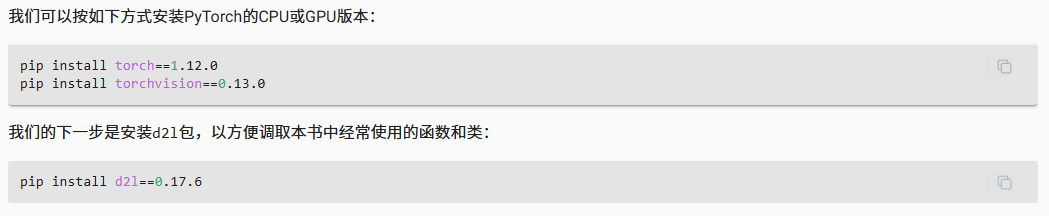
训练模型出现的错误:
D:\Anaconda\envs\d2l\lib\site-packages\torch\cuda\__init__.py:146: UserWarning: NVIDIA GeForce RTX 5060 with CUDA capability sm_120 is not compatible with the current PyTorch installation. The current PyTorch install supports CUDA capabilities sm_37 sm_50 sm_60 sm_61 sm_70 sm_75 sm_80 sm_86 compute_37. If you want to use the NVIDIA GeForce RTX 5060 GPU with PyTorch, please check the instructions at https://pytorch.org/get-started/locally/ warnings.warn(incompatible_device_warn.format(device_name, capability, " ".join(arch_list), device_name))
发现是我的 RTX 5060 GPU(cuda版本13.0)(计算能力 sm_120)与当前安装的 PyTorch 版本不兼容。PyTorch 1.12.0 不支持 sm_120 架构。
所以要去官网下载支持cuda13.0的pytorch版本
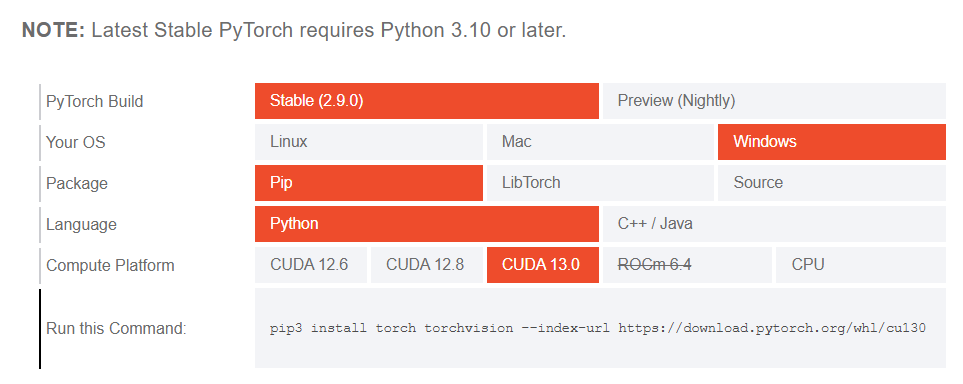
我们要下载的pytorch版本要求python版本是3.10以上,因此我们也不能按照官网上创建一个python为3.9的环境,选择3.10、3.11、3.12均可
创建好环境之后激活环境,再使用官网上提供的安装命令
pip3 install torch torchvision --index-url https://download.pytorch.org/whl/cu130
最后再安装d2l包,就可以成功训练,没有报错啦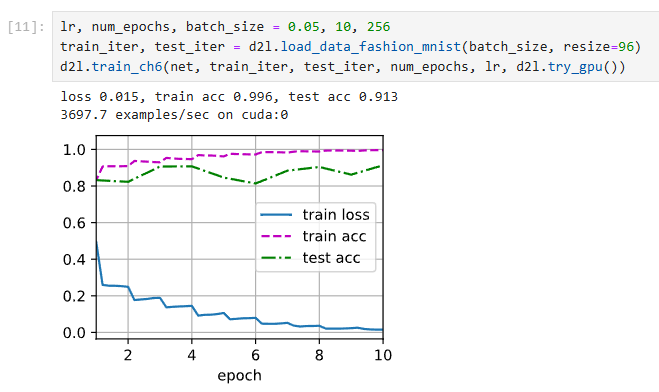
更多推荐
 5
5 0
0- 0


 已为社区贡献1条内容

所有评论(0)