
SGLang:基于AMD GPU的大型语言模型和视觉语言模型的快速服务框架
SGLang是一个综合框架,专为大规模语言模型和视觉-语言模型的高效服务而开发。该框架通过优化的后端运行时和用户友好的前端语言,增强了用户对模型的控制和交互速度(参见SGLang 原始论文和LMSYS SGLang 博客文章在这篇博文中,我们向您介绍了 SGLang 及其功能,并展示了如何使用 ROCm 在 AMD GPU 上设置 SGLang。我们演示了如何使用 SGLang 通过量化模型优化推

在人工智能快速发展的时代,高效部署大型语言模型(LLMs)和视觉语言模型(VLMs)对于实时应用至关重要。SGLang 是一个开源框架,旨在通过提供快速的后端运行时、灵活的前端语言,以及对各种LLMs和VLMs的广泛模型支持,来满足这些需求。
这篇博客将深入探讨SGLang的核心功能,突出其性能优化的后端,并展示其灵活的服务能力,为您提供工具,最大限度地发挥生成式AI模型在应用中的潜力,使用ROCm在AMD GPU上运行。
在这篇博客中,您将学习到以下内容:我们将首先介绍SGLang,突出其使用案例、关键特性和优势。然后,我们将展示如何使用ROCm在AMD GPU上设置和部署SGLang。接下来,您将了解SGLang如何通过量化模型帮助您优化推理速度和效率,以及如何在多模态模型(如LLaVA NeXT)中使用SGLang。最后,我们将介绍SGLang的前端语言、其对JSON解码的支持、张量并行(TP)、数据并行(DP)和各种量化选项。
什么是 SGLang?
SGLang 是一个综合框架,专为大规模语言模型和视觉-语言模型的高效服务而开发。该框架通过优化的后端运行时和用户友好的前端语言,增强了用户对模型的控制和交互速度(参见 SGLang 原始论文 和 LMSYS SGLang 博客文章)。
为什么选择 SGLang?
随着生成型 AI 模型的复杂性和规模日益增加,高效地服务这些模型成为一个重大的挑战,特别是对于低延迟和高吞吐量的需求。SGLang 通过提供一个高度优化的运行时解决了这些挑战,该运行时利用 GPU 的能力,使得可以有效部署最先进的语言模型和视觉-语言模型。SGLang 旨在简化部署过程并降低运营成本。
使用案例
SGLang 适用于广泛的应用,包括:
-
交互式 AI 助手: 利用快速响应时间实现实时互动。
-
多模态应用: 无缝整合视觉和语言功能,支持视频字幕、互动故事等应用。
-
生成式 AI 的可扩展后端: 在云端部署多模态 AI 模型,实现高吞吐量和大规模用户支持。
SGLang的关键特性
快速后端运行时
-
前缀缓存的RadixAttention:
RadixAttention通过将键值(KV)缓存存储在基数树数据结构中来组织和自动化在运行时重用键值缓存。它在每次生成请求后保留和管理KV缓存,允许具有共享前缀的不同提示重用KV缓存。基数树实现了高效的前缀搜索、插入和删除。这种方法减少了冗余的内存使用和计算时间,在无需手动配置的情况下提高了性能。此外,RadixAttention通过实施最少最近使用(LRU)删除策略和一个缓存感知的调度策略来管理GPU内存限制,并提高缓存命中率。
-
跳跃前进约束解码以提高效率:
跳跃前进约束解码可以让模型在生成期间跳过不必要的计算。
-
连续批处理以优化GPU利用率:
连续批处理动态调整批量大小以优化GPU利用率。
-
优化:
-
分页注意力: 通过将注意力矩阵划分为可管理的块或页面来减少内存使用,使模型能够在不超过内存限制的情况下有效处理较长的序列。
-
张量并行: 通过沿特定维度分割张量在多个GPU上分配神经网络层的计算,允许并行处理超过单个GPU内存容量的大模型。
-
FlashInfer内核: 为快速推理而设计的高度优化的GPU内核。它们利用低级硬件优化来加速常见的神经网络操作,显著减少延迟并提高吞吐量。
-
量化: 通过降低模型参数和计算的精度(例如,使用8位整数代替32位浮点),减少模型大小和计算负载,并对精度影响最小。SGLang支持多种量化方法,包括激活感知权重量化(AWQ)和生成预训练变压器量化(GPTQ),并使用INT4和FP8等数据类型。这些量化方法和数据类型可以混合和匹配,以优化模型性能和效率。
-
注意: FlashInfer对ROCm(AMD GPU)的支持目前正在开发中.
灵活的前端语言
-
直观界面: 提供直观的界面,用于编程大型语言模型(LLMs),支持高级提示、控制流、多模态输入和并行处理。
-
复杂交互: 支持与LLMs的复杂交互,包括串联生成调用、与外部工具集成和控制流管理。
广泛的模型支持
-
支持的模型: 支持主要的生成模型,如Llama、Mistral、Grok、LLaVA和QWen,以及嵌入模型如e5-mistral。
-
可扩展性: 可以轻松扩展以支持新模型。
有关详细信息,请参见 SGLang 博客文章。
在 AMD GPU 上设置 Docker
要在 AMD GPU 上运行 SGLang,您将需要:
加速器SGLang安装指南.
ROCm Docker 镜像的通用构建步骤
要构建支持 ROCm 的自定义 Docker 镜像,请按照以下步骤操作:
-
克隆 SGLang 仓库:
git clone https://github.com/sgl-project/sglang.git
-
构建 Docker 镜像:
导航到克隆仓库中的
docker目录并运行:cd sglang/docker docker build -t sglang-rocm:latest -f Dockerfile.rocm .
-
启动 Docker 容器:
使用以下命令启动容器:
docker run -it --ipc=host --cap-add=SYS_PTRACE --network=host \
--device=/dev/kfd --device=/dev/dri --security-opt seccomp=unconfined \
--group-add video --privileged -w /workspace sglang-rocm:latest
有关预构建选项和更多详细信息,请参阅 官方 SGLang 文档。
SGLang 快速入门
为了帮助您快速上手 SGLang,我们将使用 Meta-Llama-3.1-8B-Instruct 模型作为示例。该模型是 Meta 开发的一个强大的语言模型,非常适合各种语言生成任务。通过以下步骤,您可以快速设置 SGLang 并在本地机器上开始与 Llama 模型进行交互。
要运行 Meta-Llama-3.1-8B-Instruct,您需要:
-
Hugging Face 访问令牌:本教程需要您拥有一个 Hugging Face 帐户,并生成一个 用户访问令牌。
-
访问 Hugging Face 上的
Llama-3.1模型:这些是 Hugging Face 上的 受限模型。要请求访问权限,请参见 meta-llama/Llama-3.1-8B-Instruct。
快速入门指南
-
登录 Hugging Face:
获取模型访问权限后,使用 CLI 登录 Hugging Face:
huggingface-cli login
-
启动 SGLang 服务器:
使用简单的命令启动 SGLang 服务器,在本地机器上托管一个语言模型:
python -m sglang.launch_server \
  --model-path meta-llama/Llama-3.1-8B-Instruct \
  --port 30000
-
生成文本:
服务器启动后,打开另一个终端并发送请求生成文本:
curl http://localhost:30000/generate \
  -H "Content-Type: application/json" \
  -d '{
    "text": "Once upon a time,",
    "sampling_params": {
      "max_new_tokens": 16,
      "temperature": 0
    }
  }'
示例输出:
{
  "text": " in a small village nestled in the rolling hills of the countryside, there lived a",
  "meta_info": {
    "prompt_tokens": 6,
    "completion_tokens": 16,
    "completion_tokens_wo_jump_forward": 16,
    "cached_tokens": 5,
    "finish_reason": {
      "type": "length",
      "length": 16
    },
    "id": "ab5db50b58734d5884b57b3e52a52302"
  }
}
使用量化模型
为了提升性能并利用 AMD 的最新技术,您可以使用 AMD Quark 提供的以下优化模型:
这些模型通过使用 AMD 的 Quark 工具从原始模型量化而来,从而提高了推理速度和效率。通过使用这些模型的 FP8-KV 量化,您可以在保持高精度的同时实现更好的性能。
使用 AMD 优化模型的示例:
python -m sglang.launch_server \
  --model-path amd/Meta-Llama-3.1-405B-Instruct-FP8-KV \
  --tp 8 \
  --quant fp8 \
  --port 30000
此命令使用 Meta-Llama-3.1-405B-Instruct-FP8-KV 模型启动 SGLang 服务器,启用在 8 个 GPU 上的张量并行(`--tp 8`)并应用 FP8 量化(`--quant fp8`)。此配置非常适合展示 AMD MI300X GPU 的性能优势,这些 GPU 被设计用于高效处理大规模模型。
注意:`--tp 8` 标志指定模型将通过张量并行在 8 个 GPU 上拆分。`--quant fp8` 标志启用 FP8 权重量化,从而减少内存使用和计算负载。
使用 LLaVA NeXT 模型进行服务
SGLang 支持提供类似 LLaVA NeXT 的多模态模型,该模型结合了视觉和语言的能力。以下是如何使用 SGLang 设置并运行 LLaVA NeXT 8B 模型:
-
启动 LLaVA NeXT 模型的 SGLang 服务器:
python -m sglang.launch_server \
  --model-path lmms-lab/llama3-llava-next-8b \
  --port 30000 \
  --tp-size 1 \
  --chat-template llava_llama_3
该命令在端口
30000上启动服务器,使用指定的模型路径和适用于 LLaVA NeXT 的聊天模板。 -
使用 API 请求与模型交互:
您可以使用
curl向服务器发送请求:curl http://localhost:30000/v1/chat/completions \ -H "Content-Type: application/json" \ -d '{ "model": "default", "messages": [ { "role": "user", "content": [ { "type": "image_url", "image_url": { "url": "https://www.ilankelman.org/stopsigns/australia.jpg" } }, { "type": "text", "text": "What is the content of the image?" } ] } ], "temperature": 0 }'请注意,由于这是本地测试,`Authorization` 头被省略。如果您的设置需要身份验证,您可以包含带有 API 密钥的
Authorization头。此请求要求模型分析提供的图像 URL,并回答问题“图像的内容是什么?”
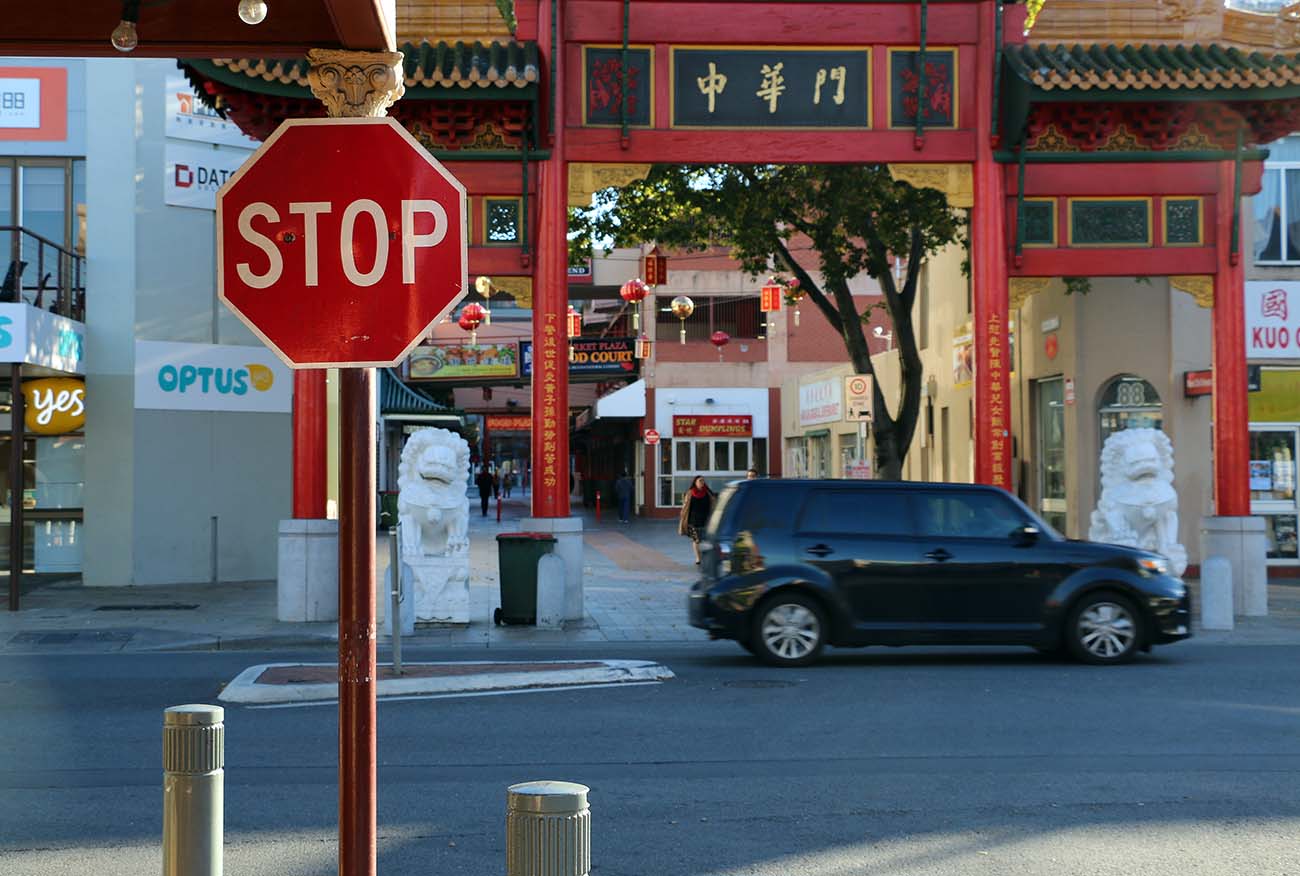
示例输出:
USER: What is the content of the image?
ASSISTANT: The image shows a stop sign at an intersection, with a black car driving past it. The stop sign is located on a street corner, and there are buildings and shops in the background. The architecture suggests an urban setting.
此例子展示了 SGLang 如何提供多模态模型,让您能够构建理解和解析文本与图像的应用程序。
前端:结构化生成语言 (SGLang)
SGLang 的前端语言可以与本地模型和API模型一起使用。它作为OpenAI API的替代方案,提供了一个直观的界面以进行复杂的提示工作流。
语言特性
首先,导入 sglang:
import sglang as sgl
SGLang 提供了简单的原语(如 gen、`select`、`fork` 和 image)。您可以在一个用 @sgl.function 装饰的函数中实现您的提示流。然后您可以使用 run 或 run_batch 调用该函数。系统将为您管理状态、聊天模板、并行性和批处理。
多模态性
使用 sgl.image 传递图像作为输入:
@sgl.function
def image_qa(s, image_file, question):
    s += sgl.user(sgl.image(image_file) + question)
    s += sgl.assistant(sgl.gen("answer", max_tokens=256))
有关完整示例,请参见 sglang 目录下 src 文件夹中的 local_example_llava_next.py。使用的图像位于同一目录中的 images 文件夹内。
运行多模态示例
首先,克隆这个博客仓库并导航到sglang目录:
git clone https://github.com/ROCm/rocm-blogs.git
cd rocm-blogs/blogs/artificial-intelligence/sglang
然后,通过执行以下命令运行多模态示例:
python3 src/local_example_llava_next.py
代码:
import sglang as sgl
from sglang.lang.chat_template import get_chat_template

@sgl.function
def image_qa(s, image_path, question):
    s += sgl.user(sgl.image(image_path) + question)
    s += sgl.assistant(sgl.gen("answer"))

def single():
    state = image_qa.run(
        image_path="images/cat.jpeg", question="What is this?", max_new_tokens=128
    )
    print(state["answer"], "\n")

def stream():
    state = image_qa.run(
        image_path="images/cat.jpeg",
        question="What is this?",
        max_new_tokens=64,
        stream=True,
    )

    for out in state.text_iter("answer"):
        print(out, end="", flush=True)
    print()

def batch():
    states = image_qa.run_batch(
        [
            {"image_path": "images/cat.jpeg", "question": "What is this?"},
            {"image_path": "images/dog.jpeg", "question": "What is this?"},
        ],
        max_new_tokens=128,
    )
    for s in states:
        print(s["answer"], "\n")

if __name__ == "__main__":
    import multiprocessing as mp

    mp.set_start_method("spawn", force=True)

    runtime = sgl.Runtime(model_path="lmms-lab/llama3-llava-next-8b")
    runtime.endpoint.chat_template = get_chat_template("llama-3-instruct-llava")

    # 或者你可以使用72B模型
    # runtime = sgl.Runtime(model_path="lmms-lab/llava-next-72b", tp_size=8)
    # runtime.endpoint.chat_template = get_chat_template("chatml-llava")

    sgl.set_default_backend(runtime)
    print(f"chat template: {runtime.endpoint.chat_template.name}")

    # 运行单个请求
    print("\n========== single ==========\n")
    single()

    # 流式输出
    print("\n========== stream ==========\n")
    stream()

    # 运行批处理请求
    print("\n========== batch ==========\n")
    batch()

    runtime.shutdown()
解释:
-
函数
image_qa:-
被
@sgl.function修饰,定义了图像问答的提示流程。 -
使用
sgl.image(image_path)将图像包含在提示中。 -
使用
sgl.gen("answer")生成答案。
-
-
函数
single,stream, 和batch:-
single(): 运行单个请求并打印答案。 -
stream(): 在输出生成时流式地打印。 -
batch(): 运行一批请求并打印答案。
-
示例输出:
chat template: llama-3-instruct-llava

========== single ==========

This is a cartoon-style or digitally rendered image of a cat wearing sunglasses and a pink jacket with the hood up, set against a pink background. The design appears to be playful and eccentric, using bright colors and human-like accessories on the cat to create a whimsical character.

========== stream ==========

This is an image of an anthropomorphized cat character designed to look like a young person wearing a vibrant pink hoodie with the hood on and cool shades on its eyes. The cat has human-like facial features, but its body retains characteristics typical of a feline. The image has a playful and imaginative aesthetic,

========== batch ==========

This is an image of an anthropomorphized cat character. It's been given human-like features such as clothing (a pink hoodie) and accessories (sunglasses). The cat has a cute and somewhat whimsical style, with the hoodie and sunglasses giving it a playful, almost rebellious look as if it is embracing a human cool style. It's a creative representation not seen in real life for entertainment or artistic purposes.

This is a stylized image showing a dog dressed up as a person, wearing a hoodie and sunglasses. The dog appears to be creatively photoshopped or digitally created to mimic the pose and clothing style of a human. The image is likely meant to be humorous or artistic, depicting the dog as if it were a person enjoying the outfit.
JSON Decoding
SGLang 允许您使用正则表达式指定 JSON 模式,从而能精确控制生成的 JSON 数据的格式。这在需要模型生成符合特定结构的输出时特别有用。
示例:
character_regex = (
    r"""{\n"""
    + r"""    "name": "[\w\d\s]{1,16}",\n"""
    + r"""    "house": "(Gryffindor|Slytherin|Ravenclaw|Hufflepuff)",\n"""
    + r"""    "blood status": "(Pure-blood|Half-blood|Muggle-born)",\n"""
    + r"""    "occupation": "(student|teacher|auror|ministry of magic|death eater|order of the phoenix)",\n"""
    + r"""    "wand": {\n"""
    + r"""        "wood": "[\w\d\s]{1,16}",\n"""
    + r"""        "core": "[\w\d\s]{1,16}",\n"""
    + r"""        "length": [0-9]{1,2}\.[0-9]{0,2}\n"""
    + r"""    },\n"""
    + r"""    "alive": "(Alive|Deceased)",\n"""
    + r"""    "patronus": "[\w\d\s]{1,16}",\n"""
    + r"""    "bogart": "[\w\d\s]{1,16}"\n"""
    + r"""}"""
)
在此示例中,`character_regex` 定义了一个 Harry Potter 世界中的角色的 JSON 模式,使用正则表达式指定预期字段和可接受的值。
函数定义:
@sgl.function
def character_gen(s, name):
    s += (
        name
        + " is a character in Harry Potter. Please fill in the following information about this character.\n"
    )
    s += "The constrained regex is:\n"
    s += character_regex + "\n"
    s += "The JSON output is:\n"
    s += sgl.gen("json_output", max_tokens=256, regex=character_regex)
此函数提示模型生成一个与给定角色名称匹配的指定模式的 JSON 对象。
完整示例 (json_decode.py):
代码位于 sglang 目录下的 src 文件夹中。
"""
Usage:
python -m sglang.launch_server --model-path meta-llama/Llama-2-7b-chat-hf --port 30000
python src/json_decode.py
"""

from enum import Enum
from pydantic import BaseModel
import sglang as sgl
from sglang.srt.constrained import build_regex_from_object

character_regex = (
    r"""{\n"""
    + r"""    "name": "[\w\d\s]{1,16}",\n"""
    + r"""    "house": "(Gryffindor|Slytherin|Ravenclaw|Hufflepuff)",\n"""
    + r"""    "blood status": "(Pure-blood|Half-blood|Muggle-born)",\n"""
    + r"""    "occupation": "(student|teacher|auror|ministry of magic|death eater|order of the phoenix)",\n"""
    + r"""    "wand": {\n"""
    + r"""        "wood": "[\w\d\s]{1,16}",\n"""
    + r"""        "core": "[\w\d\s]{1,16}",\n"""
    + r"""        "length": [0-9]{1,2}\.[0-9]{0,2}\n"""
    + r"""    },\n"""
    + r"""    "alive": "(Alive|Deceased)",\n"""
    + r"""    "patronus": "[\w\d\s]{1,16}",\n"""
    + r"""    "bogart": "[\w\d\s]{1,16}"\n"""
    + r"""}"""
)

@sgl.function
def character_gen(s, name):
    s += (
        name
        + " is a character in Harry Potter. Please fill in the following information about this character.\n"
    )
    s += "The constrained regex is:\n"
    s += character_regex + "\n"
    s += "The JSON output is:\n"
    s += sgl.gen("json_output", max_tokens=256, regex=character_regex)

def driver_character_gen():
    state = character_gen.run(name="Hermione Granger")
    print(state.text())

class Weapon(str, Enum):
    sword = "sword"
    axe = "axe"
    mace = "mace"
    spear = "spear"
    bow = "bow"
    crossbow = "crossbow"

class Wizard(BaseModel):
    name: str
    age: int
    weapon: Weapon

@sgl.function
def pydantic_wizard_gen(s):
    s += "Give me a description about a wizard in the JSON format.\n"
    s += sgl.gen(
        "character",
        max_tokens=128,
        temperature=0,
        regex=build_regex_from_object(Wizard),  # Requires pydantic >= 2.0
    )

def driver_pydantic_wizard_gen():
    state = pydantic_wizard_gen.run()
    print(state.text())

if __name__ == "__main__":
    sgl.set_default_backend(sgl.RuntimeEndpoint("http://localhost:30000"))
    driver_character_gen()
    # Uncomment the following line to run the Pydantic example
    # driver_pydantic_wizard_gen()
用法:
运行 json_decode.py 脚本:
python src/json_decode.py
示例输出:
Hermione Granger 是 Harry Potter 中的一个角色。请填写关于这个角色的以下信息。
受约束的正则表达式为:
{
    "name": "[\w\d\s]{1,16}",
    "house": "(Gryffindor|Slytherin|Ravenclaw|Hufflepuff)",
    "blood status": "(Pure-blood|Half-blood|Muggle-born)",
    "occupation": "(student|teacher|auror|ministry of magic|death eater|order of the phoenix)",
    "wand": {
        "wood": "[\w\d\s]{1,16}",
        "core": "[\w\d\s]{1,16}",
        "length": [0-9]{1,2}\.[0-9]{0,2}
    },
    "alive": "(Alive|Deceased)",
    "patronus": "[\w\d\s]{1,16}",
    "bogart": "[\w\d\s]{1,16}"
}
JSON 输出为:
{
    "name": "Hermione Granger",
    "house": "Gryffindor",
    "blood status": "Muggle-born",
    "occupation": "student",
    "wand": {
        "wood": "Vine",
        "core": "Dragon heartstring",
        "length": 10.75
    },
    "alive": "Alive",
    "patronus": "Otter",
    "bogart": "Failure"
}
注意事项:
-
使用正则表达式:
-
sgl.gen中的regex参数确保生成的输出匹配指定的模式,有助于强制执行 JSON 数据的结构和格式。
-
-
使用 Pydantic 模型:
-
build_regex_from_object自动从 Pydantic 模型生成一个正则表达式模式,简化了定义复杂模式的过程。 -
需要 Pydantic 版本 2.0 或更高版本。
-
多GPU高级部署
SGLang 支持*张量并行(TP)*和*数据并行(DP)*,用于大规模部署。有关 SGLang 功能的更多信息,请参见 SGLang 文档。
-
要启用使用两块GPU的张量并行,请添加
--tp 2。python -m sglang.launch_server --model-path meta-llama/Llama-3.1-8B-Instruct --tp 2
-
要启用数据并行,请添加
--dp 2。如果每个GPU拥有足够内存以容纳整个模型,数据并行更适合提升吞吐量。数据并行也可以与张量并行一起使用。以下命令总共使用了4块GPU。python -m sglang.launch_server --model-path meta-llama/Llama-3.1-8B-Instruct --dp 2 --tp 2
这些部署选项可以使您灵活地按需扩展您的服务架构,确保大型模型可以高效地在多个GPU甚至不同服务器上运行。
启用量化
SGLang 提供多种量化选项,以优化模型性能和效率。量化通过降低模型参数和计算的精度,减少模型大小和计算负载,同时对准确性的影响微乎其微。以下是启用和配置量化的方法:
-
启用 FP8 权重量化:
要启用 FP8 权重量化,在使用 FP16 检查点时添加
--quantization fp8,或者直接加载 FP8 检查点而不指定任何参数。python -m sglang.launch_server \ --model-path meta-llama/Llama-3.1-8B-Instruct \ --quantization fp8
-
启用 FP8 KV 缓存量化:
要启用 KV 缓存的 FP8 量化,添加
--kv-cache-dtype fp8_e5m2。python -m sglang.launch_server \ --model-path meta-llama/Llama-3.1-8B-Instruct \ --kv-cache-dtype fp8_e5m2
总结
在这篇博文中,我们向您介绍了 SGLang 及其功能,并展示了如何使用 ROCm 在 AMD GPU 上设置 SGLang。我们演示了如何使用 SGLang 通过量化模型优化推理性能,以及如何使用 SGLang 与 LLaVA NeXT 多模态模型。我们还介绍了 SGLang 前端语言及其对 JSON 解码、张量并行(TP)、数据并行(DP)和各种量化选项的支持。
SGLang 为在 AMD GPU 上部署大规模语言模型和视觉语言模型提供了高效且可扩展的解决方案。其强大的运行时和灵活的前端简化了大规模 AI 模型的部署,减少了复杂性和成本。这使得 SGLang 成为开发者在生产环境中使用 AMD 硬件引入生成性 AI 功能的优秀工具。
更多推荐
 36
36 0
0- 0


 已为社区贡献2条内容

所有评论(0)