
深度学习之Flask部署
原文出自这里提取码:7gpfB站视频:第一次讲,有很多问题,也先放在这里吧,麦克分问题,声音很小。
·
原文出自这里原文出处
链接:源代码
提取码:7gpf
B站视频:第一次讲,有很多问题,也先放在这里吧,麦克分问题,声音很小
上:https://www.bilibili.com/video/BV19f4y1y7xd?from=search&seid=4295823664546149809
下:https://www.bilibili.com/video/BV1qK411p72Q?from=search&seid=4295823664546149809
深 度 检 测 模 型 部 署 − 测 试 版 深度检测模型部署-测试版 深度检测模型部署−测试版
1.技术框架及编码逻辑
`技术框架:

Pytorch-GPU 、Flask`
`编码逻辑:`

2.一测
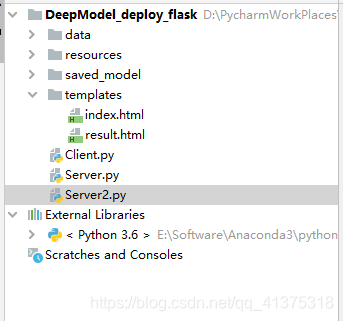
服务端:Server.py
import time
import os
import torch
from PIL import Image
import torchvision.transforms as transforms

from flask import request, Flask
app = Flask(__name__)

BASE_DIR = os.path.dirname(os.path.abspath(__file__))

path_model="./saved_model/model2.pkl"
model_loaded=torch.load(path_model)

def get_imageNdarray(imageFilePath):
    input_image = Image.open(imageFilePath).convert("RGB")
    return input_image

def process_imageNdarray(input_image):
    preprocess = transforms.Compose([
        transforms.ToTensor(),
    ])
    img_chw = preprocess(input_image)
    return img_chw

def predict_image(model, imageFilePath):
    model.eval()
    input_image = get_imageNdarray(imageFilePath)
    img_chw = process_imageNdarray(input_image)
    if torch.cuda.is_available():
        img_chw = img_chw.to('cuda')
        model.to('cuda')
    input_list = [img_chw]
    with torch.no_grad():
        output_list = model(input_list)
        output_dict = output_list[0]

        return output_dict


@app.route("/", methods=['POST'])
def return_result():
    startTime = time.time()
    received_file = request.files['file']
    imageFileName = received_file.filename
    if received_file:
        received_dirPath = './resources/received_images'
        if not os.path.isdir(received_dirPath):
            os.makedirs(received_dirPath)
        imageFilePath = os.path.join(received_dirPath, imageFileName)
        received_file.save(imageFilePath)
        print('图片文件保存到此路径:%s' % imageFilePath)
        usedTime = time.time() - startTime
        print('接收图片并保存,总共耗时%.2f秒' % usedTime)
        startTime = time.time()
        print(imageFilePath)
        result = predict_image(model_loaded, imageFilePath)
        result = str(result)
        print(result)
        usedTime = time.time() - startTime
        print('完成对接收图片的检测,总共耗时%.2f秒' % usedTime)
        print("testtest",result)
        return result
    else:
        return 'failed'

if __name__ == "__main__":


    app.run("127.0.0.1", port=5000)`
客户端:Client.py
import requests
import os

BASE_DIR = os.path.dirname(os.path.abspath(__file__))

if __name__ == "__main__":
    url = "http://127.0.0.1:5000"
    while True:
        input_content = input('输入图片路径,输入-1退出,默认值os.path.join(BASE_DIR, "data", "global-wheat-detection", "test", "51b3e36ab.jpg") ')
        if input_content.strip() == "":
            input_content = 'D:\\PycharmWorkPlaces\\DeepModel_deploy_flask\\data\\global-wheat-detection\\test\\51b3e36ab.jpg'
        if input_content.strip() == "-1":
            break
        elif not os.path.exists(input_content.strip()):
            print('输入图片路径不正确,请重新输入')
        else:
            imageFilePath = input_content.strip()
            imageFileName = os.path.split(imageFilePath)[1]
            file_dict = {
                'file':(imageFileName,
                    open(imageFilePath,'rb'),
                    'image/jpg')}
            result = requests.post(url, files=file_dict)
            predict_result = result.text
            print('图片路径:%s 预测结果为:%s\n' %(imageFilePath, predict_result))`
3.二测(客户端为页面)
服务端:Server2.py
import time
import os
import torch
from PIL import Image
import torchvision.transforms as transforms
import json
from flask import Flask, render_template, request, jsonify
app = Flask(__name__)
BASE_DIR = os.path.dirname(os.path.abspath(__file__))
path_model="./saved_model/model2.pkl"
model_loaded=torch.load(path_model)
def get_imageNdarray(imageFilePath):
input_image = Image.open(imageFilePath).convert("RGB")
return input_image
def process_imageNdarray(input_image):
preprocess = transforms.Compose([
transforms.ToTensor(),
])
img_chw = preprocess(input_image)
return img_chw
def predict_image(model, imageFilePath):
model.eval()
input_image = get_imageNdarray(imageFilePath)
img_chw = process_imageNdarray(input_image)
if torch.cuda.is_available():
img_chw = img_chw.to('cuda')
model.to('cuda')
input_list = [img_chw]
with torch.no_grad():
output_list = model(input_list)
output_dict = output_list[0]
return output_dict
@app.route('/')
def index_page():
return render_template('index.html')
@app.route("/upload_image", methods=['POST'])
def anyname_you_like():
startTime = time.time()
received_file = request.files['input_image']
imageFileName = received_file.filename
if received_file:
received_dirPath = '../resources/received_images'
if not os.path.isdir(received_dirPath):
os.makedirs(received_dirPath)
imageFilePath = os.path.join(received_dirPath, imageFileName)
received_file.save(imageFilePath)
print('image file saved to %s' % imageFilePath)
usedTime = time.time() - startTime
print('接收图片并保存,总共耗时%.2f秒' % usedTime)
startTime = time.time()
result = predict_image(model_loaded, imageFilePath)
result = str(result)
usedTime = time.time() - startTime
print('完成对接收图片的预测,总共耗时%.2f秒' % usedTime)
return render_template("result.html",result=result)
else:
return 'failed'
if __name__ == "__main__":
'''python
app.run("127.0.0.1", port=5000)`

```html
### 客户端:index.html
```html
`<!DOCTYPE html>
<html lang="en">
<head>
<meta charset="UTF-8">
<title>测试</title>
</head>
<body>
<div>
<form method="post" action="http://localhost:5000/upload_image" enctype="multipart/form-data">
<input type="file" value="选择检测图片" size="22" id="select_files" name="input_image" onchange="show_selectedImage()"/>
<br>
<canvas id="image_canvas" height="1020" width="1020"></canvas>
<text name="image_className" value=""/>
<br>
<input type="submit" class="button-new" value="提交信息" style="margin-top:15px;"/>
</form>
<script type="text/javascript">
function show_selectedImage(){
/// get select files.
var selected_files = document.getElementById("select_files").files;
for(var file of selected_files){
console.log(file.webkitRelativePath);
/// read file content.
var reader = new FileReader();
reader.readAsDataURL(file);
reader.onloadend = function(){
/// deal data.
var img = new Image();
/// after loader, result storage the file content result.
img.src = this.result;
img.onload = function(){
var canvas = document.getElementById("image_canvas");
var cxt = canvas.getContext('2d');
cxt.drawImage(img, 0, 0);
}
}
}
}
</script>
</div>
</body>
</html>`
```html
## 返回结果网页:result.html
`
返回结果是:
{{ result }}
`
### 4.补充

### 图像识别工程的工作步骤:

* * *

*   1.数据准备:
    1.1拍摄照片或者下载数据集;
    1.2图像标注;
    1.3图像数据处理(图像合成、图像剪裁、图像改变像素大小);
    1.4检查标注文件的正确性;
    1.5划分训练集、验证集.

*   2.模型搭建

*   3.模型训练(读取数据的多线程生成器、多GPU并行训练、保存模型)

*   4.模型评估(加载模型、使用业务对应的评估指标在验证集上计算模型效果)

*   5.模型测试(使用实际场景中的图像数据测试模型效果,单张图片检测、实时视频检测)

*   6.模型部署(web、Android、开发板)

*   7.闭环优化
    7.1根据业务使用场景在第2步优化;
    7.2根据模型在实际场景的使用效果在第3-6步之,间循环迭代
    7.2.1如果新加入的数据提高了模型在验证集上的效果,则替换模型部署使用的权重文件
    7.2.2如果替换后的新权重文件在实际场景中使用效果不好,则使用版本控制工具回退到上一-个版本的权重文件


* * *

### 完成搭建神经网络的要点:

1.确定网络的输入矩阵的形状;
2.确定网络的输出矩阵的形状;
3.理解网络的架构流程;
4.确定每个数据层、处理层的矩阵形状:
5.理解并实现网络计算损失的损失函数;
6.理解权重优化使用的优化器;

* * *
更多推荐
 0
0 0
0- 0


 已为社区贡献5条内容

所有评论(0)