
OpenHarmony Flutter 端云协同实战:分布式底座 + 云端智能,构建全场景智慧应用
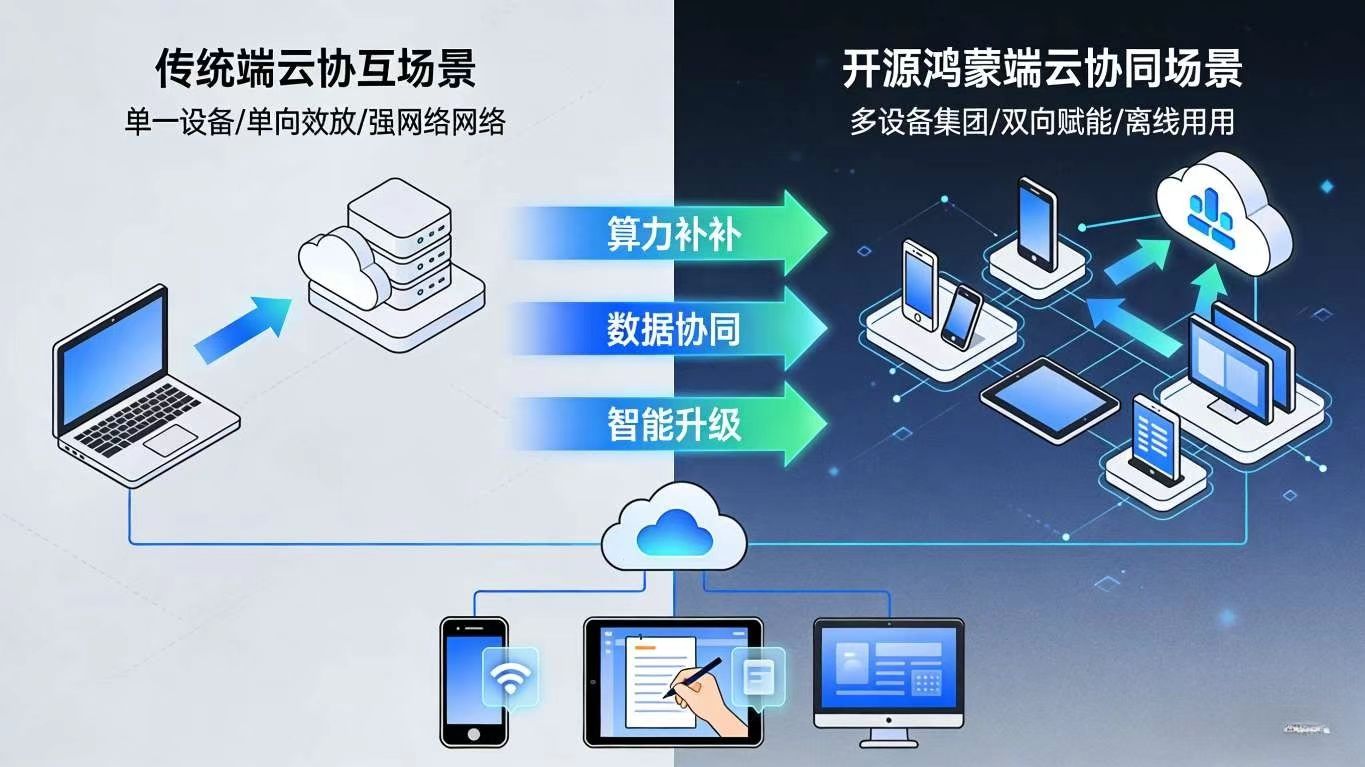
算力互补:端侧提供低延迟交互,云端提供海量算力支持(如 AI 推理、大数据分析);数据协同:分布式端侧数据实时同步至云端,云端统一管理多设备数据,保障一致性;智能升级:云端 AI 模型持续学习端侧数据,为端侧提供个性化智能服务(如内容推荐、场景预判);弹性扩展:端侧应用可通过云端接口快速扩展功能(如支付、地图、内容审核),无需本地集成厚重 SDK。
引言:端云协同 —— 开源鸿蒙全场景生态的 “智能引擎”
当手机端的本地数据能通过分布式底座实时同步至云端,当云端 AI 模型能根据多设备行为数据个性化推送服务,当智慧屏的算力不足时可调用云端资源完成复杂运算 —— 开源鸿蒙(OpenHarmony)的端云协同技术,正在打破 “端侧算力局限” 与 “云端数据孤岛” 的双重壁垒。
Flutter 作为跨端开发的核心框架,与开源鸿蒙的端云协同能力深度融合后,可实现 “端侧轻量化交互 + 云端智能化处理 + 分布式全场景联动” 的全新开发模式。本文以 “场景化智能协同” 为核心,跳出传统 “端云数据同步” 的单一逻辑,聚焦 “分布式端侧集群 + 云端智能中枢” 的创新架构,通过 “云端 AI 驱动的个性化服务、端云算力协同的复杂任务处理、分布式多端与云端的数据一致性” 三大实战场景,用 “原理 + 架构设计 + 核心代码” 的方式,带你掌握开源鸿蒙 Flutter 端云协同的进阶开发方案,让应用兼具 “本地响应速度” 与 “云端智能深度”。
一、端云协同核心原理与技术架构
1.1 核心定义与核心价值
端云协同是指基于开源鸿蒙的分布式技术底座,实现端侧设备(手机、平板、智慧屏等)与云端服务的深度协同,通过 “端侧负责交互与轻量计算,云端负责智能处理与数据存储” 的分工模式,最大化发挥端云各自优势,核心价值:
- 算力互补:端侧提供低延迟交互,云端提供海量算力支持(如 AI 推理、大数据分析);
- 数据协同:分布式端侧数据实时同步至云端,云端统一管理多设备数据,保障一致性;
- 智能升级:云端 AI 模型持续学习端侧数据,为端侧提供个性化智能服务(如内容推荐、场景预判);
- 弹性扩展:端侧应用可通过云端接口快速扩展功能(如支付、地图、内容审核),无需本地集成厚重 SDK。
1.2 端云协同与传统 “端云交互” 的核心差异
| 特性 | 端云协同(开源鸿蒙 + Flutter) | 传统端云交互 |
|---|---|---|
| 端侧形态 | 分布式多设备集群,数据与服务可跨端流转 | 单一设备端,数据与服务局限于本地 |
| 协同深度 | 端云双向赋能(端侧提供数据,云端提供智能,协同决策) | 单向请求响应(端侧请求,云端返回结果) |
| 数据处理 | 端侧轻量处理(数据预处理、缓存),云端复杂处理(AI 推理、大数据分析) | 端侧仅负责展示,云端处理所有逻辑 |
| 网络依赖 | 支持离线工作(端侧缓存核心数据与逻辑),联网后同步 | 强依赖网络,离线无法使用核心功能 |
| 个性化能力 | 基于多设备行为数据的精准个性化推荐 | 基于单一设备数据的简单推荐 |
1.3 核心技术架构:“分布式端侧层 + 云端服务层 + 协同调度层”
已生成代码
- 分布式端侧层:以 Flutter 跨端应用为载体,依托开源鸿蒙分布式软总线实现多设备协同,端侧本地缓存核心数据与轻量逻辑,保障离线可用;
- 协同调度层:端云协同的 “大脑”,负责数据同步策略制定、算力调度(判断任务在端侧还是云端执行)、离线 / 在线状态切换、身份认证与安全防护;
- 云端服务层:提供海量算力与丰富功能,包括多设备数据统一存储、AI 智能推理与推荐、第三方功能 SDK 集成,为端侧应用提供智能升级与功能扩展支持。
二、实战 1:云端 AI 驱动的个性化推荐 —— 多设备行为协同
2.1 核心场景:跨设备个性化内容推荐
用户在手机上浏览科技类 UGC 内容、在平板上收藏编程教程、在智慧屏上观看技术直播,云端 AI 模型通过分析多设备行为数据,生成统一的用户兴趣画像,为所有端侧设备推送个性化内容:手机端推荐短图文、平板端推荐深度教程、智慧屏端推荐相关直播,实现 “一人多设备,全域个性化”。
2.2 核心实现步骤
步骤 1:端侧行为数据采集与分布式同步(Flutter)
dart
// behavior_collector.dart(行为数据采集工具类)
class BehaviorCollector {
  static const MethodChannel _deviceChannel = MethodChannel("com.example.cloud/device");
  static const _cloudApi = "https://api.example.com/behavior";

  // 采集行为数据(浏览、收藏、观看等)
  static Future<void> collectBehavior({
    required String behaviorType, // 行为类型:browse/collect/watch
    required String contentId,    // 内容ID
    required String contentCategory, // 内容分类:tech/programming/live
  }) async {
    // 1. 获取设备信息(通过原生MethodChannel)
    final deviceInfo = await _getDeviceInfo();
    // 2. 构造行为数据
    final behaviorData = {
      "userId": await DistributedAuthUtil.getDistributedUserId(), // 分布式用户ID
      "deviceId": deviceInfo["deviceId"],
      "deviceType": deviceInfo["deviceType"], // phone/tablet/tv
      "behaviorType": behaviorType,
      "contentId": contentId,
      "contentCategory": contentCategory,
      "timestamp": DateTime.now().millisecondsSinceEpoch,
      "isOffline": await NetworkUtil.isOffline(), // 是否离线
    };

    // 3. 本地缓存(离线时存储,联网后同步)
    await _cacheBehaviorLocally(behaviorData);

    // 4. 联网状态下实时同步至云端
    if (!behaviorData["isOffline"]) {
      await _syncBehaviorToCloud(behaviorData);
    }
  }

  // 获取设备信息(原生提供)
  static Future<Map<String, String>> _getDeviceInfo() async {
    final result = await _deviceChannel.invokeMethod("getDeviceInfo");
    return Map<String, String>.from(result);
  }

  // 本地缓存行为数据(分布式KV存储)
  static Future<void> _cacheBehaviorLocally(Map<String, dynamic> data) async {
    final cacheKey = "offline_behavior_${data["timestamp"]}";
    await DistributedKVStore.putString(cacheKey, jsonEncode(data));
  }

  // 同步行为数据至云端
  static Future<void> _syncBehaviorToCloud(Map<String, dynamic> data) async {
    try {
      final response = await http.post(
        Uri.parse(_cloudApi),
        headers: {"Content-Type": "application/json"},
        body: jsonEncode(data),
      );
      if (response.statusCode == 200) {
        print("行为数据同步成功");
      }
    } catch (e) {
      print("行为数据同步失败:$e");
      // 同步失败,重新加入缓存
      await _cacheBehaviorLocally(data);
    }
  }

  // 离线数据同步(应用启动/网络恢复时调用)
  static Future<void> syncOfflineBehaviors() async {
    if (await NetworkUtil.isOffline()) return;
    // 读取所有离线行为数据
    final allKeys = await DistributedKVStore.getAllKeys();
    final offlineKeys = allKeys.where((key) => key.startsWith("offline_behavior_")).toList();
    for (final key in offlineKeys) {
      final dataJson = await DistributedKVStore.getString(key);
      if (dataJson != null) {
        await _syncBehaviorToCloud(jsonDecode(dataJson));
        await DistributedKVStore.deleteKey(key); // 同步成功后删除缓存
      }
    }
  }
}
步骤 2:云端 AI 推荐服务调用(Flutter)
dart
// recommendation_service.dart(个性化推荐服务)
class RecommendationService {
  static const _recommendApi = "https://api.example.com/recommend";

  // 获取跨设备个性化推荐内容
  static Future<List<RecommendContent>> getPersonalizedRecommendations() async {
    try {
      final userId = await DistributedAuthUtil.getDistributedUserId();
      final deviceInfo = await BehaviorCollector._getDeviceInfo();
      final response = await http.get(
        Uri.parse("$_recommendApi?userId=$userId&deviceType=${deviceInfo["deviceType"]}"),
      );
      if (response.statusCode == 200) {
        final List<dynamic> data = jsonDecode(response.body);
        return data.map((item) => RecommendContent.fromJson(item)).toList();
      }
      return [];
    } catch (e) {
      print("获取推荐内容失败:$e");
      // 失败时返回本地缓存的推荐内容
      return _getCachedRecommendations();
    }
  }

  // 本地缓存推荐内容(离线可用)
  static Future<void> cacheRecommendations(List<RecommendContent> contents) async {
    final dataJson = jsonEncode(contents.map((c) => c.toJson()).toList());
    await DistributedKVStore.putString("cached_recommendations", dataJson);
  }

  // 获取本地缓存的推荐内容
  static Future<List<RecommendContent>> _getCachedRecommendations() async {
    final dataJson = await DistributedKVStore.getString("cached_recommendations");
    if (dataJson == null) return [];
    final List<dynamic> data = jsonDecode(dataJson);
    return data.map((item) => RecommendContent.fromJson(item)).toList();
  }
}

// 推荐内容模型
class RecommendContent {
  final String contentId;
  final String title;
  final String type; // article/video/live
  final String url;
  final String coverImage;

  RecommendContent({
    required this.contentId,
    required this.title,
    required this.type,
    required this.url,
    required this.coverImage,
  });

  factory RecommendContent.fromJson(Map<String, dynamic> json) {
    return RecommendContent(
      contentId: json["contentId"],
      title: json["title"],
      type: json["type"],
      url: json["url"],
      coverImage: json["coverImage"],
    );
  }

  Map<String, dynamic> toJson() {
    return {
      "contentId": contentId,
      "title": title,
      "type": type,
      "url": url,
      "coverImage": coverImage,
    };
  }
}
步骤 3:推荐内容展示页面(Flutter)
dart
class PersonalizedRecommendPage extends StatefulWidget {
  const PersonalizedRecommendPage({super.key});

  @override
  State<PersonalizedRecommendPage> createState() => _PersonalizedRecommendPageState();
}

class _PersonalizedRecommendPageState extends State<PersonalizedRecommendPage> {
  List<RecommendContent> _recommendContents = [];
  bool _isLoading = false;

  @override
  void initState() {
    super.initState();
    // 同步离线行为数据
    BehaviorCollector.syncOfflineBehaviors();
    // 获取推荐内容
    _fetchRecommendations();
    // 监听网络状态变化,重新获取推荐
    NetworkUtil.listenNetworkStatus((isOnline) {
      if (isOnline) _fetchRecommendations();
    });
  }

  // 获取推荐内容
  Future<void> _fetchRecommendations() async {
    setState(() => _isLoading = true);
    final contents = await RecommendationService.getPersonalizedRecommendations();
    // 缓存推荐内容
    await RecommendationService.cacheRecommendations(contents);
    setState(() {
      _recommendContents = contents;
      _isLoading = false;
    });
  }

  // 采集浏览行为
  void _onContentBrowse(String contentId, String category) {
    BehaviorCollector.collectBehavior(
      behaviorType: "browse",
      contentId: contentId,
      contentCategory: category,
    );
  }

  @override
  Widget build(BuildContext context) {
    return Scaffold(
      appBar: AppBar(title: const Text("个性化推荐")),
      body: _isLoading
          ? const Center(child: CircularProgressIndicator())
          : _recommendContents.isEmpty
              ? const Center(child: Text("暂无推荐内容"))
              : ListView.builder(
                  itemCount: _recommendContents.length,
                  itemBuilder: (context, index) {
                    final content = _recommendContents[index];
                    return ListTile(
                      leading: Image.network(content.coverImage, width: 80, height: 80, fit: BoxFit.cover),
                      title: Text(content.title),
                      subtitle: Text(content.type == "article" ? "图文" : content.type == "video" ? "视频" : "直播"),
                      onTap: () {
                        _onContentBrowse(content.contentId, content.type);
                        // 跳转内容详情页
                        Navigator.push(context, MaterialPageRoute(
                          builder: (context) => ContentDetailPage(content: content),
                        ));
                      },
                    );
                  },
                ),
    );
  }
}
三、实战 2:端云算力协同 —— 复杂任务分布式处理
3.1 核心场景:AI 视频剪辑(端侧预处理 + 云端推理)
用户在手机上拍摄多段视频素材,端侧 Flutter 应用完成轻量预处理(素材裁剪、格式转换),然后将处理后的素材上传至云端;云端利用海量算力完成 AI 自动剪辑(卡点、配乐、字幕生成),生成多个版本的视频;最后将剪辑结果同步回所有端侧设备,用户可在平板上选择满意的版本进行二次编辑,在智慧屏上展示。
3.2 核心实现步骤
步骤 1:端侧视频预处理(Flutter)
dart
// video_preprocessor.dart(端侧视频预处理工具类)
class VideoPreprocessor {
  // 视频预处理:裁剪、格式转换(轻量任务,端侧执行)
  static Future<String?> preprocessVideo(String inputPath) async {
    try {
      // 1. 裁剪视频(保留核心片段,时长<30秒)
      final clippedPath = await _clipVideo(inputPath);
      // 2. 转换格式为MP4(统一云端处理格式)
      final convertedPath = await _convertFormat(clippedPath);
      return convertedPath;
    } catch (e) {
      print("视频预处理失败:$e");
      return null;
    }
  }

  // 裁剪视频
  static Future<String> _clipVideo(String inputPath) async {
    final outputPath = "${(await getTemporaryDirectory()).path}/clipped_video.mp4";
    // 使用flutter_ffmpeg进行裁剪(轻量级处理)
    final result = await FlutterFFmpeg().execute(
      "-i $inputPath -ss 00:00:00 -t 00:00:30 -c copy $outputPath",
    );
    if (result != 0) throw Exception("裁剪失败,错误码:$result");
    return outputPath;
  }

  // 转换视频格式
  static Future<String> _convertFormat(String inputPath) async {
    final outputPath = "${(await getTemporaryDirectory()).path}/converted_video.mp4";
    final result = await FlutterFFmpeg().execute(
      "-i $inputPath -c:v libx264 -c:a aac $outputPath",
    );
    if (result != 0) throw Exception("格式转换失败,错误码:$result");
    return outputPath;
  }
}
步骤 2:云端 AI 剪辑服务调用与结果同步(Flutter)
dart
// cloud_video_editor.dart(云端AI剪辑服务)
class CloudVideoEditor {
  static const _uploadApi = "https://api.example.com/video/upload";
  static const _editApi = "https://api.example.com/video/edit";
  static const _resultApi = "https://api.example.com/video/result";

  // 上传预处理后的视频并发起云端剪辑
  static Future<String?> uploadAndEditVideo(String videoPath) async {
    try {
      // 1. 上传视频到云端
      final uploadResult = await _uploadVideo(videoPath);
      if (uploadResult["success"] != true) throw Exception("上传失败");
      final taskId = uploadResult["taskId"];

      // 2. 发起云端AI剪辑任务
      await _startCloudEdit(taskId);

      // 3. 轮询获取剪辑结果(实际项目中可用WebSocket实时推送)
      final editResult = await _pollEditResult(taskId);
      return editResult["videoUrl"];
    } catch (e) {
      print("云端剪辑失败:$e");
      return null;
    }
  }

  // 上传视频
  static Future<Map<String, dynamic>> _uploadVideo(String videoPath) async {
    final request = http.MultipartRequest(
      "POST",
      Uri.parse(_uploadApi),
    );
    request.files.add(await http.MultipartFile.fromPath("video", videoPath));
    final response = await request.send();
    final responseBody = await response.stream.bytesToString();
    return jsonDecode(responseBody);
  }

  // 发起云端剪辑
  static Future<void> _startCloudEdit(String taskId) async {
    final userId = await DistributedAuthUtil.getDistributedUserId();
    final response = await http.post(
      Uri.parse(_editApi),
      headers: {"Content-Type": "application/json"},
      body: jsonEncode({
        "taskId": taskId,
        "userId": userId,
        "editConfig": {
          "autoBeat": true, // 自动卡点
          "musicType": "hot", // 热门音乐
          "subtitle": true, // 生成字幕
        },
      }),
    );
    if (response.statusCode != 200) throw Exception("剪辑任务发起失败");
  }

  // 轮询剪辑结果
  static Future<Map<String, dynamic>> _pollEditResult(String taskId) async {
    int retryCount = 0;
    while (retryCount < 30) { // 最多轮询30次(30秒)
      final response = await http.get(Uri.parse("$_resultApi?taskId=$taskId"));
      if (response.statusCode == 200) {
        final result = jsonDecode(response.body);
        if (result["status"] == "completed") {
          // 同步结果到分布式存储,供其他设备访问
          await DistributedKVStore.putString(
            "cloud_edit_result_$taskId",
            jsonEncode(result),
          );
          return result;
        }
      }
      await Future.delayed(const Duration(seconds: 1));
      retryCount++;
    }
    throw Exception("剪辑超时");
  }

  // 获取剪辑结果(其他设备调用)
  static Future<String?> getEditResult(String taskId) async {
    final resultJson = await DistributedKVStore.getString("cloud_edit_result_$taskId");
    if (resultJson != null) {
      return jsonDecode(resultJson)["videoUrl"];
    }
    // 本地未找到,从云端获取
    final response = await http.get(Uri.parse("$_resultApi?taskId=$taskId"));
    if (response.statusCode == 200) {
      final result = jsonDecode(response.body);
      return result["status"] == "completed" ? result["videoUrl"] : null;
    }
    return null;
  }
}
步骤 3:端云协同视频剪辑页面(Flutter)
dart
class CloudAIVideoEditPage extends StatefulWidget {
  const CloudAIVideoEditPage({super.key});

  @override
  State<CloudAIVideoEditPage> createState() => _CloudAIVideoEditPageState();
}

class _CloudAIVideoEditPageState extends State<CloudAIVideoEditPage> {
  String? _originalVideoPath;
  String? _preprocessedVideoPath;
  String? _cloudEditedVideoUrl;
  bool _isProcessing = false;
  bool _isUploading = false;
  final String _taskId = "video_edit_${DateTime.now().millisecondsSinceEpoch}";

  // 选择视频
  Future<void> _pickVideo() async {
    final XFile? video = await ImagePicker().pickVideo(source: ImageSource.gallery);
    if (video != null) {
      setState(() => _originalVideoPath = video.path);
    }
  }

  // 端侧预处理
  Future<void> _preprocess() async {
    if (_originalVideoPath == null) return;
    setState(() => _isProcessing = true);
    final preprocessedPath = await VideoPreprocessor.preprocessVideo(_originalVideoPath!);
    setState(() {
      _preprocessedVideoPath = preprocessedPath;
      _isProcessing = false;
    });
  }

  // 上传并发起云端剪辑
  Future<void> _uploadAndEdit() async {
    if (_preprocessedVideoPath == null) return;
    setState(() => _isUploading = true);
    final editedUrl = await CloudVideoEditor.uploadAndEditVideo(_preprocessedVideoPath!);
    setState(() {
      _cloudEditedVideoUrl = editedUrl;
      _isUploading = false;
    });
    // 同步任务ID到分布式存储,供其他设备获取结果
    await DistributedKVStore.putString("video_edit_task_${DateTime.now().millisecondsSinceEpoch}", _taskId);
  }

  // 跳转到二次编辑页面(平板端)
  void _gotoSecondaryEdit() {
    if (_cloudEditedVideoUrl == null) return;
    Navigator.push(context, MaterialPageRoute(
      builder: (context) => SecondaryEditPage(videoUrl: _cloudEditedVideoUrl!),
    ));
  }

  @override
  Widget build(BuildContext context) {
    return Scaffold(
      appBar: AppBar(title: const Text("端云协同AI剪辑")),
      body: Padding(
        padding: const EdgeInsets.all(16.0),
        child: Column(
          children: [
            // 视频预览
            _originalVideoPath != null
                ? AspectRatio(
                    aspectRatio: 16/9,
                    child: VideoPlayer(VideoPlayerController.file(File(_originalVideoPath!))..initialize().then((_) => setState(() {})),
                  ),
                )
                : const SizedBox(height: 200, child: Center(child: Text("未选择视频"))),
            const SizedBox(height: 20),
            // 操作按钮
            Row(
              mainAxisAlignment: MainAxisAlignment.spaceEvenly,
              children: [
                ElevatedButton(onPressed: _pickVideo, child: const Text("选择视频")),
                ElevatedButton(
                  onPressed: _originalVideoPath == null || _isProcessing ? null : _preprocess,
                  child: _isProcessing ? const CircularProgressIndicator(color: Colors.white) : const Text("端侧预处理"),
                ),
              ],
            ),
            const SizedBox(height: 20),
            ElevatedButton(
              onPressed: _preprocessedVideoPath == null || _isUploading ? null : _uploadAndEdit,
              child: _isUploading ? const CircularProgressIndicator(color: Colors.white) : const Text("上传云端AI剪辑"),
            ),
            const SizedBox(height: 30),
            // 剪辑结果预览
            if (_cloudEditedVideoUrl != null) ...[
              const Text("云端剪辑结果:", style: TextStyle(fontSize: 18, fontWeight: FontWeight.bold)),
              const SizedBox(height: 10),
              AspectRatio(
                aspectRatio: 16/9,
                child: VideoPlayer(VideoPlayerController.network(_cloudEditedVideoUrl!)..initialize().then((_) => setState(() {})),
              ),
              const SizedBox(height: 20),
              ElevatedButton(
                onPressed: _gotoSecondaryEdit,
                child: const Text("跳转平板二次编辑"),
              ),
            ],
          ],
        ),
      ),
    );
  }
}
四、实战 3:分布式多端与云端数据一致性 —— 跨设备协同文档
4.1 核心场景:跨设备协同文档编辑(端云数据实时同步)
用户在手机上创建文档并输入内容,端侧实时将内容同步至云端;同时,平板端通过云端同步获取最新内容,用户在平板上进行编辑,编辑内容也实时同步至云端和手机端;智慧屏端可实时查看文档最新版本,实现 “多端实时协同,数据一致无冲突”。
4.2 核心实现步骤
步骤 1:端云数据同步协议与冲突解决(Flutter)
dart
// document_sync_service.dart(文档同步服务)
class DocumentSyncService {
  static const _docApi = "https://api.example.com/document";
  static final WebSocketChannel _channel = WebSocketChannel.connect(
    Uri.parse("wss://api.example.com/document/ws"),
  );

  // 创建文档并同步至云端
  static Future<String?> createDocument({required String title}) async {
    final userId = await DistributedAuthUtil.getDistributedUserId();
    final response = await http.post(
      Uri.parse("$_docApi/create"),
      headers: {"Content-Type": "application/json"},
      body: jsonEncode({
        "userId": userId,
        "title": title,
        "content": "",
        "timestamp": DateTime.now().millisecondsSinceEpoch,
      }),
    );
    if (response.statusCode == 200) {
      final data = jsonDecode(response.body);
      final docId = data["docId"];
      // 本地缓存文档信息
      await _cacheDocumentInfo(docId, title, "");
      // 连接WebSocket,实时同步
      _connectWebSocket(docId);
      return docId;
    }
    return null;
  }

  // 实时同步文档内容
  static Future<void> syncDocumentContent({
    required String docId,
    required String content,
  }) async {
    final userId = await DistributedAuthUtil.getDistributedUserId();
    final syncData = {
      "docId": docId,
      "userId": userId,
      "content": content,
      "timestamp": DateTime.now().millisecondsSinceEpoch,
      "version": await _getDocumentVersion(docId), // 版本号,用于冲突解决
    };

    // 1. 本地更新
    await _updateLocalDocument(docId, content, syncData["timestamp"]);

    // 2. 云端同步(WebSocket实时推送)
    _channel.sink.add(jsonEncode(syncData));
  }

  // 监听云端文档变化(实时更新端侧)
  static void listenDocumentChanges({
    required String docId,
    required Function(String content) onContentChanged,
  }) {
    _channel.stream.listen((message) {
      final data = jsonDecode(message);
      if (data["docId"] == docId) {
        // 冲突解决:以云端最新版本为准(可根据实际需求调整策略)
        if (data["timestamp"] > await _getDocumentTimestamp(docId)) {
          _updateLocalDocument(docId, data["content"], data["timestamp"]);
          onContentChanged(data["content"]);
          // 更新版本号
          await _updateDocumentVersion(docId, data["version"]);
        }
      }
    });
  }

  // 本地缓存文档信息
  static Future<void> _cacheDocumentInfo(String docId, String title, String content) async {
    final docInfo = {
      "title": title,
      "content": content,
      "timestamp": DateTime.now().millisecondsSinceEpoch,
      "version": 1,
    };
    await DistributedKVStore.putString("document_$docId", jsonEncode(docInfo));
  }

  // 更新本地文档
  static Future<void> _updateLocalDocument(String docId, String content, int timestamp) async {
    final docJson = await DistributedKVStore.getString("document_$docId");
    if (docJson == null) return;
    final docInfo = jsonDecode(docJson);
    docInfo["content"] = content;
    docInfo["timestamp"] = timestamp;
    docInfo["version"] = docInfo["version"] + 1;
    await DistributedKVStore.putString("document_$docId", jsonEncode(docInfo));
  }

  // 获取文档版本号
  static Future<int> _getDocumentVersion(String docId) async {
    final docJson = await DistributedKVStore.getString("document_$docId");
    if (docJson == null) return 1;
    return jsonDecode(docJson)["version"];
  }

  // 获取文档时间戳
  static Future<int> _getDocumentTimestamp(String docId) async {
    final docJson = await DistributedKVStore.getString("document_$docId");
    if (docJson == null) return 0;
    return jsonDecode(docJson)["timestamp"];
  }

  // 更新文档版本号
  static Future<void> _updateDocumentVersion(String docId, int version) async {
    final docJson = await DistributedKVStore.getString("document_$docId");
    if (docJson == null) return;
    final docInfo = jsonDecode(docJson);
    docInfo["version"] = version;
    await DistributedKVStore.putString("document_$docId", jsonEncode(docInfo));
  }

  // 连接WebSocket
  static void _connectWebSocket(String docId) {
    // 发送文档订阅请求
    _channel.sink.add(jsonEncode({
      "type": "subscribe",
      "docId": docId,
      "userId": await DistributedAuthUtil.getDistributedUserId(),
    }));
  }

  // 关闭WebSocket连接
  static void closeWebSocket() {
    _channel.sink.close();
  }
}
步骤 2:跨设备协同文档编辑页面(Flutter)
dart
class CollaborativeDocumentPage extends StatefulWidget {
  final String docId;
  final bool isNewDoc;

  const CollaborativeDocumentPage({
    super.key,
    required this.docId,
    this.isNewDoc = false,
  });

  @override
  State<CollaborativeDocumentPage> createState() => _CollaborativeDocumentPageState();
}

class _CollaborativeDocumentPageState extends State<CollaborativeDocumentPage> {
  final TextEditingController _controller = TextEditingController();
  String _docTitle = "未命名文档";
  bool _isLoading = false;

  @override
  void initState() {
    super.initState();
    if (widget.isNewDoc) {
      _initNewDocument();
    } else {
      _loadDocument();
    }
    // 监听文档变化
    DocumentSyncService.listenDocumentChanges(
      docId: widget.docId,
      onContentChanged: (content) {
        setState(() => _controller.text = content);
      },
    );
  }

  // 初始化新文档
  Future<void> _initNewDocument() async {
    setState(() => _isLoading = true);
    // 从分布式存储获取文档标题
    final docJson = await DistributedKVStore.getString("document_${widget.docId}");
    if (docJson != null) {
      final docInfo = jsonDecode(docJson);
      setState(() {
        _docTitle = docInfo["title"];
        _controller.text = docInfo["content"];
      });
    }
    setState(() => _isLoading = false);
  }

  // 加载已有文档
  Future<void> _loadDocument() async {
    setState(() => _isLoading = true);
    // 1. 本地加载
    final docJson = await DistributedKVStore.getString("document_${widget.docId}");
    if (docJson != null) {
      final docInfo = jsonDecode(docJson);
      setState(() {
        _docTitle = docInfo["title"];
        _controller.text = docInfo["content"];
      });
    }
    // 2. 云端同步最新版本
    await _syncFromCloud();
    setState(() => _isLoading = false);
  }

  // 从云端同步文档
  Future<void> _syncFromCloud() async {
    final userId = await DistributedAuthUtil.getDistributedUserId();
    final response = await http.get(
      Uri.parse("${DocumentSyncService._docApi}/get?docId=${widget.docId}&userId=$userId"),
    );
    if (response.statusCode == 200) {
      final data = jsonDecode(response.body);
      setState(() => _controller.text = data["content"]);
      // 更新本地缓存
      await DocumentSyncService._updateLocalDocument(
        widget.docId,
        data["content"],
        DateTime.now().millisecondsSinceEpoch,
      );
    }
  }

  // 同步文档内容
  void _onContentChanged() {
    DocumentSyncService.syncDocumentContent(
      docId: widget.docId,
      content: _controller.text,
    );
  }

  @override
  void dispose() {
    DocumentSyncService.closeWebSocket();
    _controller.dispose();
    super.dispose();
  }

  @override
  Widget build(BuildContext context) {
    return Scaffold(
      appBar: AppBar(title: Text(_docTitle)),
      body: _isLoading
          ? const Center(child: CircularProgressIndicator())
          : Padding(
              padding: const EdgeInsets.all(16.0),
              child: TextField(
                controller: _controller,
                expands: true,
                maxLines: null,
                onChanged: (_) => _onContentChanged(),
                decoration: const InputDecoration(
                  hintText: "输入文档内容...",
                  border: InputBorder.none,
                ),
              ),
            ),
    );
  }
}
五、端云协同性能优化与最佳实践

5.1 性能优化核心技巧
- 数据同步策略:采用 “增量同步”(仅同步变化部分)而非全量同步,减少网络传输开销;
- 算力调度优化:根据任务复杂度和设备性能动态分配算力(如低端机直接上传原始素材,高端机完成预处理);
- 缓存分层设计:端侧缓存核心数据(文档内容、推荐列表),云端缓存全量数据与历史版本,提升访问速度;
- 网络适配:弱网环境下降低同步频率,采用压缩算法减少数据体积;离线状态下缓存所有操作,联网后批量同步。
5.2 最佳实践
- 安全防护:端云数据传输采用 HTTPS/WSS 加密,分布式身份认证确保数据访问安全;敏感数据(如用户行为、文档内容)云端存储时加密;
- 冲突解决策略:根据业务场景选择合适的冲突解决方式(如文档编辑采用 “最后写入获胜”,订单数据采用 “版本号对比 + 人工介入”);
- 云端服务弹性扩展:采用微服务架构设计云端服务,支持根据端侧请求量动态扩容,保障高并发场景下的稳定性;
- 端侧资源释放:离线同步完成后及时清理本地缓存的临时文件(如预处理后的视频),避免占用过多存储。
六、常见问题(FAQ)
Q1:弱网环境下端云数据同步失败怎么办?
A1:1. 实现 “断点续传” 功能,大文件(如视频)上传 / 下载支持中断后恢复;2. 降低数据同步频率,采用 “批量同步” 减少请求次数;3. 数据压缩传输,减少网络带宽占用;4. 提供同步状态提示,允许用户手动触发同步。
Q2:端云协同中如何避免数据冲突?
A2:1. 引入版本号机制,每次同步时携带版本号,云端根据版本号判断是否存在冲突;2. 采用 “操作日志” 记录所有端侧修改,冲突时通过日志回放合并数据;3. 针对特定场景(如文档编辑)采用实时协作协议(如 CRDT),实现无冲突合并。
Q3:云端服务不可用时,端侧应用如何保障基本功能可用?
A3:1. 端侧本地缓存核心业务逻辑与数据(如文档编辑、本地视频播放),离线状态下正常提供基本功能;2. 实现 “离线优先” 策略,端侧操作优先在本地执行,联网后再同步至云端;3. 云端服务恢复后,自动同步离线数据,确保端云数据一致性。
结语:端云协同 —— 开源鸿蒙全场景生态的核心竞争力
端云协同并非简单的 “端侧 + 云端” 相加,而是基于开源鸿蒙分布式技术底座的深度融合,它让端侧设备摆脱了算力与存储的局限,让云端服务获得了更丰富的场景入口与数据来源。通过本文的三大实战场景,你已掌握云端 AI 个性化推荐、端云算力协同、跨设备数据一致性的核心开发方案,能够构建兼具 “本地响应速度” 与 “云端智能深度” 的全场景智慧应用。
在开源鸿蒙生态中,端云协同是实现 “全场景智慧化” 的关键:端侧提供贴近用户的场景化交互,云端提供海量算力与智能决策,两者协同打造 “千人千面” 的个性化体验。未来,随着 5G、边缘计算、AI 大模型技术的持续发展,端云协同将迎来更深度的融合 —— 边缘节点将成为端云之间的 “桥梁”,进一步降低延迟、提升带宽利用率,让全场景智慧应用的体验达到新的高度。
更多推荐
 32
32 0
0- 0


 已为社区贡献2条内容

所有评论(0)