
paddlepaddle-gpu3.0.0进行ocr训练
1、服务器中实用NVIDIA A100并且装有cuda 12.4版本,而paddlepaddle-gpu比较接近时cuda 12.3版本。格式分布如上,图片数据:data_dir+第一个数据。
1、服务器中实用NVIDIA A100并且装有cuda 12.4版本,而paddlepaddle-gpu比较接近时cuda 12.3版本(3.0.0 beta1以下版本,在export_model导出,才有.pdmodel产生,对于低版本才能用)。
https://www.paddlepaddle.org.cn/packages/stable/cu123/paddlepaddle-gpu/pip install paddlepaddle-gpu==3.0.0b1 -i https://www.paddlepaddle.org.cn/packages/stable/cu123/进行测试:
python -c "import paddle; paddle.utils.run_check()"2、选择PaddleOCR-release-2.7.1进行ocr中文字符识别:
Eval:
  dataset:
    name: SimpleDataSet           # 数据集类型
    data_dir: /home/xxx/data/ocr/  # 数据根目录
    label_file_list:              # 验证集标签文件
      - /home/xxx/data/ocr/crop_sign_1013/val_list.txt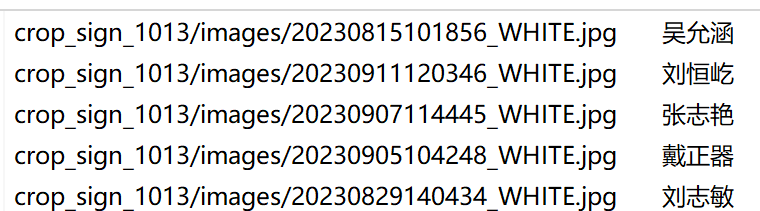
格式分布如上,图片数据:data_dir+第一个数据
进一步需要添加预训练权重,进行下载权重(在别人家成果上进行finetune)
https://www.paddleocr.ai/latest/version3.x/pipeline_usage/OCR.html#1-ocr
pretrained_model: ./signedname/PP-OCRv4_server_rec_pretrained.pdparams
character_dict_path: ./signedname/PP-OCRv4.txt
3、训练
在PaddleOCR-release-2.7.1/doc/doc_ch/recognition.md中写着如何具体操作,
进行单卡训练:
python ./train.py -c ./signedname/rec_svtrnet_ch.yml -o Global.pretrained_model=./signedname/ch_PP-OCRv4_rec_train多卡训练:
python -m paddle.distributed.launch --gpus '0,1' ./train.py -c ./signedname/rec_svtrnet_ch.yml 导出参数
python ./tools/export_model.py -c ./signedname/rec_svtrnet_ch.yml -o Global.pretrained_model=./output/rec/svtr_ch_all/best_accuracy Global.save_inference_dir=./output/rec/svtr_ch_all/inference/在PaddleOCR-3.3.2中进行数据导出:
python ./tools/export_model.py -c ./signedname/PP-OCRv5_server_rec.yml -o Global.pretrained_model=./output/PP-OCRv5_server_rec/latest.pdparams Global.save_inference_dir=./output/PP-OCRv5_server_rec/inference/4、使用ocr中paddleocr5.0进行测试(要先做export导出模型后,再做识别功能)
import time
import os
os.environ['PYTHONIOENCODING'] = 'utf-8'

# 只进行识别
from paddleocr import TextRecognition

# 初始化OCR
model = TextRecognition(
    model_name="PP-OCRv5_server_rec",
    model_dir="./output/PP-OCRv5_server_rec2/inference/"
)

def test_batch_image():
    input_txt='./ocr/train_list.txt'
    output_txt='./ocr/output.txt'

    # 读取训练列表
    with open(input_txt, 'r', encoding='utf-8') as f:
        lines = f.readlines()

    error_results = []

    for line in lines:
        parts = line.strip().split('\t')
        if len(parts) < 2:
            continue

        image_path, gt_text = parts[0], parts[1]

        image_path="./ocr/"+image_path

        # 检查图片文件是否存在
        if not os.path.exists(image_path):
            print(f"文件不存在: {image_path}")
            continue

        # OCR识别
        result = model.predict(input=image_path, batch_size=1)
        # 获取识别结果
        if result and len(result) > 0:
            rec_text = result[0]['rec_text'] if result[0]['rec_text'] else ""
            print(f"{image_path}\t{gt_text}\t{rec_text}")

            # 比较识别结果和真实标签
            if rec_text != gt_text:
                error_results.append(f"{image_path}\t{gt_text}\t{rec_text}")

    # 保存错误结果到文件
    if error_results:
        with open(output_txt, 'w', encoding='utf-8') as f:
            f.write("文件名\t标准结果\t错误识别结果\n")
            for error in error_results:
                f.write(error + "\n")
        print(f"错误结果已保存到 error_results.txt,共 {len(error_results)} 条错误记录")

    # 输出统计信息
    total_images = len(lines)
    error_count = len(error_results)
    accuracy = (total_images - error_count) / total_images * 100

    print(f"\n统计结果:")
    print(f"总图片数: {total_images}")
    print(f"错误识别数: {error_count}")
    print(f"准确率: {accuracy:.2f}%")

if __name__ == '__main__':
    # test_single_image()
    print("\n开始批量测试...")
    test_batch_image()
5、旧版本测试(使用ch_PP-OCRv4_rec)
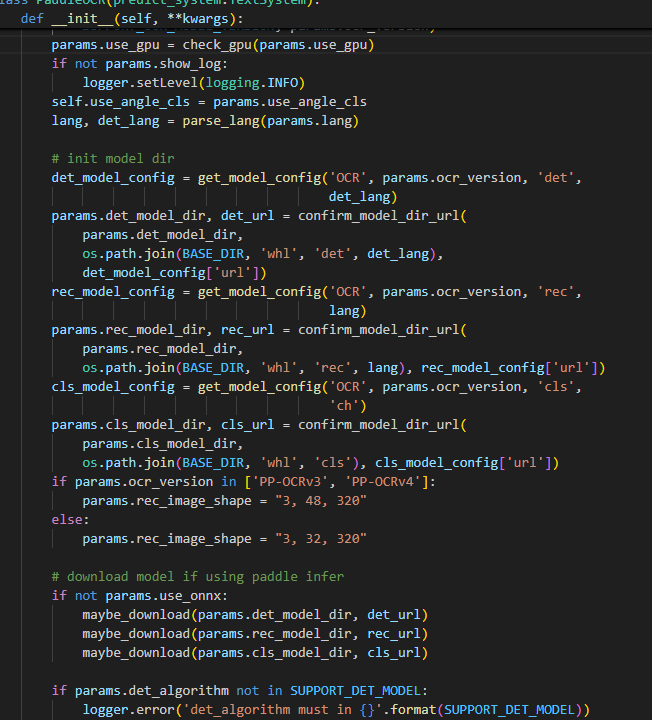
用以前的老版本paddleocr==2.7.0.3,paddlepaddle-gpu==2.4.2.post117。查看paddleocr.py对图像尺寸已经写死(3,48,320),所以训练时候要注意:
5、PP-OCRv5_server_rec.yml配置文件参数
对于字库删除了部分(日文、韩文、图标等数据),得到中文字典库15000
PP-OCRv5_server_rec.yml中有些价值参数没有释放出来,例如:
例如head中use_pos,可对数据位置编码。
Loss中CTCLoss可以开启focal loss,在权重参数中weight_1和weight_2没有释放出来,在代码默认设置为1。一般需要而言,weight_1*CTCLoss=weight_2*NRTRLoss来设置weight_1和weight_2的值。
Global:
  model_name: PP-OCRv5_server_rec # To use static model for inference.
  debug: false
  use_gpu: true
  epoch_num: 75
  log_smooth_window: 20
  print_batch_step: 10
  save_model_dir: ./output/PP-OCRv5_server_rec1
  save_epoch_step: 5
  eval_batch_step: [0, 2000]
  cal_metric_during_train: true
  calc_epoch_interval: 1
  pretrained_model: ./signedname/PP-OCRv5_server_rec_pretrained.pdparams
  checkpoints:
  save_inference_dir: ./output/PP-OCRv5_server_rec/inference
  use_visualdl: false
  infer_img: doc/imgs_words/ch/word_1.jpg
  character_dict_path: ./signedname/ppocrv5_dict.txt
  max_text_length: &max_text_length 25
  infer_mode: false
  use_space_char: true
  distributed: true
  save_res_path: ./output/rec/predicts_ppocrv5.txt
  d2s_train_image_shape: [3, 48, 320]


Optimizer:
  name: Adam
  beta1: 0.9
  beta2: 0.999
  lr:
    name: Cosine
    learning_rate: 0.0005
    warmup_epoch: 5
  regularizer:
    name: L2
    factor: 3.0e-05


Architecture:
  model_type: rec
  algorithm: SVTR_HGNet
  Transform:
  Backbone:
    name: PPHGNetV2_B4
    text_rec: True
  Head:
    name: MultiHead
    use_pos: True    #提升签名任务
    head_list:
      - CTCHead:
          Neck:
            name: svtr
            dims: 120
            depth: 2
            hidden_dims: 120
            kernel_size: [1, 3]
            use_guide: True
          Head:
            fc_decay: 0.00001
      - NRTRHead:
          nrtr_dim: 384
          max_text_length: *max_text_length

Loss:
  name: MultiLoss
  loss_config_list:
    - CTCLoss:
        use_focal_loss: true  # 处理类别不平衡,默认参数false
    - NRTRLoss:
  weight_1: 1.0   #默认参数 1.0
  weight_2: 0.3   #默认参数 1.0

PostProcess:
  name: CTCLabelDecode

Metric:
  name: RecMetric
  main_indicator: acc

Train:
  dataset:
    name: MultiScaleDataSet
    ds_width: false
    data_dir: /home/xxx/data/ocr/hwge_with_ocr_label
    ext_op_transform_idx: 1
    label_file_list:
    - /home/xxx/data/ocr/hwge_with_ocr_label/crop_sign_1013/train_list.txt
    - /home/xxx/data/ocr/hwge_with_ocr_label/crop_sign_1013/test_list.txt
    - /home/xxx/data/ocr/hwge_with_ocr_label/crop_sign_1016/train_list.txt
    - /home/xxx/data/ocr/hwge_with_ocr_label/crop_sign_1016/test_list.txt
    - /home/xxx/data/ocr/hwge_with_ocr_label/crop_sign_1117s/train_list.txt
    - /home/xxx/data/ocr/hwge_with_ocr_label/crop_sign_1117s/test_list.txt
    - /home/xxx/data/ocr/hwge_with_ocr_label/bmp0926n/train_list.txt
    - /home/xxx/data/ocr/hwge_with_ocr_label/bmp0926n/test_list.txt
    - /home/xxx/data/ocr/hwge_with_ocr_label/bmp_231117/train_list.txt
    - /home/xxx/data/ocr/hwge_with_ocr_label/bmp_231117/test_list.txt
    - /home/xxx/data/ocr/hwge_with_ocr_label/font_sign/train_list.txt
    transforms:
    - DecodeImage:
        img_mode: BGR
        channel_first: false
    - RecConAug:
        prob: 0.5
        ext_data_num: 2
        image_shape: [48, 320, 3]
        max_text_length: *max_text_length
    - RecAug:
    - MultiLabelEncode:
        gtc_encode: NRTRLabelEncode
    - KeepKeys:
        keep_keys:
        - image
        - label_ctc
        - label_gtc
        - length
        - valid_ratio
  sampler:
    name: MultiScaleSampler
    scales: [[320, 32], [320, 48], [320, 64]]
    first_bs: &bs 350
    fix_bs: false
    divided_factor: [8, 16] # w, h
    is_training: True
  loader:
    shuffle: true
    batch_size_per_card: *bs
    drop_last: true
    num_workers: 16
Eval:
  dataset:
    name: SimpleDataSet
    data_dir: /home/xxx/data/ocr/hwge_with_ocr_label
    label_file_list:
    - /home/xxx/data/ocr/hwge_with_ocr_label/crop_sign_1013/val_list.txt
    - /home/xxx/data/ocr/hwge_with_ocr_label/crop_sign_1016/val_list.txt
    - /home/xxx/data/ocr/hwge_with_ocr_label/crop_sign_1117s/val_list.txt
    - /home/xxx/data/ocr/hwge_with_ocr_label/bmp0926n/val_list.txt
    - /home/xxx/data/ocr/hwge_with_ocr_label/bmp_231117/val_list.txt
    transforms:
    - DecodeImage:
        img_mode: BGR
        channel_first: false
    - MultiLabelEncode:
        gtc_encode: NRTRLabelEncode
    - RecResizeImg:
        image_shape: [3, 48, 320]
    - KeepKeys:
        keep_keys:
        - image
        - label_ctc
        - label_gtc
        - length
        - valid_ratio
  loader:
    shuffle: false
    drop_last: false
    batch_size_per_card: *bs
    num_workers: 12
更多推荐
 3
3 0
0- 0


 已为社区贡献1条内容

所有评论(0)