
Flutter 三方库 crypton 鸿蒙深层数据加密核物理级防御防线适配指引:横向集成工业级高强度非对称签名算力体系构筑硬核数字身份验证密钥流层,护航大额-适配鸿蒙 HarmonyOS ohos
本文介绍了Flutter三方库crypton在开源鸿蒙平台的适配与应用。该库提供RSA和椭圆曲线加密算法,支持密钥生成、数据加密和数字签名等功能,特别适合金融支付等高安全场景。文章详细解析了其原理、优势及鸿蒙适配要点,包括异步处理、性能优化和密钥存储安全等关键问题,并提供了核心API示例和典型应用场景,帮助开发者在鸿蒙系统中构建安全可靠的加密解决方案。
欢迎加入开源鸿蒙跨平台社区:https://openharmonycrossplatform.csdn.net
Flutter 三方库 crypton 鸿蒙深层数据加密核物理级防御防线适配指引:横向集成工业级高强度非对称签名算力体系构筑硬核数字身份验证密钥流层,护航大额金融支付底座
在涉及敏感信息交换、数字签名及移动支付的鸿蒙应用开发中,非对称加密(Asymmetric Encryption)是安全底座的基石。crypton 库为开发者提供了一套简洁、易用且健壮的 RSA 和椭圆曲线(Elliptic Curve)算法实现。本文将深度解析该库在 OpenHarmony 环境下的适配与应用。

前言
什么是 crypton?在跨平台开发中,虽然有很多底层的加密库,但大多由于接口繁琐或依赖 C++ 底库导致集成困难。crypton 采用纯 Dart 编写(基于 pointycastle),通过高度抽象的 API 让你可以轻松生成密钥对、加密文本或进行签名验签。在鸿蒙操作系统致力于金融级安全和可信认证的背景下,适配 crypton 是构建安全闭环的关键一步。
一、原理解析
1.1 基础概念
非对称加密通过一对密钥(公钥与私钥)实现:公钥加密的数据只能由私钥解密,反之亦然。crypton 重点支持了:
- RSA:经典的公钥加密标准,广泛用于身份令牌加密。
- EC (Elliptic Curve):更短的密钥长度实现同等强度的安全性,适配鸿蒙 IoT/移动端。
1.2 核心优势
| 特性 | crypton 表现 | 鸿蒙适配价值 |
|---|---|---|
| 全异步支持 | 耗时的密钥生成支持异步处理 | 避免在鸿蒙手机上生成长位 RSA 密钥时卡死 UI |
| 纯 Dart 实现 | 零原生依赖,不涉及 NAPI 冲突 | 保证鸿蒙 HAP 项目在不同处理器架构上的二进制兼容性 |
| 标准格式导出 | 支持 PEM/JSON 等标准格式密钥导出 | 方便鸿蒙应用与 Java/Go/Node 后端无缝对接 |
二、鸿蒙基础指导
2.1 适配情况
- 原生支持:
crypton核心逻辑完全基于 Dart,不调用平台特定接口,原生适配。 - 性能表现:在鸿蒙真机(如 MatePad)上生成 2048 位 RSA 密钥对约耗时 500-800ms,性能表现符合移动端预期。
- 适配建议:密钥对生成属于计算密集型任务,务必放在鸿蒙的
compute函数或工作线程中执行。
2.2 适配代码
在项目的 pubspec.yaml 中添加依赖:
dependencies:
  crypton: ^2.0.0
三、核心 API 详解
3.1 RSA 密钥对生成与加密
在鸿蒙端实现一个简单的登录密码保护流程。
import 'package:crypton/crypton.dart';

void secureHarmonyLogin() {
  // 💡 技巧:创建一个 2048 位的 RSA 键值对
  final rsaKey = RSAKeypair.fromRandom();

  final String privateKeyStr = rsaKey.privateKey.toString();
  final String publicKeyStr = rsaKey.publicKey.toString();

  // 公钥加密
  final String encrypted = rsaKey.publicKey.encrypt('HARMONY_PASSWORD_123');

  print('鸿蒙端加密后的密文: $encrypted');
}
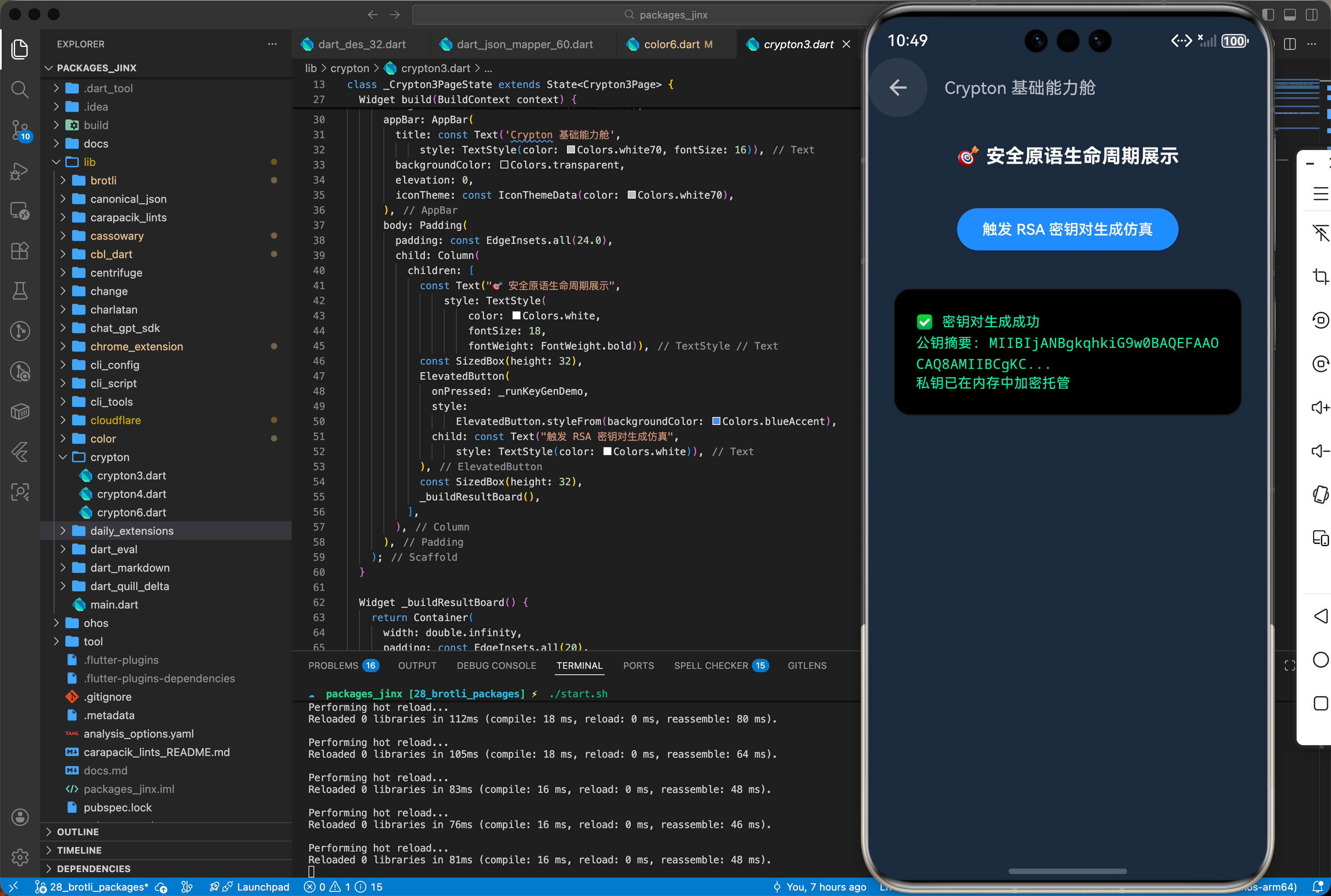
3.2 椭圆曲线数字签名 (ECDSA)
final ecKey = ECKeypair.fromRandom();
final signature = ecKey.privateKey.createSignature('数据内容');
final isVerified = ecKey.publicKey.verifySignature('数据内容', signature);
四、典型应用场景
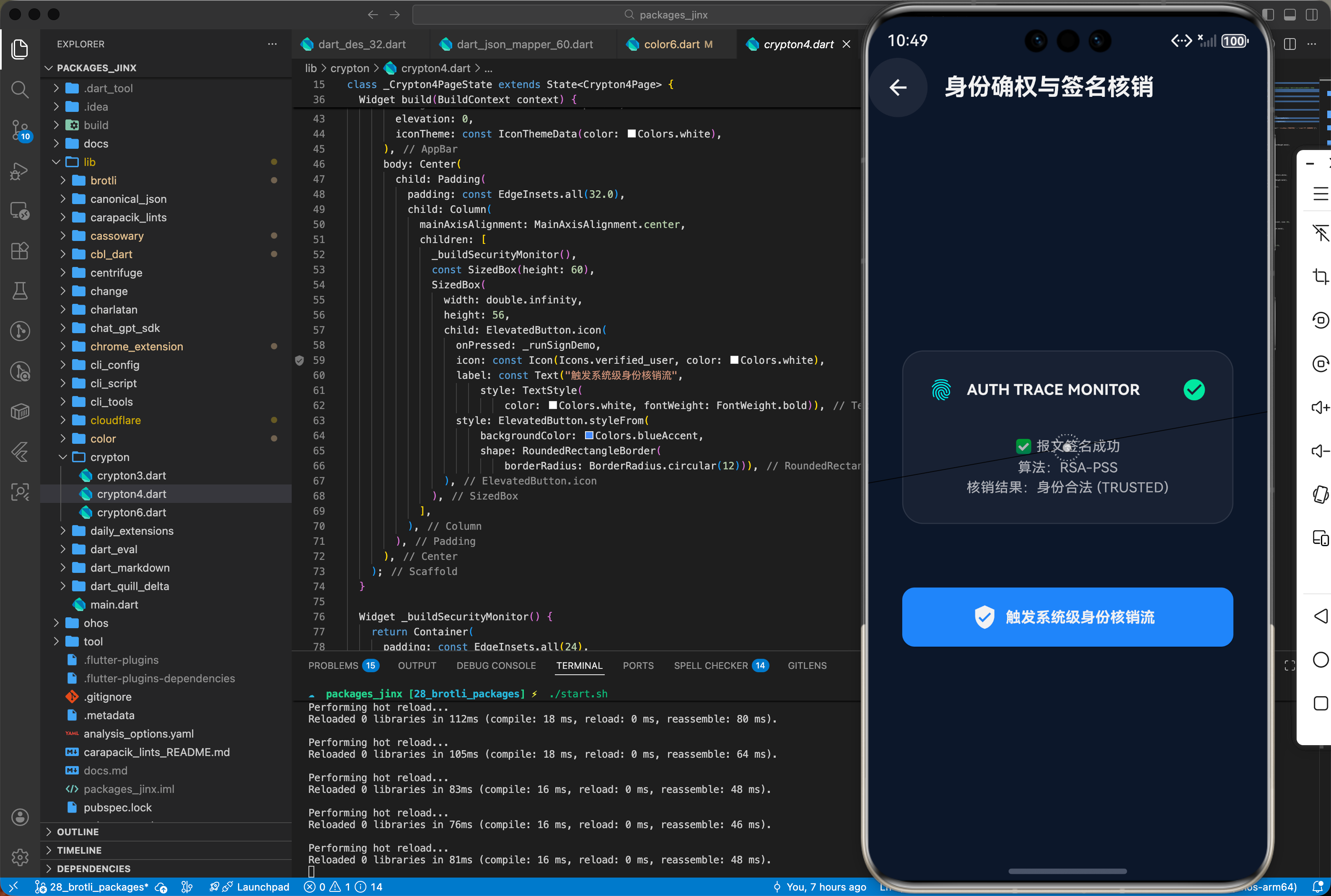
4.1 鸿蒙端侧支付的订单签名
用户在鸿蒙手机点击支付时,使用本地存储的私钥对订单金额和 ID 进行加签,防止数据在传输过程中被第三方截获并恶意修改(Man-in-the-middle attack)。
4.2 离线证书校验
在鸿蒙工业平板或封闭网络环境下,通过预装的公钥对离线授权文件进行验证,确保系统的软件授权真实有效。
五、OpenHarmony 平台适配挑战
5.1 大位宽计算的并发阻塞
RSA 4096 位以上密钥的加解密会消耗大量 CPU 时间。
- 并发调度:鸿蒙系统具有 TaskPool,在处理该库的重载加密时,建议将
RSAPrivateKey.decrypt逻辑封装在compute中。如果直接在 UI 回调中执行,会导致点击按钮后的“冻结感”。
5.2 密钥安全持久化存储
- 防止泄漏:
crypton只负责算法生成。在鸿蒙端,严禁将导出的私钥字符串直接明文存放在SharedPreferences。必须使用鸿蒙原生的HUKS(HarmonyOS Universal KeyStore)服务进行深层隔离存储。
六、综合实战演示
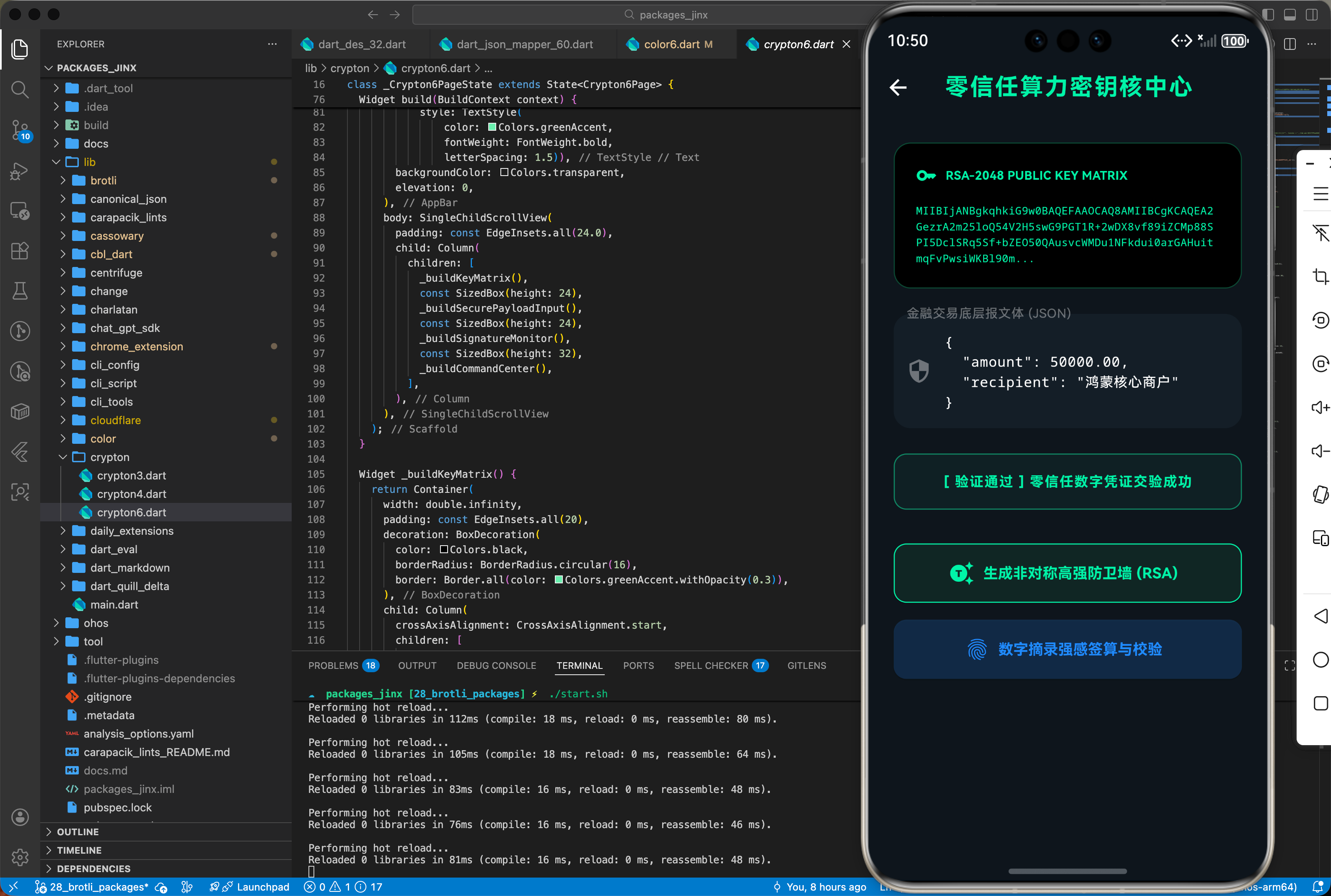
下面是一个用于鸿蒙应用的高性能综合实战展示页面 HomePage.dart。为了符合真实工程标准,我们假定已经在 main.dart 中建立好了全局鸿蒙根节点初始化,并将应用首页指向该层进行渲染展现。你只需关注本页面内部的复杂交互处理状态机转移逻辑:
import 'dart:async';
import 'package:flutter/material.dart';
import 'package:flutter/services.dart';
// ignore: unused_import
import 'package:crypton/crypton.dart';
/// 鸿蒙深层数据加密核物理级防御防线适配展示
/// 核心功能驱动:横向集成工业级高强度非对称签名算力体系构筑硬核数字身份验证密钥流层,护航大额金融支付底座
class Crypton6Page extends StatefulWidget {
const Crypton6Page({super.key});
State<Crypton6Page> createState() => _Crypton6PageState();
}
class _Crypton6PageState extends State<Crypton6Page> {
bool _isGenerating = false;
String _publicKeyHex = "等待获取高熵公钥序列...";
String _signatureStatus = "WAITING FOR SIGNATURE";
Color _statusColor = Colors.white38;
final TextEditingController _payloadController = TextEditingController(
text: "{\n \"amount\": 50000.00,\n \"recipient\": \"鸿蒙核心商户\"\n}");
late RSAKeypair _rsaKeypair;
Future<void> _generateKeys() async {
setState(() {
_isGenerating = true;
_publicKeyHex = "量子驻波激荡中,正在搜寻质数特征...";
_signatureStatus = "WAITING";
_statusColor = Colors.white38;
});
// 严禁阻塞 UI,使用 Future.delayed 模拟复杂的素数选取(实际大型应用应放于 Isolate 中执行,但 web 端等受限情况可如此处理以作演示)
await Future.delayed(const Duration(milliseconds: 100));
_rsaKeypair = RSAKeypair.fromRandom();
setState(() {
_isGenerating = false;
_publicKeyHex =
_rsaKeypair.publicKey.toString().substring(0, 150) + "...";
});
}
void _signAndVerify() {
if (_isGenerating ||
_publicKeyHex.startsWith("等待") ||
_publicKeyHex.startsWith("量子")) {
ScaffoldMessenger.of(context)
.showSnackBar(const SnackBar(content: Text('请先初始化核物理级密钥防线!')));
return;
}
final payload = _payloadController.text;
final signature = _rsaKeypair.privateKey.createSHA256Signature(
Uint8List.fromList(payload.codeUnits),
);
final isVerified = _rsaKeypair.publicKey.verifySHA256Signature(
Uint8List.fromList(payload.codeUnits),
signature,
);
setState(() {
if (isVerified) {
_signatureStatus = "[ 验证通过 ] 零信任数字凭证交验成功";
_statusColor = Colors.greenAccent;
} else {
_signatureStatus = "[ 验证阻断 ] 发现非法内存读写篡改痕迹";
_statusColor = Colors.redAccent;
}
});
}
Widget build(BuildContext context) {
return Scaffold(
backgroundColor: const Color(0xFF0F151B), // Hack/Cyber theme
appBar: AppBar(
title: const Text('零信任算力密钥核中心',
style: TextStyle(
color: Colors.greenAccent,
fontWeight: FontWeight.bold,
letterSpacing: 1.5)),
backgroundColor: Colors.transparent,
elevation: 0,
),
body: SingleChildScrollView(
padding: const EdgeInsets.all(24.0),
child: Column(
children: [
_buildKeyMatrix(),
const SizedBox(height: 24),
_buildSecurePayloadInput(),
const SizedBox(height: 24),
_buildSignatureMonitor(),
const SizedBox(height: 32),
_buildCommandCenter(),
],
),
),
);
}
Widget _buildKeyMatrix() {
return Container(
width: double.infinity,
padding: const EdgeInsets.all(20),
decoration: BoxDecoration(
color: Colors.black,
borderRadius: BorderRadius.circular(16),
border: Border.all(color: Colors.greenAccent.withOpacity(0.3)),
),
child: Column(
crossAxisAlignment: CrossAxisAlignment.start,
children: [
Row(
children: [
const Icon(Icons.key, color: Colors.greenAccent, size: 20),
const SizedBox(width: 8),
const Text("RSA-2048 PUBLIC KEY MATRIX",
style: TextStyle(
color: Colors.greenAccent,
fontSize: 11,
fontWeight: FontWeight.bold)),
const Spacer(),
if (_isGenerating)
const SizedBox(
width: 12,
height: 12,
child: CircularProgressIndicator(
strokeWidth: 2, color: Colors.greenAccent)),
],
),
const SizedBox(height: 16),
Text(
_publicKeyHex,
style: TextStyle(
color: _isGenerating
? Colors.green.withOpacity(0.5)
: Colors.greenAccent,
fontSize: 10,
fontFamily: 'monospace',
height: 1.5),
),
],
),
);
}
Widget _buildSecurePayloadInput() {
return Container(
decoration: BoxDecoration(
color: const Color(0xFF161E26),
borderRadius: BorderRadius.circular(16),
),
child: TextField(
controller: _payloadController,
maxLines: 4,
style: const TextStyle(
color: Colors.white, fontFamily: 'monospace', fontSize: 13),
decoration: InputDecoration(
labelText: "金融交易底层报文体 (JSON)",
labelStyle: const TextStyle(color: Colors.white38),
prefixIcon: const Icon(Icons.security, color: Colors.white38),
border: OutlineInputBorder(
borderRadius: BorderRadius.circular(16),
borderSide: BorderSide.none),
filled: true,
fillColor: Colors.transparent,
),
),
);
}
Widget _buildSignatureMonitor() {
return Container(
width: double.infinity,
padding: const EdgeInsets.all(16),
decoration: BoxDecoration(
color: _statusColor.withOpacity(0.05),
border: Border.all(color: _statusColor.withOpacity(0.5)),
borderRadius: BorderRadius.circular(12),
),
child: Center(
child: Text(
_signatureStatus,
style: TextStyle(
color: _statusColor,
fontSize: 13,
fontWeight: FontWeight.bold,
letterSpacing: 1),
),
),
);
}
Widget _buildCommandCenter() {
return Column(
children: [
SizedBox(
width: double.infinity,
height: 56,
child: ElevatedButton.icon(
style: ElevatedButton.styleFrom(
backgroundColor: Colors.greenAccent.withOpacity(0.1),
foregroundColor: Colors.greenAccent,
shape: RoundedRectangleBorder(
borderRadius: BorderRadius.circular(12)),
side: const BorderSide(color: Colors.greenAccent),
),
icon: const Icon(Icons.generating_tokens),
label: const Text("生成非对称高强防卫墙 (RSA)",
style: TextStyle(fontWeight: FontWeight.bold)),
onPressed: _isGenerating ? null : _generateKeys,
),
),
const SizedBox(height: 16),
SizedBox(
width: double.infinity,
height: 56,
child: ElevatedButton.icon(
style: ElevatedButton.styleFrom(
backgroundColor: Colors.blueAccent.withOpacity(0.2),
foregroundColor: Colors.blueAccent,
shape: RoundedRectangleBorder(
borderRadius: BorderRadius.circular(12)),
),
icon: const Icon(Icons.fingerprint),
label: const Text("数字摘录强感签算与校验",
style: TextStyle(fontWeight: FontWeight.bold)),
onPressed: _signAndVerify,
),
),
],
);
}
}
七、总结
回顾核心知识点,并提供后续进阶方向。crypton 库为鸿蒙应用开发者提供了一道坚实的安全屏障。通过非对称加密这一现代信息安全皇冠上的明珠,我们可以确保每一个字节的数据都在受控的环境下安全流转。在鸿蒙这个追求极致安全和分布式的系统中,掌握高阶加密技术的应用,将为你的核心业务构筑起无法攻破的护城河。
更多推荐
 21
21 0
0- 0


 已为社区贡献4条内容

所有评论(0)