
【C#深度学习之路】如何使用C#训练Yolov5模型并进行推理
本文为原创文章,若需要转载,请注明出处。
原文地址:https://blog.csdn.net/qq_30270773/article/details/143529308
项目对应的Github地址:https://github.com/IntptrMax/YoloSharp
C#深度学习之路专栏地址:https://blog.csdn.net/qq_30270773/category_12829217.html
关注我的Github,可以获取更多资料,请为你感兴趣的项目送上一颗小星星:https://github.com/IntptrMax
项目背景
Yolov5算法作为一种十分常见的视觉模型,大家并不陌生。这种模型被各行各业广泛使用。一般使用者都是再Python平台下进行训练,然后导出成onnx模型,供其他平台使用。这种使用方法必须经过一层转化,而且使用平台和训练平台大多不一样,存在一定的界限。
目前就我能找到的所有Yolov5的训练模型都是Python版本的,除Python以外的训练资料还没见到过。估计本文将会是第一份公开的如何使用除Python以外的平台训练Yolov5模型的重磅资料。如果该资料对你有帮助,请在我的Github上送我一颗小星星。该项目的Github链接为https://github.com/IntptrMax/YoloSharp
算法实现
本文将会从模型结构、数据预处理、模型的训练和推理使用几个方面进行介绍。
模型结构
Yolov5的模型分为BackBone、Head两个主要模块。Yolov5的官方模型又可以分为n、s、l、x等几种不同的尺寸。尺寸越大,模型复杂度越高,效果越好,但消耗的资源越多。详细情况可以参考Yolov5的官方项目。
本文的基础模型使用了Yolov5n,其官方定义如下:
depth_multiple: 0.33 # model depth multiple
width_multiple: 0.25 # layer channel multiple
anchors:
  - [10, 13, 16, 30, 33, 23] # P3/8
  - [30, 61, 62, 45, 59, 119] # P4/16
  - [116, 90, 156, 198, 373, 326] # P5/32

# YOLOv5 v6.0 backbone
backbone:
  # [from, number, module, args]
  [
    [-1, 1, Conv, [64, 6, 2, 2]], # 0-P1/2
    [-1, 1, Conv, [128, 3, 2]], # 1-P2/4
    [-1, 3, C3, [128]],
    [-1, 1, Conv, [256, 3, 2]], # 3-P3/8
    [-1, 6, C3, [256]],
    [-1, 1, Conv, [512, 3, 2]], # 5-P4/16
    [-1, 9, C3, [512]],
    [-1, 1, Conv, [1024, 3, 2]], # 7-P5/32
    [-1, 3, C3, [1024]],
    [-1, 1, SPPF, [1024, 5]], # 9
  ]

# YOLOv5 v6.0 head
head: [
    [-1, 1, Conv, [512, 1, 1]],
    [-1, 1, nn.Upsample, [None, 2, "nearest"]],
    [[-1, 6], 1, Concat, [1]], # cat backbone P4
    [-1, 3, C3, [512, False]], # 13

    [-1, 1, Conv, [256, 1, 1]],
    [-1, 1, nn.Upsample, [None, 2, "nearest"]],
    [[-1, 4], 1, Concat, [1]], # cat backbone P3
    [-1, 3, C3, [256, False]], # 17 (P3/8-small)

    [-1, 1, Conv, [256, 3, 2]],
    [[-1, 14], 1, Concat, [1]], # cat head P4
    [-1, 3, C3, [512, False]], # 20 (P4/16-medium)

    [-1, 1, Conv, [512, 3, 2]],
    [[-1, 10], 1, Concat, [1]], # cat head P5
    [-1, 3, C3, [1024, False]], # 23 (P5/32-large)

    [[17, 20, 23], 1, Detect, [nc, anchors]], # Detect(P3, P4, P5)
  ]
将其使用C#进行重写
public class Yolov5 : Module<Tensor, Tensor[]>
{
	internal readonly Sequential backbone;
	internal readonly ModuleList<Module<Tensor, Tensor>> head;
	internal readonly Detect dect;

	public Yolov5(int nc = 80, float depth_multiple = 0.33f, float width_multiple = 0.25f) : base("Yolov5")
	{
		float p3_d = 8.0f;
		float p4_d = 16.0f;
		float p5_d = 32.0f;
		float[][] ach = [[10/p3_d, 13 / p3_d, 16 / p3_d, 30 / p3_d, 33 / p3_d, 23/p3_d], // P3/8
				[30/p4_d, 61 / p4_d, 62 / p4_d, 45 / p4_d, 59 / p4_d, 119/p4_d],// P4/16
				[116/p5_d, 90 / p5_d, 156 / p5_d, 198 / p5_d, 373 / p5_d, 326/p5_d]];   // P5/32

		int[] ch = [(int)(256 * width_multiple), (int)(512 * width_multiple), (int)(1024 * width_multiple)];

		backbone = Sequential(
			new Conv(3, (int)(64 * width_multiple), 6, 2, 2),       //P1

			new Conv((int)(64 * width_multiple), (int)(128 * width_multiple), 3, 2),        //P2
			new C3((int)(128 * width_multiple), (int)(128 * width_multiple), (int)(3 * depth_multiple)),

			new Conv((int)(128 * width_multiple), (int)(256 * width_multiple), 3, 2),       //P3
			new C3((int)(256 * width_multiple), (int)(256 * width_multiple), (int)(6 * depth_multiple)),

			new Conv((int)(256 * width_multiple), (int)(512 * width_multiple), 3, 2),       //P4
			new C3((int)(512 * width_multiple), (int)(512 * width_multiple), (int)(9 * depth_multiple)),

			new Conv((int)(512 * width_multiple), (int)(1024 * width_multiple), 3, 2),      //P5
			new C3((int)(1024 * width_multiple), (int)(1024 * width_multiple), (int)(3 * depth_multiple)),
			new SPPF((int)(1024 * width_multiple), (int)(1024 * width_multiple), 5)
		);


		head = new ModuleList<Module<Tensor, Tensor>>
		{
			new Conv((int)(1024 * width_multiple), (int)(512 * width_multiple), 1, 1),
			Upsample(scale_factor: [2, 2], mode: UpsampleMode.Nearest),
			new C3((int)(1024 * width_multiple), (int)(512 * width_multiple), (int)(3 * depth_multiple),  false),    // [2]

			new Conv((int)(512 * width_multiple), (int)(256 * width_multiple), 1, 1),
			Upsample(scale_factor: [2, 2], mode: UpsampleMode.Nearest),
			new C3((int)(512 * width_multiple), (int)(256 * width_multiple), (int)(3 * depth_multiple), false),      // [5]

			new Conv((int)(256 * width_multiple), (int)(256 * width_multiple), 3, 2),
			new C3((int)(512 * width_multiple), (int)(512 * width_multiple), (int)(3 * depth_multiple), false),      // [7]

			new Conv((int)(512 * width_multiple), (int)(512 * width_multiple), 3, 2),
			new C3((int)(1024 * width_multiple), (int)(1024 * width_multiple), (int)(3 * depth_multiple), false)     // [9]
		};

		dect = new Detect(nc, ch, ach);
		RegisterComponents();

	}
}
Conv、C3、Detect模块的定义请见源代码。其中Detect模块在训练和推理时操作略有不同,此处需要注意。更改depth_multiple,width_multiple即可更改模型的尺寸。
数据预处理
Yolo模型的数据处理主要包括对图像的处理和label的处理。
Letterbox方法
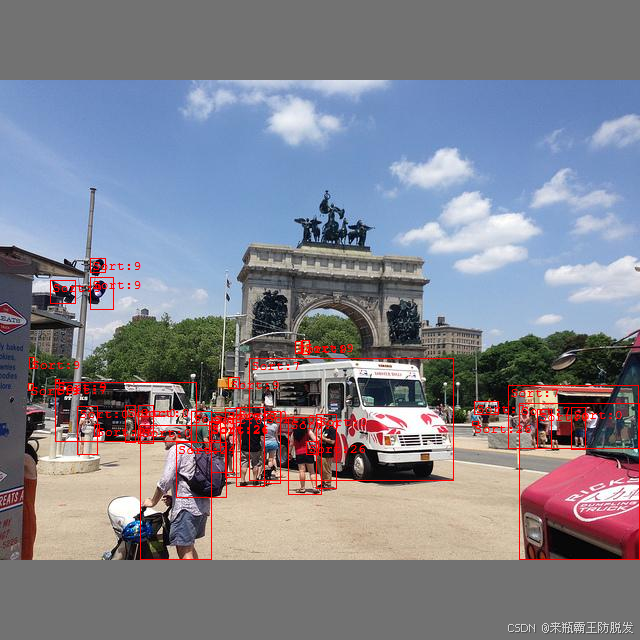
图像处理可以使用较为常见的Letterbox方法,即在图像长或短的一侧,通过补充灰色的边框,并且缩放,使图像数据集处理成尺寸统一的样式,以方便进行训练。Labels也需要根据Letterbox的变化进行缩放和位置平移。这个部分代码较为容易,此处不再赘述,可以参考源码。图片处理和标注效果如下:
Mosaic方法
另一种方法是使用Mosaic方法,这是一种使用随机图像,随机位置,随机缩放进行拼接的处理方法。官方提供了4拼和9拼两种方式,本项目提供了4拼的方式。4拼效果如下:
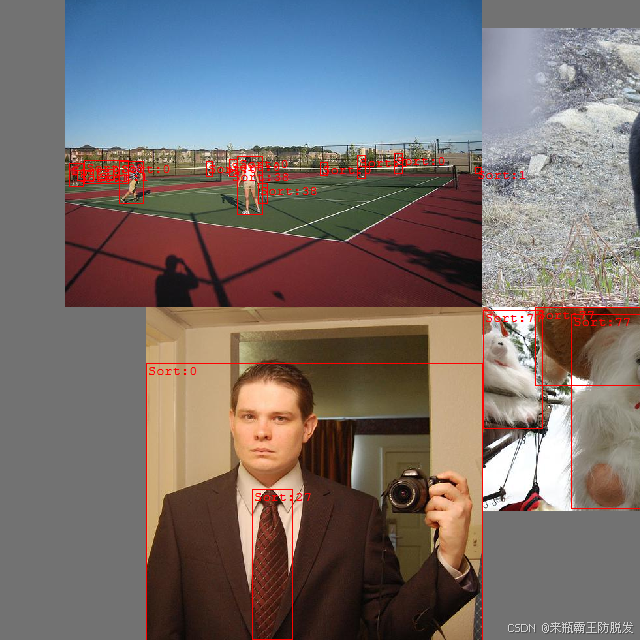
该方法的代码主要通过load_mosaic这个函数实现,这部分是该项目的第一个难点。
public (Tensor, Tensor) load_mosaic(long index)
{
	int[] mosaic_border = [-320, -320];
	Int64[] indexs = Sample(index, 0, (int)Count, 4);
	Random random = new Random();
	int xc = random.Next(-mosaic_border[0], 2 * imageSize + mosaic_border[0]);
	int yc = random.Next(-mosaic_border[1], 2 * imageSize + mosaic_border[1]);

	var img4 = torch.full([3, imageSize * 2, imageSize * 2], 114, ScalarType.Byte, device); // base image with 4 tiles
	List<Tensor> label4 = new List<Tensor>();
	for (int i = 0; i < 4; i++)
	{
		int x1a = 0, y1a = 0, x2a = 0, y2a = 0, x1b = 0, y1b = 0, x2b = 0, y2b = 0;
		Tensor img = GetOrgImage(indexs[i]).to(device);
		//img = ResizeImage(img, resizeHeight);
		int h = (int)img.shape[1];
		int w = (int)img.shape[2];
		if (i == 0)  // top left
		{
			(x1a, y1a, x2a, y2a) = (Math.Max(xc - w, 0), Math.Max(yc - h, 0), xc, yc);  // xmin, ymin, xmax, ymax (large image))
			(x1b, y1b, x2b, y2b) = (w - (x2a - x1a), h - (y2a - y1a), w, h); // xmin, ymin, xmax, ymax (small image);
		}
		else if (i == 1)  // top right
		{
			(x1a, y1a, x2a, y2a) = (xc, Math.Max(yc - h, 0), Math.Min(xc + w, imageSize * 2), yc);
			(x1b, y1b, x2b, y2b) = (0, h - (y2a - y1a), Math.Min(w, x2a - x1a), h);
		}
		else if (i == 2)  // bottom left
		{
			(x1a, y1a, x2a, y2a) = (Math.Max(xc - w, 0), yc, xc, Math.Min(imageSize * 2, yc + h));
			(x1b, y1b, x2b, y2b) = (w - (x2a - x1a), 0, w, Math.Min(y2a - y1a, h));
		}
		else if (i == 3) // bottom right
		{
			(x1a, y1a, x2a, y2a) = (xc, yc, Math.Min(xc + w, imageSize * 2), Math.Min(imageSize * 2, yc + h));
			(x1b, y1b, x2b, y2b) = (0, 0, Math.Min(w, x2a - x1a), Math.Min(y2a - y1a, h));
		}
		img4[0..3, y1a..y2a, x1a..x2a] = img[0..3, y1b..y2b, x1b..x2b];

		int padw = x1a - x1b;
		int padh = y1a - y1b;

		Tensor labels = GetOrgLabelTensor(indexs[i]).to(device);
		labels[TensorIndex.Ellipsis, 1..5] = xywhn2xyxy(labels[TensorIndex.Ellipsis, 1..5], w, h, padw, padh);
		label4.Add(labels);
	}
	var labels4 = torch.concat(label4, 0);

	labels4[TensorIndex.Ellipsis, 1..5] = labels4[TensorIndex.Ellipsis, 1..5].clip(0, 2 * imageSize);

	var (im, targets) = random_perspective(img4, labels4, degrees: 0, translate: 0.1f, scale: 0.5f, shear: 0, perspective: 0.0f, mosaic_border[0], mosaic_border[1]);

	targets[TensorIndex.Ellipsis, 1..5] = xyxy2xywhn(targets[TensorIndex.Ellipsis, 1..5], w: (int)im.shape[1], h: (int)im.shape[2], clip: true, eps: 1e-3f);
	return (im, targets);
}
这段代码选定了一个指定编号的图像,然后再随机选取三个其他编号图像,进行随机位置、随机尺寸的缩放。除了常规的变化外,还可以操作旋转变化,可以在Obb等方式中使用。相应的labels也需要根据变化的参数一并变化。
模型训练
对单个数据进行了预处理,若使用BatchSize不为1时,还需要对Label再进行进一步处理。原始的label提供的格式为{分类, x, y, w, h}但是这个在进行loss计算时,由于每张图中labels数量不一样,所以不能简单使用concat进行拼接。此处作者增加了一个维度,记录了对应的图片的序号,Tensor的形状变为了[c,6],其中C为总的labels的数量。假设c=0时,获得一组数据[0,4,0.2,0.1,0.5,0.7],该数据表示为第0张图片,label的编号为4,x=0.2,y=0.1,w=0.5,h=0.7,第0张图的0不是对应总数据集的0,而是对应BatchSize这一组中的第0张照片。这一部分的数据产生和理解是该项目的第二个难点。
这个项目第三个难点就是loss函数的计算。
先看一下loss函数的组成:
public class Yolov5Loss : Module<Tensor[], Tensor, (Tensor, Tensor)>
{
	private readonly float lambda_coord = 5.0f;
	private readonly float lambda_noobj = 0.5f;
	private readonly float cp;
	private readonly float cn;
	private float[] balance;
	private readonly int ssi;
	private readonly float gr;
	private readonly bool autobalance;
	private readonly int na;
	private readonly int nc;
	private readonly int nl;
	private readonly float[][] anchors;

	private Device device = new Device(DeviceType.CPU);

	private readonly float anchor_t = 4.0f;
	private readonly bool sort_obj_iou = false;
	private readonly float h_box = 0.05f;
	private readonly float h_obj = 1.0f;
	private readonly float h_cls = 0.5f;
	private readonly float h_cls_pw = 1.0f;
	private readonly float h_obj_pw = 1.0f;
	private readonly float fl_gamma = 0.0f;
	private readonly float h_label_smoothing = 0.0f;

	public Yolov5Loss(int nc = 80, bool autobalance = false) : base("Yolov5Loss")
	{
		int model_nl = 3;
		int[] model_stride = [8, 16, 32];
		float p3_d = 8.0f;
		float p4_d = 16.0f;
		float p5_d = 32.0f;
		float[][] anchors = [[10/p3_d, 13 / p3_d, 16 / p3_d, 30 / p3_d, 33 / p3_d, 23/p3_d],
				[30/p4_d, 61 / p4_d, 62 / p4_d, 45 / p4_d, 59 / p4_d, 119/p4_d],
				[116/p5_d, 90 / p5_d, 156 / p5_d, 198 / p5_d, 373 / p5_d, 326/p5_d]];

		(this.cp, this.cn) = Smooth_BCE(h_label_smoothing);
		this.balance = model_nl == 3 ? [4.0f, 1.0f, 0.4f] : [4.0f, 1.0f, 0.25f, 0.06f, 0.02f];
		this.ssi = autobalance ? model_stride.ToList().IndexOf(16) : 0;
		this.gr = 1.0f;
		this.autobalance = autobalance;

		this.nl = anchors.Length;
		this.na = anchors[0].Length / 2; // =3 获得每个grid的anchor数量
		this.nc = nc; // number of classes
		this.anchors = anchors;
	}
}
这里就将锚框(anchors)加入进来了。
loss模块的实现还是相当复杂的,具体实现如下,如果想要理解Yolov5模型,此处需要下功夫认真阅读:
public override (Tensor, Tensor) forward(Tensor[] preds, Tensor targets)
{
	this.device = targets.device;
	var BCEcls = BCEWithLogitsLoss(pos_weights: torch.tensor(new float[] { h_cls_pw }, device: this.device));
	var BCEobj = BCEWithLogitsLoss(pos_weights: torch.tensor(new float[] { h_obj_pw }, device: this.device));

	//var BCEcls = new FocalLoss(BCEWithLogitsLoss(pos_weights: torch.tensor(new float[] { h_cls_pw }, device: this.device)), fl_gamma);
	//var BCEobj = new FocalLoss(BCEWithLogitsLoss(pos_weights: torch.tensor(new float[] { h_obj_pw }, device: this.device)), fl_gamma);

	var lcls = torch.zeros(1, device: this.device);  // class loss
	var lbox = torch.zeros(1, device: this.device);  // box loss
	var lobj = torch.zeros(1, device: this.device);  // object loss

	var (tcls, tbox, indices, anchors) = build_targets(preds, targets);
	Tensor tobj = torch.zeros(0);
	for (int i = 0; i < preds.Length; i++)
	{
		var pi = preds[i].clone();
		var b = indices[i][0];
		var a = indices[i][1];
		var gj = indices[i][2];
		var gi = indices[i][3];
		tobj = torch.zeros(preds[i].shape.Take(4).ToArray(), device: this.device);  // targets obj
		long n = b.shape[0];
		if (n > 0)
		{
			var temp = pi[b, a, gj, gi].split([2, 2, 1, this.nc], 1);
			var pxy = temp[0];
			var pwh = temp[1];
			var pcls = temp[3];

			pxy = pxy.sigmoid() * 2 - 0.5f;
			pwh = (pwh.sigmoid() * 2).pow(2) * anchors[i];
			var pbox = torch.cat([pxy, pwh], 1);  // predicted box
			var iou = bbox_iou(pbox, tbox[i], CIoU: true).squeeze();  // iou(prediction, targets)
			lbox += (1.0f - iou).mean();  // iou loss

			// Objectness
			iou = iou.detach().clamp(0).type(tobj.dtype);

			if (this.sort_obj_iou)
			{
				var j = iou.argsort();
				(b, a, gj, gi, iou) = (b[j], a[j], gj[j], gi[j], iou[j]);
			}
			if (this.gr < 1)
			{
				iou = (1.0f - this.gr) + this.gr * iou;
			}

			tobj[b, a, gj, gi] = iou;   // iou ratio

			// Classification
			if (this.nc > 1)  // cls loss (only if multiple classes)
			{
				var tt = torch.full_like(pcls, this.cn, device: this.device);  // targets
				tt[torch.arange(n), tcls[i]] = this.cp;
				lcls += BCEcls.forward(pcls, tt);  // BCE
			}

		}

		var obji = BCEobj.forward(pi[TensorIndex.Ellipsis, 4], tobj);
		lobj += obji * this.balance[i];  // obj loss
		if (this.autobalance)
		{
			this.balance[i] = this.balance[i] * 0.9999f + 0.0001f / obji.detach().item<float>();
		}


	}
	if (this.autobalance)
	{
		for (int i = 0; i < this.balance.Length; i++)
		{
			balance[i] = this.balance[i] / this.balance[this.ssi];
		}
	}

	lbox *= h_box;

	lobj *= h_obj;

	lcls *= h_cls;

	long bs = tobj.shape[0];  // batch size


	return ((lbox + lobj + lcls) * bs, torch.cat([lbox, lobj, lcls]).detach());
}

//已经检查OK
private (List<Tensor>, List<Tensor>, List<List<Tensor>>, List<Tensor>) build_targets(Tensor[] p, Tensor targets)
{
	var tcls = new List<Tensor>();
	var tbox = new List<Tensor>();
	var indices = new List<List<Tensor>>();
	var anch = new List<Tensor>();
	int na = this.na;
	int nt = (int)targets.shape[0];  // number of anchors, targets
									 //tcls, tbox, indices, anch = [], [], [], []
	var gain = torch.ones(7, device: this.device);// normalized to gridspace gain
	var ai = torch.arange(na, device: this.device).@float().view(na, 1).repeat(1, nt);  // same as .repeat_interleave(nt)
	targets = torch.cat([targets.repeat(na, 1, 1), ai.unsqueeze(-1)], 2);// append anchor indices


	float g = 0.5f;  // bias
	var off = torch.tensor(new int[,] { { 0, 0 }, { 1, 0 }, { 0, 1 }, { -1, 0 }, { 0, -1 } }, device: this.device) * g;
	for (int i = 0; i < this.nl; i++)
	{
		Tensor anchors = this.anchors[i];
		anchors = anchors.view(3, 2).to(this.device);
		var shape = p[i].shape;
		var temp = torch.tensor(new float[] { shape[3], shape[2], shape[3], shape[2] }, device: this.device);

		gain.index_put_(temp, new long[] { 2, 3, 4, 5 });
		var t = targets * gain;
		Tensor offsets = torch.zeros(0, device: this.device);
		if (nt != 0)
		{
			var r = t[TensorIndex.Ellipsis, TensorIndex.Slice(4, 6)] / anchors.unsqueeze(1);
			var j = torch.max(r, 1 / r).max(2).values < anchor_t;  // compare
			t = t[j];  //filter
			var gxy = t[TensorIndex.Ellipsis, TensorIndex.Slice(2, 4)];   // grid xy
			var gxi = gain[TensorIndex.Ellipsis, TensorIndex.Slice(2, 4)] - gxy; // inverse
			Tensor jk = ((gxy % 1 < g) & (gxy > 1)).T;
			j = jk[0];
			var k = jk[1];
			Tensor lm = ((gxi % 1 < g) & (gxi > 1)).T;
			var l = lm[0];
			var m = lm[1];
			j = torch.stack([torch.ones_like(j), j, k, l, m]);
			t = t.repeat([5, 1, 1])[j];
			offsets = (torch.zeros_like(gxy).unsqueeze(0) + off.unsqueeze(1))[j];
		}
		else
		{
			t = targets[0];
			offsets = torch.zeros(1);
		}

		Tensor[] ck = t.chunk(4, 1); // (image, class), grid xy, grid wh, anchors
		var bc = ck[0];
		var gxy_ = ck[1];
		var gwh = ck[2];
		var a = ck[3];

		a = a.@long().view(-1);
		bc = bc.@long().T; // anchors, image, class
		Tensor b = bc[0];
		Tensor c = bc[1];

		var gij = (gxy_ - offsets).@long();// grid indices
		var gi = gij.T[0];
		var gj = gij.T[1];

		indices.Add(new List<Tensor> { b, a, gj.clamp_(0, shape[2] - 1), gi.clamp_(0, shape[3] - 1) });// image, anchor, grid
		tbox.Add(torch.cat([gxy_ - gij, gwh], 1));  // box
		anch.Add(anchors[a]); // anchors
		tcls.Add(c);// class
	}
	return (tcls, tbox, indices, anch);

}

//已经检查OK
private Tensor bbox_iou(Tensor box1, Tensor box2, bool xywh = true, bool GIoU = false, bool DIoU = false, bool CIoU = false, float eps = 1e-7f)
{
	Tensor b1_x1, b1_x2, b1_y1, b1_y2;
	Tensor b2_x1, b2_x2, b2_y1, b2_y2;
	Tensor w1, h1, w2, h2;

	if (xywh)  // transform from xywh to xyxy
	{
		Tensor[] xywh1 = box1.chunk(4, -1);
		Tensor x1 = xywh1[0];
		Tensor y1 = xywh1[1];
		w1 = xywh1[2];
		h1 = xywh1[3];

		Tensor[] xywh2 = box2.chunk(4, -1);
		Tensor x2 = xywh2[0];
		Tensor y2 = xywh2[1];
		w2 = xywh2[2];
		h2 = xywh2[3];

		var (w1_, h1_, w2_, h2_) = (w1 / 2, h1 / 2, w2 / 2, h2 / 2);
		(b1_x1, b1_x2, b1_y1, b1_y2) = (x1 - w1_, x1 + w1_, y1 - h1_, y1 + h1_);
		(b2_x1, b2_x2, b2_y1, b2_y2) = (x2 - w2_, x2 + w2_, y2 - h2_, y2 + h2_);
	}

	else  // x1, y1, x2, y2 = box1
	{
		Tensor[] b1x1y1x2y2 = box1.chunk(4, -1);
		b1_x1 = b1x1y1x2y2[0];
		b1_y1 = b1x1y1x2y2[1];
		b1_x2 = b1x1y1x2y2[2];
		b1_y2 = b1x1y1x2y2[3];

		Tensor[] b2x1y1x2y2 = box2.chunk(4, -1);
		b2_x1 = b2x1y1x2y2[0];
		b2_y1 = b2x1y1x2y2[1];
		b2_x2 = b2x1y1x2y2[2];
		b2_y2 = b2x1y1x2y2[3];

		(w1, h1) = (b1_x2 - b1_x1, (b1_y2 - b1_y1).clamp(eps));
		(w2, h2) = (b2_x2 - b2_x1, (b2_y2 - b2_y1).clamp(eps));
	}

	// Intersection area
	var inter = (b1_x2.minimum(b2_x2) - b1_x1.maximum(b2_x1)).clamp(0) * (b1_y2.minimum(b2_y2) - b1_y1.maximum(b2_y1)).clamp(0);

	// Union Area
	var union = w1 * h1 + w2 * h2 - inter + eps;

	// IoU
	var iou = inter / union;
	if (CIoU || DIoU || GIoU)
	{
		var cw = b1_x2.maximum(b2_x2) - b1_x1.minimum(b2_x1);  //convex (smallest enclosing box) width
		var ch = b1_y2.maximum(b2_y2) - b1_y1.minimum(b2_y1);  // convex height
		if (CIoU || DIoU)  // Distance or Complete IoU https://arxiv.org/abs/1911.08287v1
		{
			var c2 = cw.pow(2) + ch.pow(2) + eps;   //convex diagonal squared
			var rho2 = ((b2_x1 + b2_x2 - b1_x1 - b1_x2).pow(2) + (b2_y1 + b2_y2 - b1_y1 - b1_y2).pow(2)) / 4;   //center dist ** 2

			if (CIoU)  // https://github.com/Zzh-tju/DIoU-SSD-pytorch/blob/master/utils/box/box_utils.py#L47
			{
				var v = (4 / (MathF.PI * MathF.PI)) * (torch.atan(w2 / h2) - torch.atan(w1 / h1)).pow(2);
				using (torch.no_grad())
				{
					var alpha = v / (v - iou + (1 + eps));
					return iou - (rho2 / c2 + v * alpha);  //CIoU
				}
			}
			return iou - rho2 / c2;  // DIoU
		}
		var c_area = cw * ch + eps;    // convex area
		return iou - (c_area - union) / c_area;  // GIoU https://arxiv.org/pdf/1902.09630.pdf
	}
	return iou; //IoU
}
有了loss函数以后,就可以按照常规的训练方法进行训练了。训练过程请参考源码。
推理过程
推理过程十分简单,加载图片和模型后进行推理,可以得到三个输出层,分别为p3_out,p4_out,p5_out,将这三个层进行拼接,即可得到一般用onnx模型推理结果得到的[bs,25200,nc+5]形状的输出,这个时候可以使用之前的处理方式进行后续数据处理,也可以使用Detect层的方式处理。
public override Tensor[] forward(Tensor[] x)
{
	List<Tensor> z = new List<Tensor>();
	for (int i = 0; i < nl; i++)
	{
		x[i] = ((Module<Tensor, Tensor>)m[i]).forward(x[i]);
		long bs = x[i].shape[0];
		int ny = (int)x[i].shape[2];
		int nx = (int)x[i].shape[3];
		x[i] = x[i].view(bs, this.na, this.no, ny, nx).permute(0, 1, 3, 4, 2).contiguous();
		if (!this.training)
		{
			(this.grid[i], this.anchor_grid[i]) = _make_grid(nx, ny, i);
			Tensor[] re = x[i].sigmoid().split([2, 2, this.nc + 1], 4);
			Tensor xy = re[0];
			Tensor wh = re[1];
			Tensor conf = re[2];

			xy = (xy * 2 + this.grid[i]) * this.stride[i];  // xy
			wh = (wh * 2).pow(2) * this.anchor_grid[i];  // wh
			Tensor y = torch.cat([xy, wh, conf], 4);
			z.Add(y.view(bs, this.na * nx * ny, this.no));
		}
	}

	if (this.training)
	{
		return x;
	}
	else
	{
		var list = new List<Tensor>() { torch.cat(z, 1) };
		list.AddRange(x);
		return list.ToArray();
	}
}
用Detect层的处理方式处理后,可以得到真实坐标值,而不仅是比例值了。
项目效果
目前本项目已经解决了因为没有初始权重带来的训练困难的问题。现在已经可以加载Yolov5原始项目中提供的权重,可以得到和Yolov5项目中相同的推理效果。也可以通过加载原始权重训练自己的模型,需要的训练轮数可以大幅下降。
例如下图为使用Yolov5n模型权重推理效果,Sort:4即为飞机。

项目展望
本项目目前实现了Detect功能,除了这个功能还有Segment、Classify,Yolov8、Yolov10、Yolov11还有Pose功能,如果有兴趣可以仿照本项目自行修改。
写在最后
使用C#深度学习项目是很多人所希望的。不过在该方向上资料很少,开发难度大。常规使用C#进行深度学习项目的方法为使用Python训练,转为Onnx模型再用C#调用。
目前我希望能够改变这一现象,希望能用纯C#平台进行训练和推理。这条路还很长,也很困难,希望有兴趣的读者能跟我一起让让C#的深度学习开发环境更为完善,以此能帮助到更多的人。
我在Github上已经将完整的代码发布了,项目地址为:https://github.com/IntptrMax/YoloSharp,期待你能在Github上送我一颗小星星。在我的Github里还GGMLSharp这个项目,这个项目也是C#平台下深度学习的开发包,希望能得到你的支持。
项目下载链接
https://download.csdn.net/download/qq_30270773/89969923
本项目支持的权重下载链接在我的Github项目上,已经提供了n、s、m、l、x五种不同的初始权重,如果需要可以自行下载。
更多推荐



 37
37 0
0- 0


 已为社区贡献2条内容

所有评论(0)