
目标检测:YOLO+Opencv
在篇博文中,我们将学习如何使用YOLO对象检测器来检测图像和视频流中的目标,其中用到了深度学习、OpenCV和Python。目标检测,不仅要确定图像中目标类别,而且还要确定给定目标在图像中的驻留位置。首先简单讨论一下YOLO对象检测器,包括目标检测器如何流程:
(1)将YOLO对象检测器应用于图像(2)将YOLO应用于视频流。
并在后面,讨论一下YOLO对象检测器的一些缺点,包括个人的一些技巧和建议。
1、YOLO对象检测器介绍

关于深度学习的目标检测,你会遇到三种主要的对象检测器:(1)R-CNN及包括原来的R-CNN,快速R-CNN,和更快R-CNN;(2)单发探测器(ssd);(3)YOLO。R- cnn是最早的基于深度学习的对象检测器之一,是两级检测器。
标准R-CNN非常慢,不是一个完整的端到端对象检测器。Girshick等人在2015年发表了第二篇论文,题为Fast R-CNN。Fast -CNN算法对原始的R-CNN进行了很大的改进,即提高了准确率,减少了向前传递所需的时间;但该模型仍然依赖于外部区域提议算法。直到Girshick等人2015年发表的后续论文《Faster R-CNN》:基于区域提议网络RPN的现实目标检测,R-CNNs成为一个真正的端到端深度学习目标检测器,通过去除选择性搜索要求,而不再依赖于区域提议网络(RPN),该区域提议网络RPN是完全卷积的,(2)可以预测对象边界框和“对象”得分(即,量化图像某区域包含图像的可能性的分数),再把RPN的输出传递到R-CNN组件进行最终分类和标记。虽然R-CNN非常准确,但R-CNN网络家族问题在于它们的速度——它们非常慢,在GPU上只能获得5帧/秒。为提高基于深度学习对象检测器的速度,Single Shot detector (ssd)和YOLO都使用One-Stage检测器策略。
One-Stage检测器策略将目标检测视为一个回归问题,取给定的输入图像,同时学习边界盒坐标和相应的类标签概率。一般来说,One-Stage检测器比Two-Stage检测器精度低,但速度快得多。YOLO是一个很好的例子。首先由Redmon等人在2015年提出《You Only Look Once: Unified, Real-Time Object Detection》,介绍YOLO能够在GPU上获得45 帧/秒的检测速度,其中的另一个版本“Fast YOLO”声称在GPU上可以达到155 帧/秒。YOLO同样经历了许多不同的迭代,包括YOLO9000(即YOLOv2),能够检测超过9000个物体探测器。Redmon和Farhadi通过对目标检测和分类进行联合训练,能够实现如此大量的目标检测。采用联合训练的方法,在ImageNet分类数据集和COCO检测数据集上同时对YOLO9000进行训练,在COCO数据集上,YOLO9000达到了16%的平均精度(mAP)。COCO数据集由80个标签组成,其中包括:人、自行车、汽车、卡车、飞机、停车标志等,下面介绍如何使用YOLOv3进行目标检测。
2、项目结构
项目包括4个目录和两个Python文件,目录:YOLOV3对象检测器预先训练(在COCO数据集上)模型文件。images/:这个文件夹包含四个图像,将对它们进行对象检测,以进行测试和评估。Video/:实时处理的视频。output/:输出YOLO处理过的视频和带有边界框和类名的标注annotation可放在这个文件夹中。

文件夹存在两个Python脚本:yolo.py和yolo video.py。第一个用于图像,然后第二个脚本中应用到视频中。
3、对图像进行检测
在YOLO对象检测器应用于图像,在你的项目中新建yolo.py文件并插入以下代码:
# import the necessary packages
import numpy as np
import argparse
import time
import cv2
import os
# construct the argument parse and parse the arguments
ap = argparse.ArgumentParser()
ap.add_argument("-i", "--image", required=True,
	help="path to input image")
ap.add_argument("-y", "--yolo", required=True,
	help="base path to YOLO directory")
ap.add_argument("-c", "--confidence", type=float, default=0.5,
	help="minimum probability to filter weak detections")
ap.add_argument("-t", "--threshold", type=float, default=0.3,
	help="threshold when applying non-maxima suppression")
args = vars(ap.parse_args())

# load the COCO class labels our YOLO model was trained on
labelsPath = os.path.sep.join([args["yolo"], "coco.names"])
LABELS = open(labelsPath).read().strip().split("\n")
# initialize a list of colors to represent each possible class label
np.random.seed(42)
COLORS = np.random.randint(0, 255, size=(len(LABELS), 3),
	dtype="uint8")
这个py文件需要安装OpenCV 3.4.2+Python环境,可以使用pip install opencv-python安装Opencv python版本。推荐使用OpenCV 3.4.2+。导入所需的包,OpenCV和NumPy,解释器分析四个命令行参数,命令行参数在运行时处理,从终端更改脚本的输入。
——image:输入待检测图像的路径。
——yolo: yolo-coco目录路径,便于脚本加载所需的YOLO文件,在图像上执行对象检测
——confidence:过滤弱检测的最小概率,默认值设定为50%(0.5)。
——threshold:这是我们的非最大抑制阈值,IOU阈值,默认值为0.3。
解析参数之后,args现在是一个字典,包含命令行参数的键值对。下面是加载类标签,并为每个标签设置随机颜色,在加载所有的类LABELS(args ["yolo"]),然后将随机颜色分配给每个标签。
注:OpenCV 3.4.2可运行这段代码,该版本加载了YOLO所需的dnn模块。
# load our input image and grab its spatial dimensions
image = cv2.imread(args["image"])
(H, W) = image.shape[:2]
# determine only the *output* layer names that we need from YOLO
ln = net.getLayerNames()
ln = [ln[i[0] - 1] for i in net.getUnconnectedOutLayers()]
# construct a blob from the input image and then perform a forward
# pass of the YOLO object detector, giving us our bounding boxes and
# associated probabilities
blob = cv2.dnn.blobFromImage(image, 1 / 255.0, (416, 416),
	swapRB=True, crop=False)
net.setInput(blob)
start = time.time()
layerOutputs = net.forward(ln)
end = time.time()
# show timing information on YOLO
print("[INFO] YOLO took {:.6f} seconds".format(end - start))
然后加载输入图像并提取其尺寸、 从YOLO模型确定输出层名称、从图像构建一个blob对象、 通过我们的YOLO网络推理检测目标、显示YOLO的推断时间。
# initialize our lists of detected bounding boxes, confidences, and
# class IDs, respectively
boxes = []
confidences = []
classIDs = []
boxes:物体周围的包围方框。confidence: YOLO分配给对象的置信度值。较低的置信值表明该对象可能不是待检目标。网络将过滤掉不满足0.5阈值的对象。classIDs:被检测对象的类标签。
# loop over each of the layer outputs
for output in layerOutputs:
	# loop over each of the detections
	for detection in output:
		# extract the class ID and confidence (i.e., probability) of
		# the current object detection
		scores = detection[5:]
		classID = np.argmax(scores)
		confidence = scores[classID]
		# filter out weak predictions by ensuring the detected
		# probability is greater than the minimum probability
		if confidence > args["confidence"]:
			# scale the bounding box coordinates back relative to the
			# size of the image, keeping in mind that YOLO actually
			# returns the center (x, y)-coordinates of the bounding
			# box followed by the boxes' width and height
			box = detection[0:4] * np.array([W, H, W, H])
			(centerX, centerY, width, height) = box.astype("int")
			# use the center (x, y)-coordinates to derive the top and
			# and left corner of the bounding box
			x = int(centerX - (width / 2))
			y = int(centerY - (height / 2))
			# update our list of bounding box coordinates, confidences,
			# and class IDs
			boxes.append([x, y, int(width), int(height)])
			confidences.append(float(confidence))
			classIDs.append(classID)
循环遍历每个层输出、对输出中的每个检测进行循环、提取classID和置信值、使用置信度过滤弱检测,过滤掉了不需要的检测。下面要缩放边界框坐标,这样就可以在原始图像上正确地显示它们。提取边界框的坐标和尺寸,以下形式返回位框坐标:(centerx, centtery, width, and height),然后使用此坐标信息计算出边界框的左上角(x, y)坐标。
# apply non-maxima suppression to suppress weak, overlapping bounding
# boxes
idxs = cv2.dnn.NMSBoxes(boxes, confidences, args["confidence"],
	args["threshold"])
我们应用非极大值抑制算法NMS,抑制目标包围盒的重叠,只保留最可靠的包围盒。NMS还确保我们没有任何多余或无关的边界框。利用OpenCV内置的NMS DNN模块实现,对网络检测到的包围框进行非最大抑制,筛选。我们所需要做的就是提交我们的参数,边界框、置信度以及置信度阈值和NMS阈值。
# ensure at least one detection exists
if len(idxs) > 0:
	# loop over the indexes we are keeping
	for i in idxs.flatten():
		# extract the bounding box coordinates
		(x, y) = (boxes[i][0], boxes[i][1])
		(w, h) = (boxes[i][2], boxes[i][3])
		# draw a bounding box rectangle and label on the image
		color = [int(c) for c in COLORS[classIDs[i]]]
		cv2.rectangle(image, (x, y), (x + w, y + h), color, 2)
		text = "{}: {:.4f}".format(LABELS[classIDs[i]], confidences[i])
		cv2.putText(image, text, (x, y - 5), cv2.FONT_HERSHEY_SIMPLEX,
			0.5, color, 2)
# show the output image
cv2.imshow("Image", image)
cv2.waitKey(0)
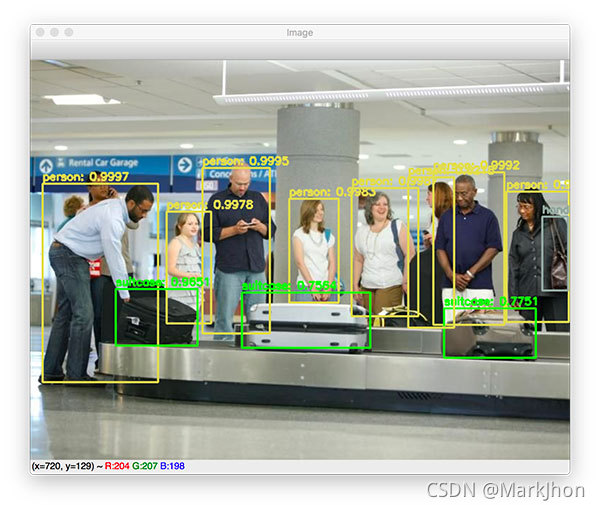
接下来就是,将筛选后的目标类别和包围框打印出来。假设至少存在一个检测目标,继续循环遍历idxs,简单地使用随机的类颜色在图像上绘制边界框和文本、最后显示结果图像,直到用户按下键盘上的任何键退出。
$ python yolo.py --image images/baggage_claim.jpg --yolo yolo-coco
[INFO] loading YOLO from disk...
[INFO] YOLO took 0.347815 seconds
4、视频流中的YOLO对象检测
新建yolo video.py文件,插入以下代码:
# import the necessary packages
import numpy as np
import argparse
import imutils
import time
import cv2
import os
# construct the argument parse and parse the arguments
ap = argparse.ArgumentParser()
ap.add_argument("-i", "--input", required=True,
	help="path to input video")
ap.add_argument("-o", "--output", required=True,
	help="path to output video")
ap.add_argument("-y", "--yolo", required=True,
	help="base path to YOLO directory")
ap.add_argument("-c", "--confidence", type=float, default=0.5,
	help="minimum probability to filter weak detections")
ap.add_argument("-t", "--threshold", type=float, default=0.3,
	help="threshold when applyong non-maxima suppression")
args = vars(ap.parse_args())
这个py文件没——image参数,而换为了两个视频相关的参数:——input:输入视频文件的路径。——output:输出视频文件的路径。可以使用你用智能手机录制的视频或你在网上找到的视频,然后处理视频文件,生成带注释的输出视频。同时,如果你想用你的摄像头来处理实时视频流,那也是可以的。
# load the COCO class labels our YOLO model was trained on
labelsPath = os.path.sep.join([args["yolo"], "coco.names"])
LABELS = open(labelsPath).read().strip().split("\n")
# initialize a list of colors to represent each possible class label
np.random.seed(42)
COLORS = np.random.randint(0, 255, size=(len(LABELS), 3),
	dtype="uint8")
# derive the paths to the YOLO weights and model configuration
weightsPath = os.path.sep.join([args["yolo"], "yolov3.weights"])
configPath = os.path.sep.join([args["yolo"], "yolov3.cfg"])
# load our YOLO object detector trained on COCO dataset (80 classes)
# and determine only the *output* layer names that we need from YOLO
print("[INFO] loading YOLO from disk...")
net = cv2.dnn.readNetFromDarknet(configPath, weightsPath)
ln = net.getLayerNames()
ln = [ln[i[0] - 1] for i in net.getUnconnectedOutLayers()]
# initialize the video stream, pointer to output video file, and
# frame dimensions
vs = cv2.VideoCapture(args["input"])
writer = None
(W, H) = (None, None)
# try to determine the total number of frames in the video file
try:
	prop = cv2.cv.CV_CAP_PROP_FRAME_COUNT if imutils.is_cv2() \
		else cv2.CAP_PROP_FRAME_COUNT
	total = int(vs.get(prop))
	print("[INFO] {} total frames in video".format(total))
# an error occurred while trying to determine the total
# number of frames in the video file
except:
	print("[INFO] could not determine # of frames in video")
	print("[INFO] no approx. completion time can be provided")
	total = -1
在上面的模块中,我们打开指向视频文件的文件指针,以便在下一个循环中读取帧、初始化视频写入器和帧尺寸、尝试确定视频文件中的帧总数,这样我们就可以估计整个视频处理需要多长时间。然后我们准备开始一个一个地处理帧:
# loop over frames from the video file stream
while True:
	# read the next frame from the file
	(grabbed, frame) = vs.read()
	# if the frame was not grabbed, then we have reached the end
	# of the stream
	if not grabbed:
		break
	# if the frame dimensions are empty, grab them
	if W is None or H is None:
		(H, W) = frame.shape[:2]
定义一个while循环,然后获取第一帧。然后,检查一下是不是视频的最后一帧,如果是这样,则需要从while循环中中断。接下来,如果还没有获取框架尺寸,我们将获取它们。接下来,使用当前帧作为输入,执行YOLO的前向传递:
	# construct a blob from the input frame and then perform a forward
	# pass of the YOLO object detector, giving us our bounding boxes
	# and associated probabilities
	blob = cv2.dnn.blobFromImage(frame, 1 / 255.0, (416, 416),
		swapRB=True, crop=False)
	net.setInput(blob)
	start = time.time()
	layerOutputs = net.forward(ln)
	end = time.time()
	# initialize our lists of detected bounding boxes, confidences,
	# and class IDs, respectively
	boxes = []
	confidences = []
	classIDs = []
在这里,构造一个blob对象,并将它传递到网络,获得预测。使用用时间戳包围了前向传递操作,以此计算网络对一帧进行预测推理的时间,以此帮助我们估计处理整个视频所需的时间。然后,我们将继续初始化前面脚本中使用的三个列表:boxes、confidence和classid下一个代码块与前面的对图像进行检测的代码相同:
	# loop over each of the layer outputs
	for output in layerOutputs:
		# loop over each of the detections
		for detection in output:
			# extract the class ID and confidence (i.e., probability)
			# of the current object detection
			scores = detection[5:]
			classID = np.argmax(scores)
			confidence = scores[classID]
			# filter out weak predictions by ensuring the detected
			# probability is greater than the minimum probability
			if confidence > args["confidence"]:
				# scale the bounding box coordinates back relative to
				# the size of the image, keeping in mind that YOLO
				# actually returns the center (x, y)-coordinates of
				# the bounding box followed by the boxes' width and
				# height
				box = detection[0:4] * np.array([W, H, W, H])
				(centerX, centerY, width, height) = box.astype("int")
				# use the center (x, y)-coordinates to derive the top
				# and and left corner of the bounding box
				x = int(centerX - (width / 2))
				y = int(centerY - (height / 2))
				# update our list of bounding box coordinates,
				# confidences, and class IDs
				boxes.append([x, y, int(width), int(height)])
				confidences.append(float(confidence))
				classIDs.append(classID)
在这个代码块中,(1)循环输出层和检测,(2)提取classID并过滤掉弱预测,(3)计算边界框坐标,(4)更新我们各自的列表。接下来,应用非最大值抑制:
	# apply non-maxima suppression to suppress weak, overlapping
	# bounding boxes
	idxs = cv2.dnn.NMSBoxes(boxes, confidences, args["confidence"],
		args["threshold"])
	# ensure at least one detection exists
	if len(idxs) > 0:
		# loop over the indexes we are keeping
		for i in idxs.flatten():
			# extract the bounding box coordinates
			(x, y) = (boxes[i][0], boxes[i][1])
			(w, h) = (boxes[i][2], boxes[i][3])
			# draw a bounding box rectangle and label on the frame
			color = [int(c) for c in COLORS[classIDs[i]]]
			cv2.rectangle(frame, (x, y), (x + w, y + h), color, 2)
			text = "{}: {:.4f}".format(LABELS[classIDs[i]],
				confidences[i])
			cv2.putText(frame, text, (x, y - 5),
				cv2.FONT_HERSHEY_SIMPLEX, 0.5, color, 2)
	# check if the video writer is None
	if writer is None:
		# initialize our video writer
		fourcc = cv2.VideoWriter_fourcc(*"MJPG")
		writer = cv2.VideoWriter(args["output"], fourcc, 30,
			(frame.shape[1], frame.shape[0]), True)
		# some information on processing single frame
		if total > 0:
			elap = (end - start)
			print("[INFO] single frame took {:.4f} seconds".format(elap))
			print("[INFO] estimated total time to finish: {:.4f}".format(
				elap * total))
	# write the output frame to disk
	writer.write(frame)
# release the file pointers
print("[INFO] cleaning up...")
writer.release()
vs.release()
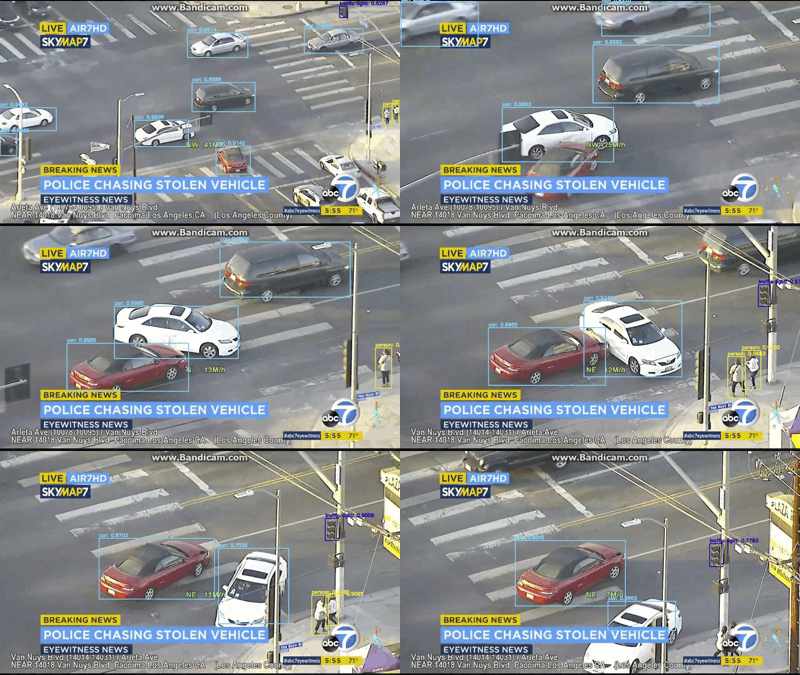
以上模块,进行(1)初始化视频编写器,(2)写入器将在循环的第一次迭代时初始化。打印我们对处理视频所需时间的估计,(3)将帧写入输出视频文件,(4)清理和释放指针。应用效果如下:
$ python yolo_video.py --input videos/car_chase_01.mp4 \
	--output output/car_chase_01.avi --yolo yolo-coco
[INFO] loading YOLO from disk...
[INFO] 583 total frames in video
[INFO] single frame took 0.3500 seconds
[INFO] estimated total time to finish: 204.0238
[INFO] cleaning up...
项目文件已进行上传。
更多推荐



 0
0 0
0- 0


 已为社区贡献1条内容

所有评论(0)